- Hard drives are cheap, and I still have one free SATA port on my desktop system, so I ordered another drive as a Linux playground to solve the problem described in my entry for December 19, 2009. This time I’m going with a Seagate, since for reasons still obscure, the Linux kernel seems to like Seagate drives better than Western Digital drives.
- And while we’re talking drives, Seagate has just announced the 2.5″ Momentus Thin, which at 7mm is about as thick as a vanilla wafer (you can tell I’m off my diet for the holidays) and will definitely bring down the BMI of netbooks and other portable gadgetry.
- I think most people may have seen this by now (I forgot to Odd Lot it back when it appeared a couple of weeks ago) but wow: video footage of an underwater volcanic eruption under three klicks of water. Man, this is what robotics is for. (Thanks to Aki Peltonen and several others for the link.)
- I just received my brand-new Dell Inspiron Mini 10 netbook here, and all I know so far is that it powers up and boots reasonably quickly into Windows XP Home. The unit as configured to order has both a built-in TV tuner and a GPS receiver. It’s going to be my travel computer and replace my knuckleheaded Lenovo 2005 Thinkpad X41 Convertible Tablet PC. I’m going to mess with it for a little while and will post something here as soon as I have a feel for it.
- We’ve been hearing about Apophis for years: the 900-foot asteroid that will swing by in 2029 and say hello. And for an unnerving change of perspective, check out the close encounter from the asteroid’s point of view, in a JPL animation that counts as the scariest thrill ride I’ve taken in awhile. (Have not seen Avatar yet.)
- Speaking of asteroid collisions, if you’re an SF writer spinning a plot involving big rocks and the sudden release of kinetic energy, look for Hazards Due to Asteroids and Comets, Tom Gehrels, ed. (University of Arizona Press, 1994.) It’s a 1300-page compendium of academic papers on big things hitting even bigger things, with lots of formulas, charts, and analysis. Dense and not an easy read (and also not cheap–it was a steal years ago for $40) but I’ve learned a great deal from it.
- It’s interesting to read the reasons why good and intelligent men do not believe in God, and here’s Gregory Benford’s testimony, which is a lot more cogent than most I’ve seen. (Thanks to Frank Glover for the link.)
- Finally, if there’s some source code in your past that you regret (I’m thinking of a few lines right now that I’d like to wipe from this space-time continuum if I could) maybe the answer is Bad Code Offsets. Debug-and-Trade, anyone? (Thanks to Bruce Baker for the link.)
Odd Lots
Linux Bug #257790
I never thought I’d say anything like this, but…I may have run afoul of Linux bug #257790, “Kernel does not recognize Western Digital Caviar SE WD3200AAJS 320GB 7200 RPM SATA 3.0 GB/s Hard Drive (2nd Generation)”. I recently bought a new 7200 RPM hard drive (guess which model!) for my main desktop system, which had come with an older Seagate 5400 RPM unit as the primary bootable drive. I migrated my Windows XP install over to the new WD drive without any trouble. But when I go to do a clean Linux 9.10 install, the installer does not see the WD drive. It does see the secondary drive in the system, which is a 5400 RPM Seagate 750 GB unit. But the WD? Installer no see.
Interestingly, gparted has no trouble seeing the WD, and even resized the Windows partition there to make room for two additional Linux partitions. However, when I go to install Karmic in the new partition on sda2, the installer doesn’t see the sda device at all…except when I check the button telling the installer partitioner to erase the whole drive and install Linux on the entire thing. Then sda magically appears. At that point, when I re-check the option to install Windows and Linux side by side, the sda device vanishes from the device selection pane at the top of the installer partitioner window.
While sniffing around the Web looking for insights, I ran across Linux Bug #257790, simply because it names the precise model of drive that I just bought. Supposedly, that bug was fixed for the 9.10 Karmic release at the end of October, but evidently the installer still has some reservations about certain WD drives…like the one I now have. I’m tempted to download and install Fedora to see if I get better service, but if any of you Linux gurus have any suggestions I’ll certainly hear them. I do not want to go back to my older (slower) drive, nor do I want to wait for Lucid Lynx (V10.04) due in April. I can’t imagine that this is not a fixable problem. Thoughts?
Odd Lots
- I know, I know, I’ve been quiet for a week, but there’s been a lot to do away from the keyboard, much of which borders on sock-drawer sorting. Focusing on only one project for most of a year almost guarantees that things will get messy away from the target of your focus. So I’ve been picking up downstairs in my workshop and sorting my office closet. No socks, but lots of loose fileables sitting in a pile, one with a yellowed corner that did not come with age. (So much for cacheing data on the floor.)
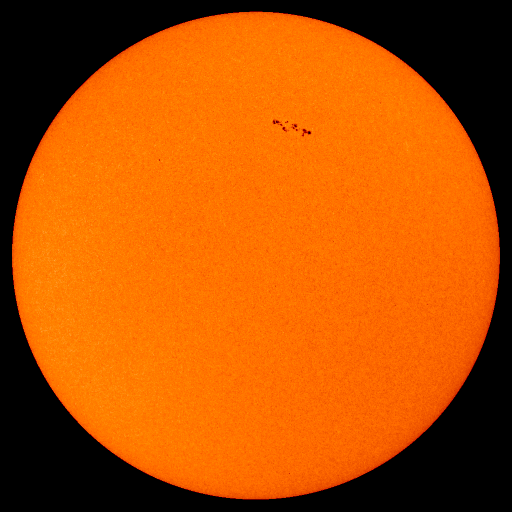
- We have a rattlin’ good sunspot creeping across old Sol’s face, and whaddaya know: I spun the dial across 15 meters this afternoon and heard voices. ‘Course, my fire alarm still does not like the Icom 736, so all I could do was listen, but it was nice to think of this overlong solar minimum as something other than eternal.
- If you haven’t already, upgrade to Firefox 3.5.6. There are a number of newly discovered exploits in earlier releases, including a remote code execution item that looks pretty ugly.
- I also upgraded to Thunderbird 3.0 earlier today, and so far am most pleased. They’ve added a profile-wide message search feature that (considering the appalling number of emails I’ve accumulated and carried forward since 1995) will be extremely useful here.
- Speaking of ugly, when a film with the budget and ambitions of The Avatar can only do aliens who look like ugly humans, you have to wonder what CGI is for. This is the problem I’ve always had with Trek: A splurch of latex on some extra’s forhead does not an alien make. I’ll see it anyway, but I call failure-of-imagination based on the trailers.
- InfoWorld posted a very nice review of the major virtualization products, including VMWare Workstation 7, Parallels Desktop 4, and Sun’s VirtualBox 3.1. VirtualBox is free and installed by default in Ubuntu 9.10, but you have to jump through some inexplicable hoops to get it to recognize USB devices. I haven’t upgraded to VMWare Workstation 7 yet, but Workstation 6 is cheap and does everything I need it to do.
- People argue a little about how useful certain time-honored degunking techniques are (especially disk defragmentation, and double especially defragmentation for SSDs) but the biggest single win in my own experience is degunking the Windows Registry. There are a number of apps to do this, but the best on the free side is doubtless CCleaner. (Its original name was Crap Cleaner, which gets points for truth-in-advertising.) Freeware, and if you’re ever faced with a Registry that’s been gathering crap for eight or ten years, you’ll appreciate what it can do.
- Two people wrote to me (a little breathlessly) to tell me that Neal Adams is drawing the next several PvP strips, and I had to admit that I had no idea whatsoever who he was. I flashed on Nick Adams, whom I saw on a few episodes of The Rebel back in 1961…but a comics guy I’m just not, even if I do follow PvP. (In case you’re as clueless as I, here’s a bio on Neal Adams.)
A Sublime Autumn

It got down to -13 F last night, breaking a longstanding record for the date here. By 10:00 AM it had finally broached zero, and I went out to get the morning paper. And while doing so I noticed an interesting thing: The leftover snow that my old and cranky snowblower always leaves on the sidewalks was vanishing. There was no wetness on the walks or the driveway, and I wouldn’t expect any at 0 degrees F. But the little splats and scattered dusting were all going away, and a quick check just now (2 PM) shows mostly clear walks and driveway, except where people have walked or the car passed.
How sublime! I guess at 6600 feet, snow and ice don’t have to melt to go away.
The photo above was taken yesterday by our neighbor and friend Lena Olson, who is a spectacularly talented sculptor and photographer. She made it look like our house was lost in the middle of a wintry nowhere, when in fact there are neighbors on all sides of us, in houses generally bigger than ours. That’s just a telltale of her talent: She knows exactly how to frame a shot. Wow.
Some Good Juju and Some Bad Juju
Bad juju first: When I woke up this morning it was 0, and we had six inches of new snow on the ground. Carol had a physical scheduled for 10:00, so we were out the door extra early, slithering (even in 4WD) in a winter wonderland. We got there and back intact, but it was snowing again when we pulled into the driveway, and the Weather Channel radar indicates that it may be snowing for some time. Given that six inches is close to the limit my little snow blower can handle at one gulp, I decided to get rid of what was there to make way for what was clearly coming. Not too difficult, and I was mostly done when I slipped on a patch of black ice on the driveway and went down hard on my right arm. Here’s hoping an Aleve will minimize the swelling, but I’m expecting some exquisite bruises on that arm, albeit bruises no one will see except Carol given that long-sleeved shirts are the order of the season. Winter began here in early October, and may we be so bold as to demand that it be gone by February?
Probably not; that promising sunspot that popped up for a few days on the far side of the Sun is now gone, and our hundred-year solar minimum continues with no end in sight.
The good juju comes to us mostly from the Engadget blog. A very perceptive post from Niley Patel on Saturday exposes Michael Arrington’s wrath over the Crunchpad coup that supposedly killed the tablet stone dead a week ago. And today several people wrote to tell me that what had been the Crunchpad is now the Joo Joo Tablet, and Arrington’s erstwhile hardware partners Fusion Garage intend to go it on their own. More details over on Gizmodo.
Saturday’s post suggests that Arrington was careless about defining contractual relationships between his firm and Fusion Garage, which is peculiar, considering that Michael Arrington was a lawyer long before he was a blogger or a tech enterpreneur. He registered the trademark for “Crunchpad” only at the end of November, after calling it by that name for well over a year. And now, wowzers, Fusion Garage claims that he never had much to do with the technical development of the device to begin with.
Arrington is threatening wholesale litigation, and the whole thing is starting to smell like greasepaint to me. But think: What better way to launch an unlikely dark horse in the tech world than to foment a media circus? Everybody loves a fight. I see a possible business plan that puts the Underpants Gnomes to shame:
- Phase 1: Talk for a year or two about a fantastical device and see if anybody notices.
- Phase 2: If nobody notices by the time the device is ready to sell, pretend to have a riproaring legal fight over who has rights to what.
- Phase 3: Harvest endless millions of dollars’ worth of free PR while taking pre-orders.
- Phase 4: Have a group-hug videocast to settle conflicts that never really existed.
- Phase 5: Profit!
The problems could be real, too, obviously. But there’s something funny going on somewhere, and whereas I won’t order one until I see that it can be configured as an ebook reader (and ideally let somebody else try it first) I still have high hopes. Let’s watch.
Update 12/8/2009: Engadget has a little more detail, and a hands-on video.
Odd Lots
- We broke a new cold record for December 3 last night, when it went down to -3 here. (The previous record was +3, so that’s a significant margin.) Cheyenne Mountain is covered with snow, and it’s a wonderful wintry-Christmasy scene out my office windows, though I have to get out there and clear the walks when the temps eventually get up into double digits.
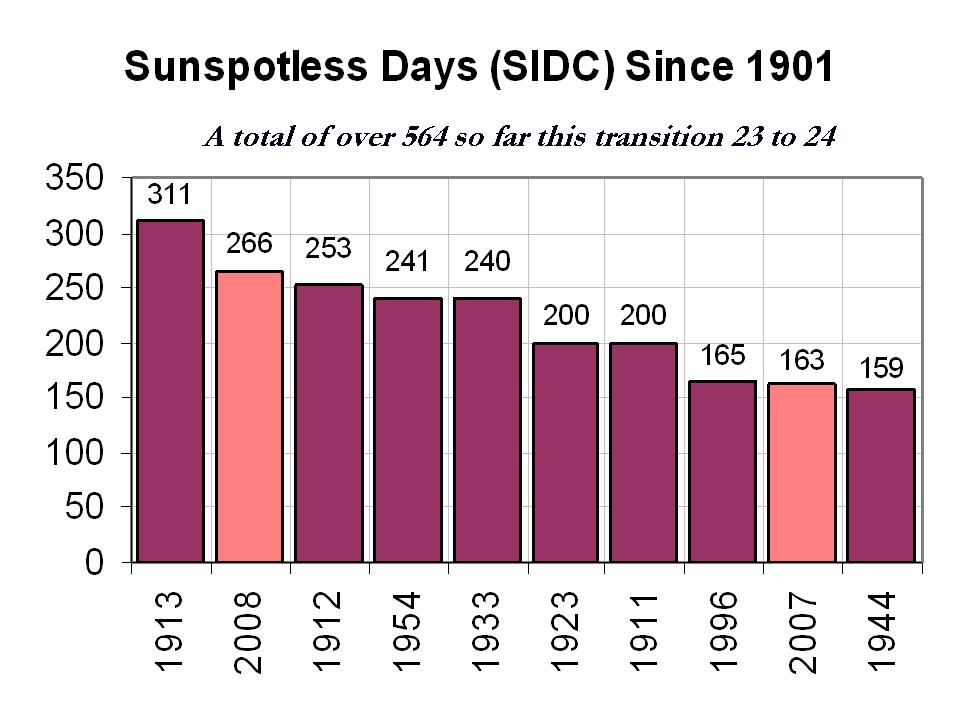
- My prediction: We will not quite break 2008’s record for sunspotless days this year. Why so sure? Well, we’re already at 255 days (and just passed 1912’s count of 253) but a sunspot appears to be forming on the back of the Sun, and it will rotate around the far side and come into view in about a week. If it’s a big enough spot, it may be visible for the rest of December. So add 7 to our current 255 and you get 262, which is in cigar territory for 2008’s 266 sunspotless days, but not quite lit. Of course, if the spot lives and dies over the next week or so (which I’ve seen happen for smallish spots) we may still beat 2008. Either way, we’re in the thick of the deepest solar minimum in 150 years.
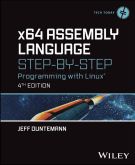
- I just ordered a Dell Inspiron Mini 10 netbook, after spending some quality time with Julian Bucknall‘s slightly older and smaller Dell netbook at the Meetup-less Delphi Meetup last night. The keyboard is surprisingly usable, and I don’t expect to be writing any 180,000-word computer books on it. I was looking for compactness, not cheapness (there’s a larger toy budget this year, much thanks to Assembly Language Step By Step and other things) and so I loaded up with a GPS receiver, higher-res display, faster CPU, and (obviously) a bigger battery. All that, and it still runs XP. Windows 7 was an option, but why burden a pocket machine any more than it’s already burdened by just being a pocket machine?
- Intel has unveiled a novel 48-core x86 processor, arranged as 24 dual-core CPUs communicating through a mesh network with up to 256GB/s bandwidth. Cores no longer need hardware cache coherence machinery, which cuts the complexity and power consumption of the (huge: 567 mm2!) part. I’m still wondering howinhell we’re gonna program these things.
- Does anybody my age or older remember the TV series Men Into Space? It ran for one season in 1959-1960, and was created by Ziv TV, the firm that also did Science Fiction Theater, Sea Hunt, and Highway Patrol. Remarkably, I don’t remember it at all, even though Broderick Crawford’s iconic “10-4!” is crystal clear in my head. There was supposedly some Bonestell backdrop art in the show, and a solid attempt at factual accuracy, within the limits of weekly TV production of the time. Thanks to Roy Harvey for the link.
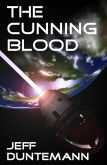
- People who are familiar with my novel The Cunning Blood should take a look at these 3-D renderings of the Mandelbulb. This is almost precisely what I had in mind when imagining Magic Mikey’s views of chaos signatures using the Femtoscope. (Chapter 12, p.196ff.)
- In a dance-around-it sort of way, Slate admits that there’s no compelling reason to use Office 2010…or 2007…or any version past the one that meets all your needs. Duhh.
- From Neil Rest comes a pointer to a puppet show dramatizing the Bohr-Einstein debates over spooky-action-at-a-distance. Einstein is played by a stuffed bichon. (What else? You’d cast a Chihuahua?) BTW, this is for real; it’s not a parody but an actual physics lesson.
- Borders is closing about 200 of its Waldenbooks mall stores in January. Here’s a PDF list of stores to be closed. I’ll admit that I haven’t bought anything at a Waldenbooks store for many years, simply because they don’t have the selection of the “big” Borders stores. (I also don’t go to shopping malls that often.) This may be good news, if it means that fewer of the big stores will have to go down too.
Review: Planet 51
 There’s concept, and there’s execution. You need both to make a truly terrific work of fiction, whether on film or in text. I had high expectations for Planet 51, and the concept did not disappoint me: A loopy twist on the classic alien monster movies of the 1950s…except that this time, we’re the aliens, landing on a planet full of…1950s aliens.
Or, let’s say, 1950s aliens living in an alien analog of 1950s small-town America. As with the 2005 animated film Robots, there’s an alien analog to just about everything Earthish: Malt shops, bowling alleys, poodle skirts, backyard barbecues, and hovering alien ’59 Caddies. There are 50’s alien monster movies, and 50s paranoia, here directed against…aliens. Somewhere off in the desert is a mythic alien Secret Base a la Men In Black, where dozens of captured robotic space probes from Earth are kept under glass domes. Into the thick of all this lands a souped-up Lunar Excursion Module containing an oafish, self-involved square-jawed astronaut, who is surprised that Planet 51 is inhabited, and is as terrified of its innocuous green noseless inhabitants as they are of him. His arrival triggers the awakening of a 6-wheeled robotic rover named Rover, which handily dismantles the dome under which he’s been stored, and then goes looking for his master, NASA Capt. Chuck Baker.
Is that a great concept or what? Alas, for all the great ideas and great artwork, somehow it doesn’t completely gel. Much could be done with an astronaut who realizes (as Chuck Baker eventually does) that he’s simply baggage strapped into a completely automated spacecraft, and that it’s not about him. Too bad that nothing is; Baker is drawn as an idiot, but somehow isn’t even true to that time-honored Hollywood template. Is he an astronaut, a lounge lizard, or a motivational speaker? (I got the impression that the scriptwriters couldn’t quite agree on who or what he was.) The alien characters are fun because they’re just barefoot green 50s suburbanites (the women all have built-in high heels) doing 50s things, and even listening to 50s music. It’s a stretch, but this is a cartoon movie, and for the most part the alien side of things works. Teen alien Lem debates with his comic-store geek friend Skiff about the existence of, well, aliens. (I.e., humans.) Skiff is sure that we’re out here; Lem can’t take any of it seriously, at least until he has to hide Capt. Baker in his bedroom. Lem pines over alien girl Neera, whose growing sensitivity to social issues prompts her to hang out with a group of protesters led by a long-haired, guitar toting alien hippie jerk named Glar. (Bzzzzzt! Hippies had not yet evolved in 1959, and the friction between the two cultures suggest something more like 1965 than 1959.) Once knowledge of Baker’s landing escapes the boundaries of sleepy alien town Glipforg, the alien army converges on the town, under cool, sunglassed Patton-archetyped General Grawl, and acts pretty much like the US Army acts in all those 50s alien monster movies.
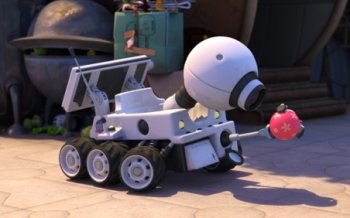 The film is carried largely by the brilliant little robot Rover, who acts like a very bright dog with a power screwdriver, and gets most of the good sight gags and physical humor, including a surreal riff on “Singin’ in the Rain,” as it rains…rocks. (Rover’s job is to pick up rocks, like any good interplanetary probe. Alien rain is thus a species of nirvana for him.)
There are some good laughs here, though not as many as I wanted. The mandatory cultural references come thick and fast, some of them so subtle that if you blink you’ll miss them. The big negative is that Baker’s character is almost entirely wasted, even as a comedic figure. I also think some of the potty humor was over the line, or at least it would have been when I was a 12-year-old.
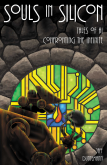
But hey, it was good (if not completely clean) fun. I have a special fondness for Rover, because he was pretty much how I imagined a character in one of my published stories: a clever and lonely Mars probe also named Rover. (See “Bathtub Mary” in my collection Souls in Silicon.) Burger King actually has a Planet 51 tie-in going on right now, and if I could force myself to eat at Burger King I could get a Rover toy for my bookshelf. (I’ve done worse for less, so we’ll see…)
Cautiously recommended.
Daywander
(Playing around with blogging styles here.) We got back from our Thanksgiving trip to Chicago yesterday afternoon, just before the deep freeze closed in again. Low tonight 10; high tomorrow 15; low tomorrow night 4. This is the coldest damned autumn we’ve had since we moved here, as well as the snowiest. Still, I’ll take this climate over Chicago’s three-month gloomfest any day.
I stuck my nose in the attic earlier this afternoon, scoping out what it might take to finish the job of shielding the leads from my garage smoke detector from my new-and-never-used wire dipole. What it will take is gloves and a winter coat, and wistful regret over not doing this in the fall. Wait a sec–this is the fall. And it’s not like I have any sunspots to coerce my signals into a path long enough to be useful.
My venerable 2005-era Kodak EasyShare V530 pocket camera is malfunctioning consistently and is probably scrap. I’ve said this before and it unexpectedly and inexplicably came back to life, but it’s been sitting dead in its little cradle for a month now, and I’m trying to decide what may take its place. I have the superb Canon G10 for technical photography, at which I’ve gotten tolerably good, but I still need an unfussy camera that will fit in a pocket, not need a case, and take a certain amount of rattling around with keys and small change (or big change) without damage.
In truth, what I’m really looking around for in a pocket camera is the champ at minimizing shutter lag. When I press the button I want the picture now–or as close to now as the technology permits. (I know DSLRs are good at this, but I want something small.) All of my previous digital cameras have required an ungodly amount of time to calculate what they’re going to do with the pixels that they’re about to capture, and this has meant a lot of missed shots of cute nieces and rowdy bichons playing dog soccer with Katie Beth’s beach ball. Sony seems to lead in most of the stack ranks on the shutter lag front, so I’m thinking about the Sony DSC-WX1.
Elsewhere in the Dying Hardware Department is my poor HP Laserjet 2100M printer, which I’ve had since, well, damn, I don’t remember, but probably 1998. I have pumped an immense amount of paper through that little cube, and replaced its worn-slick feed rolls in March of 2006, expecting them to work for another six or seven years. No luck. Paper feed has gotten erratic once more, and I’m not sure I want to go through the gnarly process of changing the feed rolls yet again. (That said, I have another repair kit on the shelf, so I probably will. I was the Lord High Feed Roll Executioner thirty-five years ago when I worked the LaSalle St. copier territory for Xerox, and such hard-won skills are a shame to waste.) So this might in fact be a good time to pop for my first color laser printer. I’m still shopping, but the HP CP1518 is the current front-runner. I know that the color laser cartridge market is a racket, but there have been times this year when I would really have liked color output for proofing book pages and covers. I guess if I do change out the rolls on the 2100 yet again I could park it downstairs for volume runs and keep the color unit up here. We’ll see, and soon–I need the tax deduction this year, courtesy my assembly language book.
Dash is sliding into puppy puberty: I caught him marking the baseboards in the front hall where QBit often sleeps. I rolled him on his back and tried my best to sound furious. He wagged his tail. A disciplinarian I’m not. I sense (nay, smell) interesting times ahead.
So Much for the Arrington Crunchpad
Damn. Like, well, damn. Michael Arrington just announced that, probably no more than a week or two before shipping boxed product, the Crunchpad is dead. I rarely post two entries on the same day, but I happened on this just a few minutes ago, and it’s important enough not to hold until tomorrow. The problem seems to have come out of nowhere and is shaped something like this: The CEO of Fusion Garage, the firm tasked with manufacturing the Crunchpad device, just popped up in Arrington’s inbox and basically said, We don’t need you anymore and will be making and selling the device ourselves. WTF? And WDHTHIA? Barlennan?
What happened probably happens a lot in certain tech partnerships between small and roughly equal entities: One who thought they held more of the cards wanted a bigger cut of the take than the original agreement gave them. And because both Arrington’s group and Fusion Garage have joint ownership of the various pieces of IP involved, neither can just move ahead and release the product on their own. (Why Fusion Garage doesn’t recognize this is obscure.) Unless this is an extremely clever way to simply kill the project without admitting technical failure (a possibility, but not something I’d expect out of Michael Arrington) the project may be dead on legal grounds.
Or maybe it really was the problematic 12″ capacitive touchscreen that has given these guys pure hell from the outset. Doesn’t matter. I had high hopes for the gadget, which (screw the Web!) would have been a spectacular ebook reader. I dislike the physically small, low-res e-ink readers we now have, because they don’t display technical art well, nor color at all. Comics people have the same gripes, albeit for a different kind of art. There’s no physical law saying that all ebook readers must be the same color-and-resolution-limited, coat-pocketable thing. Books are different.
Again, if the fail was really technical, and all this huggermugger a smokescreen, we won’t see anything out of the ashes. But I do hope that if we’re just seeing tantrums here, something can be worked out.
(Still, is it just me…or did Arrington fold perhaps a little too quickly?)
More here later if I can find it.
Odd Lots
- Here’s a great graphic strongly suggesting that the much-denied Medieval Warm Period really existed, and was indeed a global phenomenon. (For further evidence, read The Little Ice Age, which predates the worst of the current Global Warming hatefest and thus may be considered reasonably reliable.)
- I had not heard this before: The imminent Nook ebook reader from Barnes & Noble will have a Wi-Fi connection, allowing owners to browse free ebook previews that are only accessible through store hotspots. This gives people a reason to come into physical stores, Nooks in hand, spend time, drink coffee, browse the print collection, and leave with a bag full of print titles that aren’t available as ebooks. Assuming it’s true, as a marketing gimmick, it’s brilliant.
- The Nook has a slot for a Micro-SD card with a capacity of up to 16 GB. Assuming a typical text-mostly ebook file to be 500K in size (which is very generous; most fiction titles I’ve seen are about half that, or less) a Nook is capable of storing about 30,000 books. If you read a complete book every single day, that will last you for…82 years.
- I’ve already seen the Nook e-reader referred to as the “Nookie reader.” Which it will be, trust me.
- People are quibbling in the comments that it’s not a self-propelled model train, but screw it: This guy made a Z-scale model of an N-scale model train layout, working effectively at a scale of 1:35,200. He gets serious points for, well, something, and the video is very cool.
- And at the other end of the scale, here’s the world’s largest model train layout. (Thanks to Pete Albrecht for the link.) Makes me want to go back and work on The Million-Mile Main Street, positing a 1:1 scale model train layout that covers an entire planet, where the trains (each a sort of AI hive mind) run things, and the people are hired actors.
- Researchers at Purdue have demonstrated ALICE, a new species of rocket fuel consisting of aluminum nanoparticles and…water. Larger aluminum particles have been used in rocket fuel before (they’re part of the formula in the Shuttle’s strap-on boosters) but the smaller the particles, the more efficiently they burn. As aluminum is common just about everywhere, if you can corner enough solar radiation to smelt the aluminum and dig up some water (guess where, Alice!) you can go places.
- Pete Albrecht sent me a link to SeatGuru, which provides detailed floor plans for all major aircraft on all major airlines, including where the power ports and extra legroom are. If you fly a lot, it might be worth a close look. Here’s a good example of a specific aircraft.
- This insane vampire business has evidently begun to affect the cosmetics business; the Daily Mail reports that pale foundation and powder are pushing their tanner competitors right off the market.
- I stumbled upon the above item after stumbling upon this, which may be the most inexplicable Web site I’ve seen in the last several years. They pay people to put that together? And what kind of organism from what planet reads it?
- Word must have gotten out that I’m a liturgical conservative. I therefore find this funny, in a slightly painful kind of way. (Thanks to Bruce Baker for the link.)