Jeff Duntemann's Contrapositive Diary Rotating Header Image

linux

Pi, Oh My

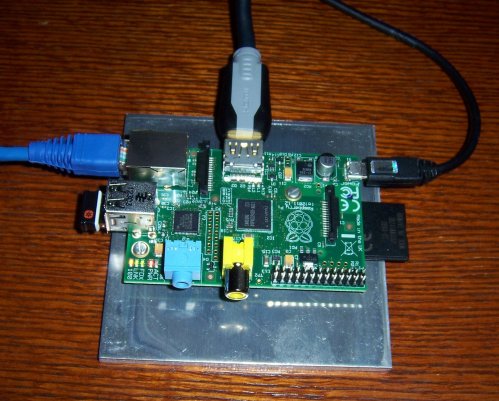
PiAssembled-500Wide.jpg

My longtime friend and collaborator Jim Strickland has had a Raspberry Pi board almost since the beginning, and he startled me by handing me one as a Christmas present. I was aware of it but hadn’t researched it deeply. Here’s a good place to start if you’re new to the concept.

Basically, it’s an ARM-6 board with HDMI and composite video output, two USB ports, and a standard RJ45 Ethernet connector. For disk it uses an SDHC card. There’s an I/O header for connecting to physical gadgets like relays and lights and things. There’s more than one OS available for it, but most people use the adaptation of Debian Wheezy called Raspbian.

I don’t like having circuit boards flopping around in mid-air, so I drilled and tapped two 4-40 holes in a husky 3/16″ aluminum plate and mounted the Pi on a pair of 3/8″ nylon standoffs.

Putting it together was a snap. I downloaded the Raspbian image file, wrote it out to a spare 8 GB SDHC card I had in the drawer with Image Writer for Windows, plugged the card into the card slot on the board, hooked up the cables, and turned it on.

Bootup isn’t snappy, and the first time in you have to set a few things like time zone, but in a couple of minutes I had Linux on my big-screen LED TV. The small black item connected to the USB port block in the photo above is the Bluetooth dongle for a Logitech wireless keyboard and mouse. This leaves me a port free for something else. Ethernet came to the device through a pair of Linksys Powerline bridges, which I’ve described here before.

I now have what Michael Abrash would call “Linux on my bedroom wall.”

This particular distro comes with Python and Scratch preinstalled, but Jim’s already gotten the ARM-6 port of FreePascal/Lazarus downloaded and running. That’s next on the list for me. I’ll wrestle with that another time, as it’s getting late here. I have a special purpose in mind for the gadget which I won’t spill just yet, since it may not be realistic. More as I learn it.

Odd Lots

Odd Lots

  • You’re getting two Odd Lotses in a row for a reason. Stay tuned–I’ll try and explain tomorrow, if I don’t run out of Aleve.
  • Bruce Eckel is returning his Kindle Fire because the damned thing will not render .mobi files. C’mon, Amazon. I mean, come on. (Thanks to Mike Bentley for the link.)
  • Xoom 2, where are you? Whoops, it’s going to be called the Droid XYboard to distance itself from the Xoom brand, which was done in because Somebody Didn’t Want It To Have a Card Slot. (Don’t know who. Have suspicions.)
  • Charlie Stross makes a good case that DRM on ebooks (as required by the Big Six) is a stick handed to Amazon with which to pummel the Big Six. Read the piece, follow the links (make sure you know what a “monopsony” is) and then read the comments.
  • Schumann resonance waves can apparently be detected from space. This is surprising, as my earlier readings suggested that they only exist by virtue of a sort of immaterial waveguide formed by layers in the Earth’s atmosphere–the same waveguide effect that allows hams like me to bounce signals around the world.
  • Femtotech? I postulated a “femtoscope” in my novel The Cunning Blood, but it was used to plot quantum pair creation and did not rely on exotic matter. I’m not sure such things are possible, or could be done in any environment where we could live or even work through proxies. But as with a lot of things (especially LENR) I would hugely enjoy being wrong.
  • I torrented down the brand-new Linux Mint 12 Lisa the other day, and like its predecessor it will not detect the video hardware correctly on my 2009-era Core 2 Quad with NVidia 630i integrated graphics. Somewhat surprisingly, it will install on an older Dell GX620 USFF with (as best I can tell) no video problems. Not sure if I like GNOME 3, though. MATE, a GNOME 2 fork, has promise.
  • I may have made this point once before, but hard steampunk authors should have the Lindsay Books catalog on hand, or at least have the site bookmarked. These are books explaining how to actually do steampunk technology, often in the form of reprints of original Victorian-era reference texts. Thermite, brass, steam engines, and loads of other goodies just as great-great grandpa learned them. (Thanks to Bruce Baker for the noodge.)
  • One of my German friends told me that plagiarism in German doctoral theses is so widespread that it’s spawned a crowdsourced mechanism for detecting it. That’s the abbreviated English-language version; if you have a reasonable amount of German, go to the richer, fuller main page.
  • Very spooky time-lapse video of a little-known physical phenomenon. (Thanks to Pete Albrecht for the link.)
  • I originally thought this was a hoax. On the other hand, I have a Tim Bird and I love it. It’s hard to believe that such things actually work as well as they do.
  • Sometimes you wear what you eat–or at least a reasonable facsimile.

Odd Lots

Minty Failness

I gave it a good shot and I tried, honestly I did. But Canonical’s Unity UI simply doesn’t work for me. It’s obvious that Canonical is trying to create a single UI that will serve end-user computing from top to bottom. It’s just as obvious to me (now that I’ve had six weeks or so to play around with a Droid X2) that there is no single “end-user computing” anymore. Desktops are fundamentally different from smartphones, or anything else (tablets, possibly; we’ll see) that is primarily tap-and-consume. I’m having no trouble working the Android UI on my phone, and Android habits don’t intrude on my desktop synapses. I’m not confused or in any way slowed down by the differences between the two, no more than I’m confused about the differences between a shovel and a rake.

So if Unity is all I get under Ubuntu, Ubuntu has to go. Others seem to agree with me, and at times the discussion gets disturbingly violent. Online I’m seeing that huge numbers of people are fleeing Ubuntu for Linux Mint, which I’d barely heard of a year ago. I have to smile a little bit, because Linux Mint is Ubuntu, basically pulled back to a variation on the GNOME 2.3 interface. The upcoming release (Mint 12) will move to GNOME 3, which worries me a little (I like GNOME 2) but I’ve seen word that Mint 12 will allow users to have something very like the old UI–which is precisely what Canonical did not do with Ubuntu and Unity. It was Unity or the highway, and boy, it’s bumper-to-bumper out there.

There’s an enormous issue of why we’re suddenly tossing older and much-loved UIs away without nary a glance over our shoulders, when there’s no compelling reason to adopt one of the new models. Programmers like to create Shiny New Stuff, fersure. I in turn don’t like to change the way I interact with the machine I use, unless such changes make me a lot more effective. So far, the costs in relearning ordinary tasks far outweigh the fairly paltry benefits for me.

I’ll take up that issue eventually. In the meantime, I’ve hit the highway, and installed Linux Mint 11 Katya in its own partition here on the quad core. The OS looks great and works the way I’m used to working. I have some minor quibbles, like the failure of the Software Manager to tell me when it’s done installing something. Ubuntu does this well, but Mint installs and gives no sign. This was critical when I installed WINE, since (because WINE is not an app, strictly speaking) it’s tricky to determine if WINE was fully and correctly installed. Because running Software Manager again and selecting WINE still indicates “not installed,” I think there’s something wrong.

Small stuff. The big deal is that Mint doesn’t work well with the integrated graphics on my EVGA NForce e-7150/630i Core 2 Quad motherboard. The default graphics drivers worked, but looked clunky and don’t support effects. Installing the recommended proprietary NVIDIA drivers produced weird graphics failures, including windows refusing to render once they’re over a certain size. (Some windows would not render at all, and simply remained blank and white even when first instantiated.) Using the supposedly experimental NVIDIA 173 drivers worked better, but still fails on certain apps, especially Stellarium, which worked exactly once and then comes up with a blank, black window every time. I’m not willing to give up Stellarium, so at this point Linux Mint is on hold while I wait for Mint 12 Lisa.

Linux Mint has supposedly become the 4th most popular OS on the planet. It’ll be interesting to see if that continues to be the case once they cut in the mandatory GNOME 3 upgrade. I’ll give GNOME 3 the same consideration I gave Unity, but I’m also looking closely at the Xfce UI and Xubuntu. It’s going to be an interesting year in the Linux world. I’m keeping all my old Linux installer .iso files, trust me.

Odd Lots

  • I’ve just added a book catalog page to my primary WordPress instance of Contra. There’s a link on the title bar at the top. If you’re using LiveJournal, here’s the direct catalog link. From my WordPress instance you can also go direct to an individual title within the catalog by clicking on one of the cover thumbnails in the right sidebar. It’s a little barebones for now, but it’ll do until I finish getting the Copperwood Press site rehabbed.
  • This sounds worse than it probably is: B&N has restricted sideloaded content to only 1 GB of the Nook Color’s internal memory. The NC has become very popular as a somewhat broader device than an ebook reader, and I’m sure B&N is worried that people will fill the little slab up with so much of their own stuff that there’s no room to buy more from B&N. The key is the MicroSD slot, which (for the time being) can hold up to 32GB. If sideloaded content stored on the MicroSD card is completely accessible to the Nook’s machinery, it’s really not a terrible problem. (I don’t have an NC so I don’t know for sure.)
  • B&N’s certainly been busy: There’s a new, inexpensive, smaller, lighter e-ink Nook in the pipe called Nook Simple Touch. 6-inch display and two months on a charge (sheesh!) will appeal hugely to commuters who just want to read books and not do seventeen things at once. $139; mid-June arrival.
  • Then again, if you want a cheap Nook ($99) and don’t mind the orginal model, go to eBay.
  • Here’s an expert’s braindump on ebook creation/formatting, which clearly highlights the appalling nature of ebook formats and ebook creation tools. Mobipocket in particular comes in for some (well-deserved) hard whacks with the baton. None of this crap should be necessary. An epub file is basically a collection of HTML documents with an external TOC, all wrapped up in a ZIP archive. Why is this so hard to do? (My thought: Immature rendering engines, like Web browsers in 1994. We are compensating for bad software.)
  • This is the high road toward SSTO, and I hope to hell they can pull it off. The trick isn’t so much getting to orbit as getting back intact. We’ll see.
  • From the Words-I-Didn’t-Know-Until-March-But-Forgot-Until-Yesterday Department: oneiric; meaning of or pertaining to dreams. Also the adjective in the next Ubuntu animal version code: Oneiric Ocelot, due this November. Not new news, but I forgot to mention it in March. Dreams, sure. But having read some of the fights that the discussion of Ubuntu Natty’s Unity desktop has triggered since then, I also picture an ocelot that lost one ear in a bar brawl.
  • Bichons are notoriously hard to housebreak. Carbreak too, evidently.
  • From the Painfully Obvious Research Department: A study (PDF) suggesting that when we see people breaking the rules, we assume that they’re powerful. Duh. (One wonders if a lifetime of watching powerful people be abject shitheads could have anything to do with it.)
  • And a much more interesting study on the role that some airborne bacteria play in acting as seeds for precipitation. Get a look at that hailstone! (Duck!)
  • Amen, brother. (Thanks to John Ridley for the link.)

Lazarus, Stay Where You Are!

…because when you came forth, you stepped on my bootloader.

I’ve tried to like Lazarus. I’ve tried for years. I can only assume that (as also evidenced by its similarly screwy cousin, Kylix) there is something in the Linux platform that makes Pascal compilers go a little bit whacko.

A few days ago I installed the KDE Fedora Spin in a new partition on my Linux box. It’s been a good education in the Plasma desktop. Plasma is all very blue and cold looking (way too blue for me, in fact, though the default wallpaper is striking) but unlike my first taste or two of KDE 4, it actually works.

So I started installing the software I’m familiar with to begin using it, and somewhere down the list was Lazarus, the Delphi-ish GUI front end for FreePascal. The package available from Fedora was V0.9.28.2, which is considerably newer than the one I have installed on Ubuntu Lucid, and only a little older than the one you can get from the project Web site. After it downloaded and installed all of its enormous pile of stuff, it asked me to restart Linux. I did.

And grub failed to run.

All I got was a blinking text cursor in the upper-left corner of the screen. This is the first time I’ve ever seen grub fail, apart from the well-known habit of Windows to overwrite grub with its own bootloader. (This is why Windows goes in first, if you’re going to have it at all.) I booted the Ubuntu 11.04 live CD I’d burned a few days after it was released, just to see if my MBR had been damaged. As best I could tell it had not, but I’m not good enough at grub’s internals to really be able to tell what was wrong with the software itself. Since I had plenty of free space on the 750 GB drive, I just installed Ubuntu on yet another partition, hoping that its update of grub would put things right. And it did.

So why would installing a compiler and an IDE mess up the OS bootloader? (Anybody?) I don’t have a lot of clues. The copy of Lazarus I installed looks like it works as well as Lazarus ever does, so I can’t assume that something in the installer or the package glitched and overwrote something unrelated. None of the other partitions on the disk were affected, as best I can tell. I’m tempted to install Lazarus under Ubuntu, to see if it will stomp on Ubuntu’s copy of grub as well…but that will happen another day, when I’m not as busy and not so grouchy.

Fedora Spin: KDE Desktop

Sometime back I ran into a concept called Fedora Spins, which are customized Fedora installs with different desktops (KDE, LXDE, XFCE) or a slant in some direction like security, graphics, or games. I downloaded the KDE Spin ISO earlier today, burned it to CD, and this evening (having burned out on ebooks) took it for a…ride. I had 300 GB of free space on my Linux box, so there was no reason not to, and I’d like to get a little better at the KDE Plasma desktop.

Some reactions:

  • The Fedora partitioner is very good. I did a manual partition operation, and created a new 60 GB partition for Fedora, and a 12 GB swap partition. It helps to know a little bit about partitioners generally, but overall it was intuitive and gave me no trouble.
  • For some reason, Fedora installs grub with grub’s hiddenmenu option enabled. (It’s conceivable that I accidentally chose that somehow, but I don’t recall being asked.) This means that at boot time, grub’s menu isn’t displayed, and the system boots directly into Fedora. (The system already has Ubuntu Lucid and Windows XP on it.) You can get the boot menu by pressing F10 during grub’s timeout period, but otherwise you aren’t presented with an OS menu at all.
  • Fedora recognized the existence of my XP partition, but didn’t know what it was. In grub’s menu, XP is therefore listed as “Other.” However, if you select it, grub boots it just fine.
  • Fedora has a GUI bootloader configuration utility that allows selection of the timeout value and the default OS. However, the utility’s sole window does not have a Save or Apply button. You can make changes, but closing the utility throws them away. Wow. This is a bug, and not a brand-new one.
  • Unlike Ubuntu, Fedora does not automatically add the initial user account to the sudoers list. So try to do anything rootish like editing grub’s config file gives you that inane message “jduntemann is not in the sudoers list. This incident will be reported.”
  • Adding yourself to the sudoers list is seriously unintuive, but the best way is probably to use the visudo command, which opens a vi edit window with the sudoers list ready to change. Add USERNAME ALL=(ALL) ALL to the end of the file and save; it’s done. Details here.
  • Fixing grub requires editing the grub.conf file and commenting out the hiddenmenu option. While I was there, I also changed the description of the XP partition from “Other” to “Windows XP.”
  • A 2.8 GHz Dell SX280 does not have sufficient graphics chops to run Plasma’s desktop effects. I wanted to see just how slow they were, but within seconds of enabling desktop effects, Fedora disabled them again. I knew that the SX280 wouldn’t run them well from my online research (it’s one reason I’m getting a more powerful Linux box shortly) but I didn’t know the system would simply refuse to run the effects against my wishes. Interestingly, Ubuntu’s GNOME desktop effects subsystem works on the same machine.

Overall, getting to a usable configuration with Fedora is a lot more screwing around than with Ubuntu. But once done, it works well. More as I experience it.

Odd Lots

  • Ubuntu 11.04 Natty Narwhal is out, and hardly anybody’s even mentioned it. Could it be that nobody’s really upgrading every six months anymore? (My workaday Linux system is still running 10.04.) I’m not bullish on Unity, and may reconsider Kubuntu when I set up a GX620-based Linux box in coming weeks.
  • The formidable Al Williams has a three-part series on DDJ explaining how to use the visual tool App Inventor to create Android apps. I have not used App Inventor yet, but Al’s analysis of the challenges of using it (and of visual metaphors for programming generally) are worth reading. Part 1. Part 2. Part 3.
  • John Scalzi has written a brand new Fuzzies novel. (Not furries, Fuzzies–tiny aliens created by H. Beam Piper.) Scalzi’s good–this one could be fun. I’ve read all the Fuzzies books (by Piper and others) and truly only like Little Fuzzy (the original) and Fuzzy Bones by William Tuning. Fuzzy Sapiens is so-so, and Fuzzies and Other People is so awful that Piper chose not to submit it for publication after he wrote it in 1962. It was found in a box after he committed suicide in 1964, and not published until the late 1980s.
  • Interestingly, most of Piper’s copyrights were not renewed, and a great deal of his work (including Little Fuzzy) is now in the public domain. Go to the “P” author page on Project Gutenberg and scroll down.
  • I heard years ago that armadillos are the only other mammalian species that contracts leprosy, but now there’s evidence that virtually all human cases of the disease (which is vanishingly rare these days) were contracted from them. (Thanks to Pete Albrecht for the link.)
  • Illinois is banning trans fats in its schools (with a notable exception for doughnuts, how healthy!) but does anyone dare remind them that there is absolutely no trans fat in unhydrogenated lard? In terms of monounsaturated fat (the good fat) lard comes out better than butter, and both are far better than the vegetable oil spreads we call margarine. Funny how the more animal fat I eat, the more animal fat (my own!) that I lose. (Thanks to Pete Albrecht for the Illinois link.)
  • And the much-reviled Dr. Eades makes the point that Mediterranean people who supposedly take all their foods as olive oil are actually doing a lot of their cooking in animal fats, especially lard. (They export the olive oil to people like us, who think it’s healthier.)
  • This gets an award for something. I’m still not sure what.

Restoring Grub with Rescatux

If a task has to be done often enough, sooner or later somebody will automate it. And so it happened with a very common task that I’m glad I didn’t have to do the hard way: Restore Grub to the MBR after a Windows reinstall overwrote it.

Windows does not play nice with Linux the way Linux plays nice with Windows. When you install Linux on a hard drive that already contains a bootable Windows partition, Linux adds the Windows instance to the Grub bootloader menu, allowing you to choose which OS to boot on startup. On the other hand, when you install Windows to a hard drive that already contains a bootable Linux partition, Windows ignores the Linux partition and puts its own bootloader link into the master boot record (MBR.) At startup, the system boots straight into Windows. Linux is still there, but you don’t get to choose to boot into it at startup.

Getting Grub back into the MBR after a Windows reinstall isn’t hideously difficult, but it’s a bit of picky terminal work done from a LiveCD. The trick is knowing how. The canonical description of how to do it is borderline incoherent, including advice like “This method apparently no longer works. Use with caution (if at all.)” The information is all there, but you have to dig a little to make sense of it. (Being a Linux geek helps a great deal.)

There’s now an easier way that I wasn’t aware of the last time I had to reinstall Windows on a dual-boot system: The Rescatux LiveCD. It’s a Debian instance with some scripting added that puts up a wizard and automatically detects installed bootable partitions. It then rebuilds the Grub bootloader menu and points the MBR back to Grub.

A couple of cautions:

  • The wizard is fairly terse. Don’t expect a great deal of handholding. If you don’t have any prior experience with Grub, read the documentation on the Web site. Then read it again.
  • Give the wizard time to work at each step. When you click the OK button, the options reappear immediately, but when there’s some disk access to be done, the script goes off to work and doesn’t give you any indication that it’s working. It doesn’t take more than a few seconds. Be patient.

I failed to be patient the first time I ran Rescatux, and clicked something once too often. (I’m still not entirely sure what.) When I booted the system again, Grub ran and Ubuntu was listed, but this time Windows was missing. There’s some rough justice in that, I guess, but I need to get into Windows just as surely as I need to get into Ubuntu. So I rebooted back into Rescatux and ran the wizard again, giving it enough time to finish each step. Another reboot, and Windows was back in the Grub bootloader menu.

Supposedly Rescatux works with both Grub 2 (the current version) and “Legacy Grub,” V0.97. My system uses Grub 2, and thus I didn’t test its dealings with older Grub versions.

It’s still a little rough, but it saved me a certain amount of eye-crossing terminal work this afternoon, and that’s always a good thing. Be careful and read the doc before you begin, but having said that, I do recommend it.