- The 64GB Microsoft Surface Pro tablet has only 23GB of open storage. Yukkh.
- Given that I do most of my reading curled up in a monster cushy chair, I’ve begun to wonder if a tablet with a 12″ display (or perhaps even larger) with a charger dock on the adjacent end table would be useful. Such things exist, but not in great numbers and not cheap. Technical PDFs are often uncomfortable reading even on my 10″ Transformer Prime.
- Here’s yet another reason I’m not bullish on the Cloud: If all you have is the Cloud, everything has to include a rain dance. I ruled out Eye-Fi when it first came out for this reason, but the absurdity of requiring global connection to make a local connection needs to be aired every so often.
- Short summary of Bowl of Heaven by Gregory Benford and Larry Niven: Ringworld with an engine, and nowhere to go. It’s the first Larry Niven book I can recall that I genuinely hated. Save your money.
- Here’s a result of vintage calculators (well, if not “result,” what’s the proper collective?) and a pointer to what would be a stunning steampunk model, if it hadn’t been designed in 1788.
- Early heads-up for what may be a really brilliant thing: Pulp-O-Mizer, which is a sort of image generator that spits out convincing Deco/Diesel magazine or book covers. Thanks to Jim Rittenhouse for putting me on to it. I’ll have more to say when I take it for a spin myself.
- I don’t know from personal experience if this is true; I don’t drink enough, nor late enough, to be a good test case. However, I’ve been told by several in my inner circle that too much booze too late at night makes for very bad sleep.
- There are a lot more Steampunk R2D2s out there than I would have guessed. I like the one with the monocle.
- It’s as easy as fishin’? I’ll stick with bluegills. (Thanks to Pete Albrecht for the link.)
- The big movie studios are evidently creating fake YouTube accounts with fake users uploading supposedly pirated movie trailers promoting new films. For the sake of plausible deniability, they’re sending YouTube takedown notices on the trailers. And you wonder why I see maybe three movies a year.
- This may not be a viable business model.
- In times long past, men used to wear high heels. (More recently, I remember seeing guys in platforms when I was in college.) Why? To stay on their horses. Or maybe to avoid being mistaken for Neanderthals. We may never know.
hardware
Odd Lots
Sledding in January–on the Quadcore
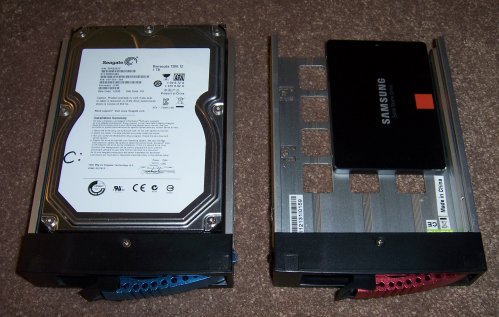
Having had a certain amount of trouble with keeping multiple OS images on a single drive, I’ve been looking for a reliable way to pop a bootable SATA hard drive into my quadcore. The goal is to have one OS per drive. Drives smaller than 128GB are fairly cheap, and drives 80GB or smaller are dirt cheap. The challenge is purely mechanical, and I think I’ve got a line on it: the IStarUSA T-7M1 mobile rack. It can be had in a number of places, including Newegg and Amazon. About $35. It’s a full-size SATA drive holder that contains a removable sled to which the drive itself is bolted. The sleds themselves are available separately, at about $15-$20 each. They come in several different colors, including silver, blue, black, and red.
In use, the drive can be spun down while the machine is operating, or you can wait until you power down the machine as a whole before popping a drive and tucking a new one in. (That’s what I do. The Windows feature allowing hot-swapping of the drives slows down drive throughput, or so I’ve read.) I’m currently in the process of building a new Windows image on a Samsung 120GB SSD, and being able to swap sleds between my current image and the new image means I can take my time and do it right.
The only serious question about this is how many times the SATA leaf connectors on the backs of SATA drives can be cycled without compromising them. The SATA spec says 50 times, which does seem low but is probably conservative. The truth is that I don’t think of these as bigger thumb drives and won’t be yanking them anywhere near as often. Although I occasionally boot into Linux on this machine, I have a dedicated multiboot Linux box in my shop. I doubt I’ve gone into Linux here since last fall. Also, I have a case that contains two toaster-style SATA slots on top, and I’ve been using them for monthly backups since last summer without incident. A backchannel correspondent who swaps files using a BlacX case like mine says the danger is overrated. He’s had drives in and out of various docks well over 50 times and the drives still work perfectly. Even if I plug drives in monthly, I still get 5 years of backups without going beyond the spec. That’s more than good enough for me.
I’ve wanted to try an SSD for a couple of years. My reaction so far is that software comes in quite a bit faster from an SSD, especially the first time after boot-up. And with one less motor spinning, the machine is mildly but noticeably quieter. (I don’t have an outboard graphics card, and the case stays quite cool with only a single 120mm fan running.)
I’ve got a couple more evenings of configuration to do on the SSD image, but after I’ve been using it awhile I’ll post my impressions here. So far, the sledding has been fine.
Odd Lots
- Cisco has sold their Linksys home-router business to Belkin. I’ve used Linksys gear for ten years now, know it well, and like it as much as I like any given brand. Getting it out of Cisco’s hands, where it had languished, is a good thing.
- From a long-time Contra commenter I know only as bcl, here’s a very detailed technical review of USB chargers, which are not all the same based on equal output specs.
- I’m trying to figure out what Ten Gentle Opportunities is “like” (a comp, I think they call it) and have asked those who’ve read the first draft. Someone recommended Piers Anthony’s Apprentice Adept series, which I’ve never seen nor heard of. Will begin looking for copies in local used bookstores.
- IBM is perfecting an anti-microbial gel that they claim bacteria cannot develop resistance to. IBM. God love ’em–because the way things are going, we are gonna need this, and need it bad.
- Then again, IBM also says that Steampunk will be the next big thing. Wait a minute. I thought Steampunk was the last big thing. (Thanks to Bill Cherepy for the link.)
- I’m getting recommendations on surplus dealers I’ve never heard of from all corners. Here’s Twin Cities retailer Ax-Man Surplus, courtesy Lee Hart.
- Lee also passed along the sad news that Glenwood Sales in Rochester NY, where I spent a great deal of money 1979-1984, is no more.
- Pete Albrecht sent word of C&H Surplus in Duarte California. I used to have a print catalog from them and it vanished somewhere along the way, but the firm exists and sells mostly industrial surplus (motors, fans, compressors, etc.)
- I stumbled on a nice free wallpaper site while looking for wood texture images, and there’s a lot of very good stuff there. That said, the single picture they have of a bichon is awful.
- Bill Cherepy sent a link to a Steampunk workspace. Looks cool. As with most Steampunk keyboards, it looks uncomfortable. Love the tube amp, though it’s not really Steampunk. He needs a new (old?) mouse.
- Sex with Neanderthals may have ram-charged our immune system and in other ways made us stronger. Genetic diversity is always good. And I’ll reiterate here that I have serious doubts about Homo Sap wiping out the Neanderthals. I think the Neanderthals wiped themselves out. Tribalism is fatal. Make sure your loyalties are diverse. Never throw poop at other tribes. Throw it at your own tribal leaders. If you can’t do that, well, you’re pwned.
- Cats with jet packs…in 1584. Except I don’t think it’s really a jetpack. Given the bird’s unnecessary jet pack, I suspect that they are acting as living firebombs. The past sucked. I’m glad I’m here.
- We’ve had a so-so winter so far; could use more water coming out of the sky. However, it’s about to get cold again. Perhaps I could use one of these. (Does anybody else flash on H. R. Giger looking at that damned thing?)
- There are certified zombie shotgun shells. Haven’t seen Bigfoot flip-flops yet, though.
The Raspberry Pi Keyboard Stutter Problem
When I first cabled up and ran my Raspberry Pi board, it worked like a charm, first time. I was powering it with the Motorola Droid X2 charger that I had stolen from the kitchen desk upstairs. To keep peace in the valley, I went out and bought a cheap Micro-USB phone charger at Best Buy. It booted normally, but then, when I tried to log in, the keyboard began repeating characters. I’d type in “pi” and see a parade of extraneous i’s march in stately fashion across the display:
piiiiiiiiiiiiiiiiiiiiiiiiiiiiiiiiiiiiiiiiiiiiiiiiiiiiiiiiiiiiiiiiiiiiiiiiiiiiiiiiiiiiiiiiiiiiiiiiiiiiiiii
Needless to say, I couldn’t log in. Now, this didn’t happen every time, but probably half of all logins I attempted failed, with the same keyboard jitter. I tried two other USB keyboards I had on the shelf plus the known-good one attached to my GX620 USFF, and saw exactly the same behavior. It clearly wasn’t the keyboard itself. I’m using a Dell SK-8135 keyboard, which has a 2-port USB hub to which a Dell USB optical mouse is connected. This leaves one USB port on the RPi free, with any luck to use for thumb drive add-in storage. More on that once I figure it out.
Anyway. Some googling suggested a power supply shortfall. I got out my DVM and put the probes on test points 1 and 2. These are minuscule “doughnut” pads on the RPi circuit board. One is labeled TP1, the other TP2. Hunt around on the board for them; it’s not like there are a lot of square inches to search. TP1 is located next to the 220 uF filter cap at the Micro USB jack. TP2 is right next to the yellow RCA jack.
The RPi is designed to work at 5V. Anything much below that and things may start getting flaky. My reading across the test points was 4.72V. Aha! We now have a new phone charger for the kitchen desk–a cool one with a retractable cord–and I decided to dedicate the old one to the RPi. With the original Motorola Droid X2 charger in the wall, I measured 5.03V across the test points. Shazam! No more keyboard stutter.
I’m not sure it’s a question of the RPi drawing more current than the charger can provide. The Droid X2 charger that works is rated 850 ma. The no-name charger that provided only 4.72 volts is rated 2.1 A. Current sourcing ability is important, especially since different USB keyboards and mice draw different amounts of power–but accurate voltage is just as important. I’m guessing it’s sloppy voltage regulation in the cheap charger. If you’re getting keyboard weirdness, put your DVM on the test points and see what your charger is feeding the RPi.
What? You don’t have a DVM? No Pi for you!
The RPi Enthroned
I wonder how many Raspberry Pi boards will spend their entire working lives sitting cockeyed on a desk somewhere, at the center of a tangle of cables. That’s how mine was until a couple of days ago, when despite my cough I allowed myself a few minutes of quality screwdriver time to pull a proper RPi system together.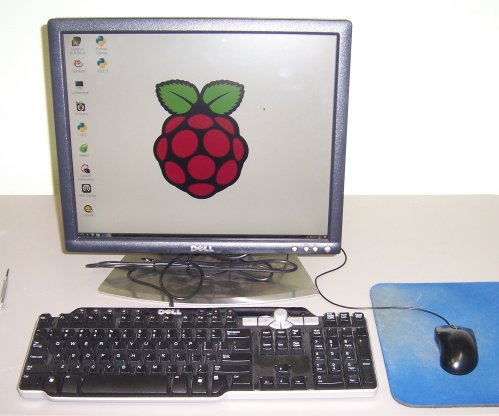
It didn’t take much. Mostly what it took was a 2004-era Dell SX270 all-in-one system minus the SX270, which I now use as a bookend. The key component is a heavy stainless steel base with a VESA monitor mount and a bracket to hold the SX270 behind the monitor. The monitor itself is an unexceptional Dell 1704fp, with a native resolution of 1280 X 1024. (Those now sell for ~$50 on eBay.) That’s more than enough pixels for an RPi, although I tested it on one of my 21″ 1600 X 1200 behemoths and the little gadget did quite well overall.
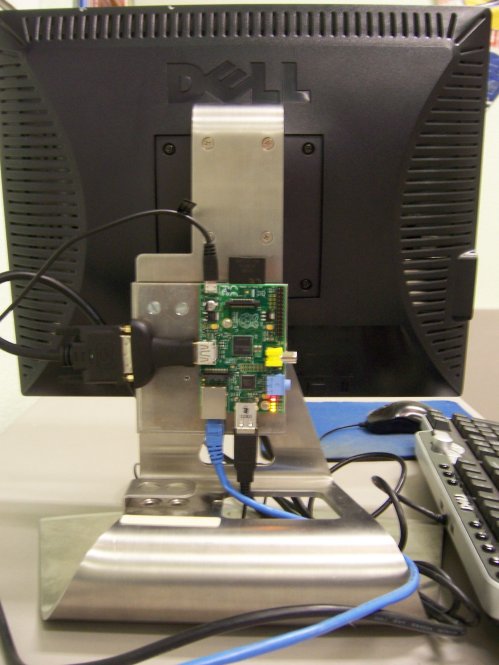
I had already mounted the board on an aluminum plate, and all I had to do this time was drill two holes and bolt the plate to the SX270 mounting bracket. I may dress the wires a little to keep them from placing any torque on the connectors, but it works well as-is.
I was surprised to find out that the MagPi magazine is actually laid out on an RPi, using the open-source Scribus layout program. I installed Scribus via apt-get and poured some text into a layout. (I’ve been playing with Scribus for years.) Brisk! I guess we need to stop boggling at the capabilities of tiny little computers with all of two ICs on the mobo.
It certainly does a good job with FreePascal and Lazarus, which is why I went to all this trouble. They’ve now sold half a million of these things. At least a few of those people ought to be willing to buy a Lazarus tutorial for it. We’ll see.
Odd Lots
- I’ve been playing with the new generation of desktop “all-in-ones” at Best Buy etc. and can’t get my head around the notion of using a touch screen on a desktop–especially a big touch screen. I thought I was just being a grouch, but now I have company.
- This slightly confused piece from the BBC raises a crucial issue–what the whole self-esteem movement is doing to our kids–but appears to confuse “self-esteem” with “confidence.” Confidence means “I am well-calibrated.” Self-esteem means “I don’t need to read the dial.”
- Make is going deep on Raspberry Pi. Check out that repurposed Mac Classic.
- One of my domains got on an RBL the other day. Not sure why; it’s off now. But it’s a good time to remind you of the valli.org RBL checker.
- We’ve experienced a very sudden burst in sunspot formation in recent days, which you can see on this startling photo. When I was projecting the transit of Venus on foamcore this past summer, line of sight to the setting sun passed through the approach to O’Hare Field, and I saw four or five of these much quicker transits. It’s nice to see one captured, for those who didn’t get to see them in realtime.
- And while we’re talking sunspots, here’s a good piece on the technical details of how we count sunspots.
- This past Christmas I had my first sip of Goldschlager in 30+ years. Was stronger than I remember it, or maybe I’m just weaker. Moot point: I’m holding out for Ytterbiumschlager.
- Made me wonder how strong booze has to be to be burnable in an alcohol lamp. When absinthe burns, what happens to the wormwood?
- Carol had heard good things about Shasta sodas, particularly their diet ginger ale. I wasn’t sure where they could be found, but they have a “soda finder” that I wish more independent brands would emulate, particularly Green River.
- That said, you can get diet Green River from Wal-Mart, but you have to order a case. I don’t think it’s in their stores.
- Alas, the wonderful retro soda-maker across the street from my alma mater vanished in 1986 and won’t be found again: The Lasser factory building has been converted to half-million dollar lofts. I do remember having a lime rickey or two while at DePaul. I guess I just like seriously green sodas.
- I think they did this in Colorado last fall.
SATA as the New Thumb Drive
I’m giving a webinar next month to a publishers’ group on the challenges of ebook piracy. So I’ve been taking notes and making sure that things haven’t changed much over the past year. One thing that surprised me a little came through on the backchannel (that is, email comments from people who for whatever reason don’t want to use Contra’s comment system) in June, concerning the resurgence of “sneakernet” piracy. I posted a link to a piece on TechDirt indicating that only 15% of music acquisition is done through all P2P technologies together. The bulk of piracy happens between friends, off the Net, where Big Media can’t see it.
What’s interesting came in through a backchannel correspondent whom I didn’t know and haven’t heard from since: Much or even most of the in-person file trading is done by treating entire high-capacity SATA hard drives as thumb drives. He saw my post on the Thermaltake BlacX case with a 2-drive SATA toaster dock built into the top panel. He has one too and wanted to see how common they were. He and his friends swap files by copying entire SATA drives onto blank drives via toaster docks, whether built into cases or standalone. I’ve had a 1-slot Ineo toaster dock since 2010, but it gathers dust now that I have the BlacX. I do my monthly off-site backups by copying everything onto a pair of 750 GB SATA drives using the docks on the top of the BlacX. I keep the backup drives in plastic flip-top cases made precisely for that purpose.
The correspondent (known only as “Don”) pointed out that there are now 2-slot standalone toaster docks that can clone drives from one to another without requiring any connection to a computer. Here’s one example (which even looks like a toaster!) and another. They’re evidently sector copiers and do not send files individually through a file system. Don and his friends get together and watch movies while popping SATA drives into and out of the docks.
I asked him if the drives ever fail by being plugged and unplugged so often. After all, internal SATA connectors are rated for only 50 matings. (ESATA connectors are rated for 5,000.) He hasn’t seen it happen so far, and if it happens, new drives are only $60-$80.
My experience with thumb drives goes the other way: I’ve had more USB ports fail on me than thumb drives. SATA drive connectors are really just etched PC board edge connectors, which can get scratched or dirty. (This is one reason I keep my SATA backup drives in plastic boxes.) I think with careful handling, drives should go a lot longer than 50 plug/unplug cycles.
Every time I think piracy can’t get any scarier, somebody comes along and says “Boo!” even louder. I keeping wondering what’s next. My hunch: Seedboxes, which still don’t entirely make sense to me. Once I figure them out, I’ll report back in this space.
Odd Lots
- I got FreePascal and Lazarus installed on my Raspberry Pi using apt-get. Instructions here. (It’s trivial.) Alas, it’s not the current release, but a chap has posted notes on how to install Subversion on the Pi and recompile Lazarus from source. One caveat: The Pi has just barely enough memory to pull it off, and then only if X isn’t running.
- One interesting thing that I had not heard about and did not expect is that the Raspberry Pi has its own app store.
- There is a Raspberry Pi magazine, MagPi. It’s a free download (either HTML or PDF) and from the couple of issues I looked at might be worth your time if you’re a Pi guy.
- One interesting part of this Pi project is the 3D-printed case. The other is hot-wiring a SATA SSD into a USB hub for additional storage beyond what you can put on an SD card.
- Speaking of which: SSD prices are starting to go through the floor. I just ordered one and am about to see what it can do on my primary machine.
- Ditto e-readers, apparently: The Kobo Mini is now going for just $50. I’m impressed by the fact that they make no attempt to lock users into their reader. Sideloading can be done via USB link; there’s no card slot. How good their store is I have no idea.
- There seems to be evidence that obesity is influenced by gut bacteria. I would take this article a lot less seriously if if weren’t well-established that bacteria cause stomach ulcers. Obviously, it’s not the whole story, and more research is needed. My conviction that calories don’t count remains intact. It’s the kind of calories that matter, since everything depends on how the body processes them. (There are lots of calories in sawdust. Eat 3000 calories worth of sawdust a day and get fat? Try it and see!)
- Robert Lentz has drawn an icon of Albert Einstein. And Prof. Tolkien. Way cool. Now, can we have Origen too?
- The K-Cup coffee maker patents expired this past September. We have a machine and it’s handy, though my #1 favorite coffee isn’t available in a cup. Expect an explosion in K-Cup options come the new year.
- From the Please-Find-a-Proofreader-Right-Freaking-Now Department.
- Wow. They gave an End of the World, and nobody came!
Pi, Oh My
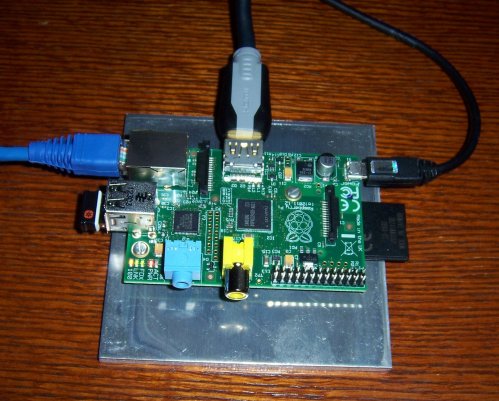
My longtime friend and collaborator Jim Strickland has had a Raspberry Pi board almost since the beginning, and he startled me by handing me one as a Christmas present. I was aware of it but hadn’t researched it deeply. Here’s a good place to start if you’re new to the concept.
Basically, it’s an ARM-6 board with HDMI and composite video output, two USB ports, and a standard RJ45 Ethernet connector. For disk it uses an SDHC card. There’s an I/O header for connecting to physical gadgets like relays and lights and things. There’s more than one OS available for it, but most people use the adaptation of Debian Wheezy called Raspbian.
I don’t like having circuit boards flopping around in mid-air, so I drilled and tapped two 4-40 holes in a husky 3/16″ aluminum plate and mounted the Pi on a pair of 3/8″ nylon standoffs.
Putting it together was a snap. I downloaded the Raspbian image file, wrote it out to a spare 8 GB SDHC card I had in the drawer with Image Writer for Windows, plugged the card into the card slot on the board, hooked up the cables, and turned it on.
Bootup isn’t snappy, and the first time in you have to set a few things like time zone, but in a couple of minutes I had Linux on my big-screen LED TV. The small black item connected to the USB port block in the photo above is the Bluetooth dongle for a Logitech wireless keyboard and mouse. This leaves me a port free for something else. Ethernet came to the device through a pair of Linksys Powerline bridges, which I’ve described here before.
I now have what Michael Abrash would call “Linux on my bedroom wall.”
This particular distro comes with Python and Scratch preinstalled, but Jim’s already gotten the ARM-6 port of FreePascal/Lazarus downloaded and running. That’s next on the list for me. I’ll wrestle with that another time, as it’s getting late here. I have a special purpose in mind for the gadget which I won’t spill just yet, since it may not be realistic. More as I learn it.
Odd Lots
- Jim Strickland sent word that Lindsay’s Technical Books is shutting down next year, not for financial reasons but simply because Lindsay is retiring. Their last print catalog has been sent. Order the stuff you’ve been procrastinating about for years–I will be. (Recommendation: Radio for the Millions.) Tip for those who haven’t heard of him before: Lots of steampunk-pertinent do-it-yourself there.
- Amazon can wipe any Kindle it wants to, anytime, without telling you. We’ve known this since the 1989 dustup over the rights to Orwell’s 1984. It’s still a risk, and you can trigger it by trying to sneak around region restrictions. Now, Ars Technica explains how to keep what you’ve bought by removing the DRM. I object to region restrictions in digital content because it makes piracy a safer way to acquire content. Don’t train your customers to be pirates. When are we going to learn?
- I knew this, but not in detail: Kodak had a working digital camera prototype in 1975, and it used a casette tape to store photos–which took 23 seconds per photo. Here’s more on the device from the man who invented it.
- If that sort of thing intrigues you, here’s the motherlode.
- In case you’ve never actually seen it (I hadn’t) here’s where you can stream the video of Doug Engelbart’s prophetic (to put it mildly) Mother of All Demos, during which he showed how a mouse could be used to help with various computer tasks like word processing.
- I bought the original Microsoft Mouse in 1983 and still have it. It still works. It had better, as I paid $200 for it.
- The placebo effect may be genetic–which is a far less significant question than how the hell it works to begin with.
- The first mirror for this telescope has now been completed. The finished telescope will have seven of them. I struggled to grind, polish, and figure a ten-inch mirror when I was 15. This helps me put the whole thing in perspective. Wow.
- Slate seems to think that humans would win fights with Neanderthals. Having seen a number of skeletal and muscle reconstructions of those gnarly guys, I tend to doubt it. Why, then, did they go extinct if we didn’t kill them? My guess: They killed each other. Why do I think that? I read human history and anthropology.
- You can now buy a brand-new, reinforced and factory rustproofed body for a 1940 Ford Coupe…from Ford. If they made an AWD minivan I’d already have one. Here’s hoping.