- This exploit isn’t new, but may be the most devilish thing I’ve seen in a couple of years: Using the Unicode “right-to-left override” character in a filename to make a .exe file look like a .pdf, a .jpg, .txt, or anything else. Double-click on that PDF, and you’ll get pwned…because it isn’t a PDF.
- Working 16-hour days and sleeping a couple of hours under your desk may contribute to the high percentage of failures among startups. Basically, people who short on sleep think dumb thoughts and chase dumb ideas. They seem to wear their wilfull sleeplessness like a badge of honor, even as it kills their startups. Or themselves.
- Note the near-obligatory Ekirch reference in the above article. I’ve still not found much evidence for his theory of “divided sleep” outside of his own book, but the guy gets citations all over the place.
- This article on food myths is less interesting than the comments, which generally confirm my conclusion (having seen lots of similar comment sections) that nobody really knows what healthy eating is. (Thanks to Roy Harvey for the link.)
- My own advice runs like this, with no apologies whatsoever to Michael Pollan: Eat food. Not too much. And sometimes plants.
- Much activity in this realm recently. Bruce Baker sends this link from the New York Times . Comments section very similar. The whole field, in fact, is a virtual food fight. Proving you’re right by insulting your opponents is very in right now, especially on Facebook.
- Neil Rest sends a link suggesting that exposure to bright light in the morning lowers BMI. Now, I think BMI itself is bogus–the metric doesn’t differentiate between fat and muscle, sheesh!–but if morning sunlight does indeed goose metabolism, getting out in the sun is a good thing. We should be cautious here: It’s been established that losing sleep does promote weight gain, and it’s mostly night people who lose sleep.
- Name brand diet soda sales are in free-fall. I think that this is less about health and more about cost: People are probably reacting to price hikes from Big Soda over the past couple of years by moving to house brands from Wal-Mart and the major grocery chains.
- House brands are a fascinating business, and there’s very little out there on how this titanic but virtually invisible industry operates. Who makes the Cheerios that aren’t Cheerios?
- Is the Internet taking away religious faith? Hardly. What it’s doing is providing secular religions (like political ideology) to satisfy the tribal hunger of the 50% whose disaffiliation from organized religion can’t be explained in other ways. Tribal ideology is cheap (no churches or clergy to support) and once you’ve given yourself permission to hate others who differ from you, it provides the perfect excuse.
Odd Lots
Ask the Man Who Has One. Or Seventeen.
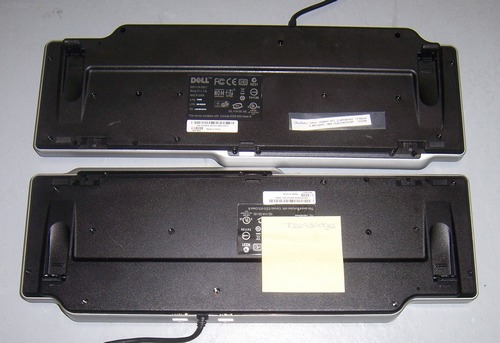
Computers suck. Ask the man who has one. Or seventeen.
You haven’t seen much from me lately because I began the XP rampdown a little too late to be calm and systematic about it. It wasn’t evolution, nor upgrading. It was demolition. I will probably be tinkering with the rubble for a good long while, but the explosions have for the most part occurred where and how I intended them.
Before I get into that, take a look at the photo above. I use the Dell SK-8135 keyboard everywhere I don’t need one of my precious Northgates, and I destroyed one a couple of weeks ago by literally dropping a computer on it. (I don’t know if the SX270 got hurt. It’s now in somebody’s recycle pile, and will not trouble this world again.) That left me with no spares, so I ordered a couple of used ones from a surplus house. Both arrived the other day…with logins and passwords taped to their undersides. Heartbleed? We don’t need no steeking Heartbleed…
So we return to the XP crater. The smoke is clearing. Both of Carol’s machines are now used but spotless Optiplex 780s running Win7. My GX620 USFF upgraded to Win7 without a whole lot of argument. My quadcore now has a newer and much larger SSD, plus a new card reader and four new USB ports on the front panel. My new Dell e6400 laptop was a Win7 slab from the outset. I got rid of four SX270s, plus a couple of old Pentium 3 mini-towers that followed me home years ago and refused to leave. I was about to recycle my dead 2001 Thinkpad X21, then plugged it in, scratched my chin, shoved the hard disk solidly into its slot, and boom! Windows 2000 said hi to me for the first time since early 2005. The X21 remains my favorite laptop of all time. Still not sure what to do about that.
There were driver problems, not that that came as a complete surprise. Both my HP 5370C flatbed scanner and my OpticBook flatbed edge scanner came with drivers that refused to install. (Interestingly, my even older HP PhotoSmart S20 slide scanner installed without any grumbling.) HP’s 5370C driver was an abomination even when it was new. The 5370C is a freaking scanner, for cripe’s sake. Why does it need twenty-five assorted DLLs, OCXs, and other dubious squidlies in order to function? Well, I’m in the thick of scanning a lot of paper records for offsite storage, and I needed that scanner bad. What I ended up doing turned out to be a bit of a wonder: I bought the Pro version of VueScan. It rankled me a little at first to have to spend $80 to reclaim a scanner I paid for twelve years ago. That said, what VueScan gave me was marvelous: A common UI for every scanner in the house. (VueScan supports the S20 as well.) The product is well worth the money. It comes with a reasonably literate 111-page user guide, and there’s a book about it too. The book’s on order, and so far I’ve been able to find my way around by (gasp) reading the manual, with less head-banging than I expected. The list of scanners supported by VueScan is boggling. If I ever need to get another scanner, I won’t have to screw with psychotic vendor drivers, nor learn any needlessly different vendor UIs.
Win a program, lose a program. I have a little utility called Jasc Image Commander that’s been with me since the midlate 90s. All I use it for is to crop, resize, rotate, and adjust color on pictures for Contra. Alas, Win7 will have no part of it. Bummer. I installed FastStone and IrfanView and am trying to decide which to keep. Both are more complex than I need, but I’ve used them both before and the jump won’t be too traumatic. So far, IrfanView has the edge.
Win7 itself wasn’t that big a deal. I still have a couple of head-scratchers on the list. The e6400 simply will not join my homegroup. I’ll come back to that once I study up a little on homegroups. I have a weird impression that Win7 is dropping keystrokes on me when I type quickly–and as most of my friends are aware, I type very quickly. This may in part be due to the PS/2-USB keyboard converter that allows me to use a 1991 Northgate on a machine without a PS/2 keyboard connector. Don’t know. Will continue to research it.
I may put XP in a VM in case I need it for something. I’m also keeping one XP-based SX270, not for the sake of XP but because it’s the only machine in the house that can read floppies and Zip disks. Who still has floppies and Zip disks? I do. And they wander in sometimes carrying interesting things.
Still, for the most part, it’s done. Sure, I should have begun sooner. Yeah, I’ll miss XP a little. I won’t miss the boxloads of old hardware that the switchover finally motivated me to dump. And boy, am I looking forward to moving on to more entertaining projects than this!
Odd Lots
- Hats off to T. C. Chua, who figured out how to make Zoundry Raven work with IE9+. Raven uses IE’s WYSIWYG editor, and changes made to the editor with IE9 breaks the program completely. Zoundry is open-source and hasn’t been updated since 2008. Mr. Chua traced through the Python code, found the problem, fixed it, and built an .EXE out of the Python code. He’s made it available here. I’ve used Raven to edit and post Contra entries since 2008, and didn’t feel like chasing down some new blog editor now that I’ve moved to Win7. Bravo!
- Vegetarian diets are not as healthy as we’ve been led to believe. Make sure you scroll down to Table 3 and get a look at the figures for cancer. Now, some thrive on vegetarian diets and many don’t. What the research doesn’t appear to take into account is “lifestyle panic,” which is severe anxiety that some (usually minor) aspect of your life will kill you. If worry about your diet turns your life into a cortisol thrill ride, your diet won’t help you, and it certainly won’t be what killed you.
- Mars reaches opposition on April 8, and the best day for observing it is April 14. Actually, any time within a week or two of those dates will provide a pretty good show, especially if you have even a smallish telescope. Such opportunities happen roughly every two years, so catch it now or wait until 2016!
- Wearable computing has never really set the world on fire, and here’s a reasonably honest assessment as to why. I already have one computer in my pocket, and that’s plenty.
- A GoPro-packing RC flying wing. Makes kites look kind of lame, but lame is what I have on hand, and lame is how I’m going to fly my GoPro this spring. If we ever get a spring. (6″ of sloppy stuff this morning; would have been 15″ had it been ten degrees colder.)
- Cores (the other kind of cores) like dust.
- My instance of the Gallery photo server is pretty much dead, and I’ve begun migrating photos to Flickr. Here’s my photostream link, and my three sets so far. I’m not yet an ace at the system by any means, but with some practice I’ll get everything interesting up there.
- Ok. Precision marshmallow toasting is cool. Just don’t get nuts and melt the mallow into the machinery.
- I study climate, in general to support a fiction concept I’m working on, but I don’t talk about it here because I don’t like to trigger the sort of slobbering tribal hatred that any such discussion invariably involves. This is an interesting (if depressing) psychological phenomenon all by itself. (Thanks to Trevor Thompkins for the link.)
- This turned up on April 1, but like all the best hoaxes, it is nowhere clear that it’s actually a hoax. So is it? (Thanks to Esther Schindler for the link.)
- The world’s smallest volcano was maybe just a little easier to suss out…
Cranking Up the GRC-109 R-1004
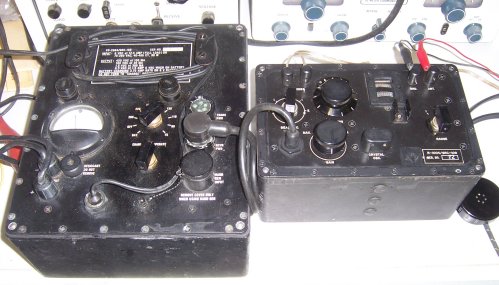
While everybody else yesterday was running around looking for foot bras and the world’s smallest volcano (more on which in the next Odd Lots) I was tidying up my shop/shack, and pulled down my AN/GRC-109 Special Forces radio system. I’ve had it since the mid-1990s, but hadn’t fired it up literally since we left Arizona in 2003. I don’t have the full list of accessories so I had to do a little lashing-up to get the R-1004 receiver connected. It didn’t disappoint me.
I have the CW-only T-784 transmitter as well. I don’t use it because I’ve largely lost my CW chops and the only guys still pounding brass are whistling along at 20+ WPM. Not having an antenna that won’t set off my security system is the other issue. (Shielding the heat sensor it triggers it is not an option due to insurance regs.) My outdoor dipole will go up as soon as we have a few leaves on the tress, whenever that actually happens.
So. What we have here is a vintage all-tube spy radio, where the spies either have stealth jeeps or very strong backs. The design came out of the CIA in the late 1940s, and was adapted for more general use in the 1950s. It was used until the end of the Vietnam War. The receiver weighs 8.75 pounds all by itself. The PP-2684 power supply will weigh you down another 25 pounds or so. (There’s a lighter, smaller power supply, the PP-2685, that I don’t have.) The receiver uses conventional 7-pin miniature battery-filament tubes in a fairly simple superhet circuit. The only glitch there is the 1L6 converter tube, which is hard to find and costs a small fortune when you find it. The 1L6 is scarce enough so that people have designed solid-state replacements for it.
The R-1004 tunes from 3 MHz to 24 MHz in three bands. Selectivity is good, hardly single-signal but a reasonable compromise for a set designed to receive both AM and CW. I had to grin at how spoiled I’ve gotten by modern digital rigs like my IC-736, which can tell you to a single cycle where you are. The dial is pretty accurate, reading bang-on for WWV at 5 and 10 MHz, but it’s a wide dial, and lacks a vernier. Sensitivity seems lower on the 12-24 MHz band. No matter; in the evenings all the action is at 12 MHz and down.
SSB was still pretty exotic when the R1004 was designed, and yet its BFO is solid enough that I didn’t have to “chase” sideband signals on 40 and 75 meters with either the tuner or the BFO knob. AM quality was good, considering that it has caps to roll off audio response past 3 KHz. I tuned the entire range from 12 MHz down to 3, stopping at the ham bands or anything else unusual. I used to do that a lot before I was licensed as WN9MQY in 1973. I was hoping to find a numbers station (are there still numbers stations?) or one of those long-extinct semi-musical beacons that I used to hear in 1965. SWBC hasn’t really changed much since 1970: Christian stations, national stations, some German and French, and a lot of things too far down in the noise to quite make out. Canadian time station CHU is no longer on 7335 KHz, but a quick Google check pointed me to its new location at 7850 KHz. I listened to an AM net on 7290, and was startled when K5MIL’s big signal came up and forced me to turn down the gain–he’s only 5 miles north of me, and running a fair bit of power.
Talk about old times, whew.
My R-1004 hasn’t seen much hard use; I’d almost call it pristine. Serial number 25. By contrast, the power supply has been around the block–or maybe the world–a few times, and when I bought it I had to do some fussy needle-file work to get the corrosion off the power connectors. It sounds goofy, but I love how this gear smells: bakelite and black rubber, with undercurrents of oil and perhaps solder flux. (Radio terroir!) If ever there were a canonical Dieselpunk radio, well, here it is. My only gripe is that my high-Z “cans” headset gave me a headache after squeezing my ears for an hour, and I really need to lash up an audio transformer to take the R-1004’s 4000 ohm output impedence down to whatever my cushy padded headset likes. I’ve done this before, but alas, the adapter unit (built into a 70s contacts case I got from Carol) is hiding somewhere.
No matter. You’ve seen my shop and my collection; it will be done. When we can manage a nerd party here sometime this summer, I’ll put it out on the deck and drop a wire over the edge if I haven’t done so already. Put the black thing up against your ear, young’un: That’s what the Internet was when I was mowing the lawn and not chasing you off of it!
Daywander
This entry will be a hodgepodge, or as they say in some circles, a “hotch potch.” (I think it’s a Britishism; Colin Wilson used that spelling many times.) Stuff has been piling up in the Contra file. Carol and I have been slighting housework for these past six months, she laid up after surgery on both feet, and me writing what has doubtless been the most difficult half-a-book I’ve ever written. We’ve been cleaning up, putting away, and generally getting back to real life. Real life never tasted so delicious.
One reason is rum horchata. I’m not one for hard liquor, mostly, and generally drink wine. (Beer tastes far too bitter to me.) But Rumchata got me in a second. It’s a dessert cordial no stronger than wine, with the result that you can actually taste the other ingredients, like vanilla, cream, and cinnamon. Highly recommended.
People ask me periodically what I’ve been reading. After soaking my behind in computer science for the past six or eight months, I’ve been studiously avoiding technology books. That said, I do endorse Degunking Windows 7 by my former co-author Joli Ballew. I actually used it to learn some of the Win7 details that weren’t obvious from beating my head on the OS. I wish it were a Coriolis book, but alas, it’s not. That doesn’t mean it’s not terrific.
True to my random inborn curiosity about everything except sports and opera, I’ve developed an interest in the chalk figures of southern England. The next time we get over there (soon, I hope, though probably not until summer 2015) we’re going to catch the Long Man of Wilmington, the White Horse of Uffington, and that very well hung (40 feet!) Cerne Giant. Other chalk figures exist, many of them horses. Some can be seen from Google Earth. A reasonable and cheap intro is Lost Gods of Albion by Paul Newman. The book’s been remaindered, and you can get a new hardcover for $3. I wouldn’t pay full price for it, but it was worth the hour and change it took to read. My primary complaint? It needs more pictures of chalk figures, duhh.
Quick aside: While researching kite aerial photography with my found-in-the-bushes GoPro Hero2 sports camera, I came upon an impressive video of the White Horse of Westbury taken from a double bow kite (rokkaku). I have the cam, and loads of kites. All I need now is a chalk figure. (I suspect I could coerce my nieces into drawing one for me.)
Far more interesting than Lost Gods of Albion was Gogmagog by Thomas Lethbridge. I lucked into a copy of the 1957 hardcover fairly cheap, but availability is spotty and you may have to do some sniffing around. If you’re willing to believe him, Lethbridge did an interesting thing back in the 1950s: He took a 19th century report that a chalk giant existed on a hillside in Wandlebury (near Cambridge) and went looking for it. His technique was dogged but straightforward: For months on end, he wandered around the hillside with a half-inch metal bar ground to a point, shoving it into the ground and recording how far it went in before it struck hard chalk. His reasoning was that the outlines of a chalk figure would be dug into the chalk, and thus farther down than undisturbed chalk. In time he had literally tens of thousands of data points, and used them to assemble a startling image of two gods, a goddess, a chariot, and a peculiar horse of the same sort as the Uffington White Horse.
Not everybody was convinced. Even though Lethbridge was a trained archaeologist, his critics claimed that he was a victim of pareidolia, and simply seeing the patterns he wanted to see in his thousands of hillside holes. The real problem was that Lethbridge was a pendulum dowser, and a vocal one: He published several books on the subject, which make a lot of claims that aren’t easily corroborated. Lethbridge claims that most people can dowse, and hey, it’s an experiment that I could make, if I decided it was worth the time. (It probably isn’t.)
The third book in my recent readings is The Physical Phenomena of Mysticism by Herbert Thurston, a Jesuit priest who spent a good part of his life collecting reports of peculiarly Catholic weirdnesses (stigmata, levitation, inedia, odor of sanctity, etc.) and presenting them in a manner similar to that of Charles Fort, if better written. Most of the articles were originally published in obscure theology journals, but were collected in 1952 in a volume that I’ve never seen for less than $100. Last year it was finally reprinted by White Crow Books and can be had for $18. I’m not sure what one can say about reports of people who have not eaten for forty years. Mysticism is a weird business, but physics is physics. The book is entertaining, and it’s given me some ideas for stories, particularly since I have a spiritually butt-kicking psychic little old Polish lady as a major chartacter in Old Catholics. (Vampires are just so 2007.)
If three books doesn’t seem like much, consider my habit of going back to books I’ve read and liked, and flipping through them to see what notations I’ve made in the margins. We all make them; when was the last time you deliberately went back to read and reconsider them? I’ve been dipping into Gary Taubes’ Good Calories, Bad Calories, Steven Pinker’s The Better Angels of Our Nature, Colin Wilson’s A Criminal History of Mankind, and Matt Ridley’s The Rational Optimist, and arguing with my own marginal notes. One can learn things arguing with oneself, and I’ve been known to change my mind based on things I scribbled in other people’s book’s ten or twelve years ago. (Before that I was too young to have anything like informed opinions.)
For example, I’ve gone back to calling it “global warming.” Climate is always changing, and the assumption that we know all the forces propelling those changes is just wrong–and in tribalist hands, willfully dishonest. Carbon dioxide has exactly one climate trick in its bag: It warms the atmosphere. That’s it. If the discussion is about carbon dioxide, it’s about global warming. Why climate changes is still so poorly understood (and so polluted by political hatred) that we may be decades before we even know what the major forcings are. In the meantime, I want predictions. If your model gives you climate data out fifty years, it will give you data out five. Publish those predictions. And if they prove wrong, be one of those people who really do #*%^*ing love science and admit it. Being wrong is how science works. Being political is how science dies.
I have a long-delayed electronics project back on the bench: Lee Hart’s CDP1802 Membership Card. I started it last summer, and set it aside when the Raspberry Pi gig turned up. It’s basically a COSMAC Elf in an Altoids tin. I had an Elf almost forty years ago. I programmed it in binary because that’s all there was in 1976. And y’know? I can still do it: F8 FF A2. F8 47 A5…
Some things really are eternal.
More on the Dell Optiplex 780
Not a great deal of time today, but I realized I left out an important fact about the Dell 780, and presumably the other USFF machines in the same case like the 980: The all-in-one mount is not VESA compatible, and will only take Dell monitors. The all-in-one mounts for the two earlier USFF case styles (SX270 and SX280) took any 10cm VESA monitor. The flipside is true, too: More recent Dell monitors are not VESA compatible, and use the same proprietary tab-and-button mount as the 780-family all-in-one mount. Be careful when you’re assembling a refurb system. Not everything from Dell fits everthing else from Dell.
That said, if you’re going to use a Dell LCD monitor, Dell has a very nice amplified speaker bar that clips securely to the bottom edge of the monitor. It’s the AS501, and you can get NOS units from eBay for $15 shipped. All of the Dell UltraSharp monitors that I have here provide a 5V barrel jack on the back of the monitor to power the AS501. Very good fidelity, and certainly sufficient volume for puttering around your office or workshop. The 780 contains a tiny internal speaker, roughly equivalent to the one in the SX280, but it’s not good for much beyond notification sounds.
Disabling the Intel Boot Agent Admin Password on the Dell Optiplex 780
 I’m replacing my venerable Dell SX270s and SX280s with much newer Optiplex 780 USFFs running Windows 7. I have two here now and at some point will buy a third. They’re smaller than even the SX270 and almost dead silent. Not bad for a Core 2 Duo with 4 GB RAM. The machines date back to 2009 and are recently coming off 5-year depreciation schedules, so you’re now able to snag one for $200 or less.
As with the SX270s and SX280s (and in fact with most of Dell’s ultra-small form factor machines) the 780 is a cube farm box, not suitable for gaming or video editing but completely suitable for nearly all office work. The machine was designed for central management, and in both of the machines I’ve acquired, the Intel Boot Agent has first shot in the boot order, attempting a PXE boot through the 100BASE-T port. Boot Agent eventually gives up, but while it’s waiting for DHCP to pass down an operating system (these IP addresses don’t burn worth a cent!) the machine just sits there, adding at least thirty seconds to your boot time.
So I F2’d my way into Setup…only to find myself locked out by an admin password. I tried a few obvious ones, then looked online for some indication how to reset the password, to no avail. I downloaded the Dell tech doc, which sent me looking for a jumper that my machine doesn’t have. I then sent off a message to the eBay seller I bought it from with a polite complaint. Fortunately, the seller (who’s sold many of these things and doubtless hears this question a lot) told me to pull the blue jumper from a header marked “Clear Password” on the mobo near the fan. I opened it up, pulled the blue jumper off the header, and shazayum: No setup password. Once I got in, I pushed Intel Boot Agent way down to the bottom of the boot order. The machine now boots into Windows in seconds.
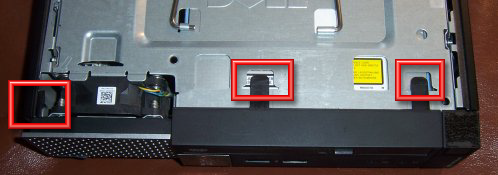
If you’ve got a 780 in hand and want to nuke the setup password and get Boot Agent out of your way, here are some tips once you’ve removed the top panel:
- The plastic front-panel bezel has to come off first. There are three plastic tabs locking it in place. (See photo above.) Two are flat and easy to see. You pull those gently upward, while pressing the third and less obvious tab gently to the left. The bezel will pivot forward and down, and then off.
- There is a wire handle on the disk drive subassembly. Pull up and the whole business will left into your hands.
- Three SATA cables connect the disk subassembly to the mobo. You can pull them all and remove the subassembly completely, or you can remove the blue cable and rotate the subassembly 90 degrees to get it out of the way.
- Look for a blue jumper block near the fan, clearlly marked “Clear Password.” (See photo below.) Yank it with a needle-nose; your fingers probably won’t be able to get a purchase on it. I have a drawer for such things, but if you feel you may need to set a Setup password on it again someday, put it back on one (not both!) of the header pins.
- Reconnect the SATA cable, drop the disk drive subassembly back where it came from, and then put the front panel bezel back. Hook the two little feet at the bottom into their corresponding slots, then pivot the bezel upward until the three plastic tabs lock back into place.
- Button it up, connect it back to the peripherals, and boot it. The splash screen says “Press F12 for boot options” but that’s not useful. Press F2 repeatedly while it’s booting, until the Setup screen appears. From there it’s like any BIOS setup program, and you can set the boot order in the usual way.
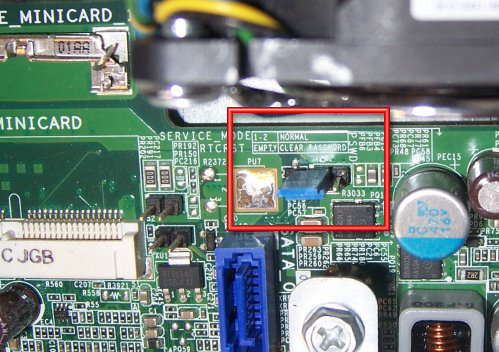
That’s all you need to do, assuming there aren’t other Setup items you need to address.
Some other odd notes on the 780:
- The Dell all-in-one mount for the 780 and its successors is hideous, compared to the SX270’s or the still better SX280’s. The 780 fits into a sleeve that then mounts to the stand. The fit is tight. You’re better off just leaving it on the desk. It won’t take up much room.
- There is a PCIE Mini-Card slot on the mobo for a laptop-style Wi-Fi client adapter. I’ve got CAT5E in the walls and don’t need it, which is good, because I have yet to see the adapter itself for sale on eBay, and the tech doc says nothing about installing it. There is an external antenna that mounts on the rear panel and connects to the adapter with a coax cable. I’m guessing that without the antenna, the steel box will keep the adapter from connecting.
- The 780’s video output connector is a DisplayPort, so if your monitor is DVI or HDMI, you’ll need an adapter cable. (Display Port is basically HDMI with additional DRM.)
So far I like it, though I’m still configuring and installing software. If anything interesting turns up in the future, you’ll read about it here.
Odd Lots
- Yeeeeeeeeeee-HAH!*
- One of my backchannel correspondents emailed me some weeks ago: “I know what you’re working on. Not much of a secret if it’s listed on Amazon.” True dat. I’m just following orders.
- People in disorderly environments pay more for the same things, and appear to think less clearly generally. I guess I had better start shoveling out my office before I go broke.
- This is not just a problem in exotic physics. This is a problem in all modern science, particularly the science of complex systems. The easy stuff has been done. Everything else is measuring gnats in a sandstorm.
- Video shot from far away generally makes volcanic eruptions look like they’re unfolding in slow motion. Get a quadricopter up to the edge of an erupting volcano, and suddenly it all looks a whole lot…faster .
- A new frozen woolly mammoth find may provide what scientists would need to clone a mammoth. Now, will you guys please go looking for frozen glytodont?
- This is what happens when you try to print a house on a gigantic Epson fanfold printer.
- Make one with sweet red wine, and it would be unbeatable.
- * If you don’t know by now what I’m cheering about, well, read Wednesday’s entry.
Pinging Jeff…
Pong, everybody. Relax. I’m still here. And I’m very glad to say that I’m probably 1200 words from the end of my current book project. If it weren’t for some home repairs and carpet cleaning I’d be done by now, and I expect to be done by EOD Friday. The publisher is still reluctant to say much about the book, for reasons I still don’t understand. I’m puzzled, but in publishing as in so many other realms, those who write the checks make the rules.
Much to do after the last word rattles out of the keyboard. Getting rid of XP is high on the list, given our April 8 deadline. This afternoon I ordered a refurbed Win7 laptop, a Dell e6400. How could such an old laptop be useful to me? Easy: I don’t do much on laptops. It’s a travel computer, for Web, email, and some light word processing–like writing Contra entries on the road. It cost me $240 postpaid, as they used to say. I’ve had very good luck with used Dell machines in the last ten years. Every machine in the house but my quadcore is a Dell refurb. I already have two Win7 Dell 780 USFFs for upstairs, and installed Win7 on my lab machine over a year ago. That leaves the laptop and the quad, basically, and if I didn’t need to use the quad to finish this book, the quad would be running Win7 by now as well.
The SX270s are now all bookends. They make very nice bookends.
Oh, and the computer junk pile is getting impressive.
The list of things to do Post Book is long. We need to replace our driveway slab, which is descending into rubble. Ditto the garage slab, the replacement of which will require putting my lathe, big drill press, tooling, and metal stock in storage somewhere. There’s a lesson here: Soil compaction matters. We spent thirty grand mudjacking the lower level, recarpeting, and repainting. Settling soil pulled our gas meter down so far the pipe cracked and damned near blew us over the top of Cheyenne Mountain. I made a number of mistakes having this house built, and I will never make those mistakes again.
Then there’s 3D. I drew 81 figures by hand for this book project, all of them in Visio. (I actually drew 83, but two of them won’t be used.) I’m very good at Visio. However, Visio is inextricably a 2D CAD program, and every time I’ve tried to use it for 3D, it makes me nuts. I took a lot of drafting and engineering graphics when I was in school and know how to do it. (Sure, it was with a T-square. Ya gotta problem widdat?) I need to be able to draw things in 3D. I downloaded the free version of Sketchup after Google bought it in 2006, but was too busy back then to spend much time with it. I see that Google sold it a year or two ago, and the new owners are positioning it as an architectural CAD system. That’s fine, since I know from earlier tests that Sketchup can do telescope parts, and if it can also design me an observatory, I’m good with that. I need somewhere to put an observatory, obviously, but that’s a separate challenge. So learning Sketchup is another priority.
Fiction, too. I’m going to try finishing Old Catholics. If that doesn’t work, I’ll start The Everything Machine, complete with a 3D scale drawing of a thingmaker, courtesy Sketchup. (I tried that in Visio years ago. Uggh.)
I will also be doing some intensive research on Oscar Wilde, for reasons that only a few people in my inner circle understand.
As I always say, Boredom is a choice. I may be tired, but I am not bored. And in a few days, I suspect I will no longer be tired. Bring it on!
The WhisperCup
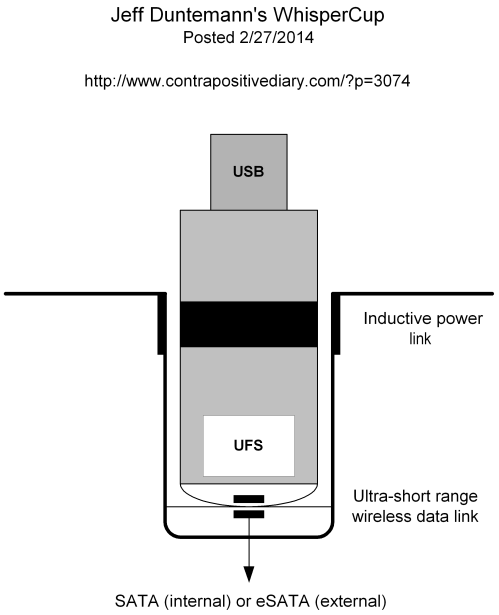
Ok. Yesterday I told you what the problem was. Today I’ll show you what I think will solve it. I looked around online and didn’t see anything like this, not that that proves or disproves anything. If the idea wasn’t out there before, well, it’s out there now.
I call it the WhisperCup. It consists of a specially equipped USB thumb drive, and a cylindrical well that matches the thumb drive’s special equipment. The cup provides power to the thumb drive via induction. At the rounded end of the thumb drive is a wireless connection of some sort. I don’t know precisely what; such things may exist already, and if so, all the better. I call it “ultra-short range” because all it needs to do is link data into the thumb drive from the bottom of the cup. Its range could be as little as a half an inch. Certainly it should quit before the wireless end of the thumb drive clears the top of the cup. It doesn’t have to shout microwaves; hence the name WhisperCup.
The drive itself adheres to the Universal Flash Storage standard, which incorporates an interface that might as well be SATA-on-a-chip. I’ve never much likes USB as a storage interface. UFS is faster and supposedly more reliable. Adding USB to the tang end isn’t difficult; all this stuff is jelly-bean logic now. Toss it in the cup and the volume mounts. If you don’t have a cup to toss the drive in, plug it into a USB port.
The proper place for the cup is built into the top panel of a tower case. If you don’t have such a case, there’s nothing wrong with an external WhisperDock with eSATA and a wall wart. (eSATA doesn’t provide power to its devices–big mistake, but we have to live with it.) I have a Thermaltake VB9 BlacX, and there are two toaster-dock style SATA slots in the top panel. Damned handy, though I mainly use them to do my monthly offsite backups onto naked drives. I’d gladly trade one slot for a pair of WhisperCups.
The thumb drive has no internal power source. If it’s in the cup, it gets power from the cup. If it’s in a USB port, it gets power from the USB port. I don’t want the damned thing whispering while it’s in my pocket. I want to emphasize that this isn’t anything like AirStash, which is a portable wireless Web server for file sharing. That certainly has its uses, but it’s not what I’m talking about.
That’s the basics. If you’re nervous about just dropping the thumb drive into a cup, you could line the cup with plastic bristles, which would both center the thumb drive and keep it in the cup until a firm tug yanks it out.
That would do it. No plugging into a fragile port. Put the drive in the cup, and you’re ready to go. If you take the drive somewhere that doesn’t have a cup, well, the wear is on their USB port, not yours.
What’s not to like?