Jeff Duntemann's Contrapositive Diary Rotating Header Image

hardware

USB Connectors Are Lousy

I finished Chapter 6 yesterday, and have only one more chapter to write. When I was exporting my Visio drawing files to .png for submission, I discovered that a figure I drew two weeks ago had gone bad. It went bad in a way I’ve seen before: It was smaller than similar figures…and it crashed Visio. That happened to another Visio drawing file of mine a couple of years ago, when the front-panel USB port on my Antec 900 case went intermittent. I’m guessing that the data connection opened up while the file was being written, and not everything made it from the Windows filesystem to the Cruzer Micro Skin on which the file was stored. This happened to another couple of files, most of them Word documents. In those cases, I found out before I did my weekly backups. This time I didn’t, and the bad file had already propagated to my backups and overwritten the intact copy of the file. I have a hardcopy and can probably redraw it in an hour or so. Mercifully, it’s not anywhere near as complex as some of the 79 other figures I’ve drawn for the book in Visio so far. But man, I don’t want to go this way again. The Thermaltake V9 BlacX case has worked very well for me since I first described it in this space. I don’t think it’s the case’s fault, nor the fault of the Antec 900 before it.

It’s the USB ports. And I don’t know quite what to do about it.

I’ve had a personal computer since 1979, and have trudged my way through generations of removable storage since then. Here’s the list:

1979: 8″ floppies

1982: 5 1/4″ floppies

1985: Original “cafeteria tray” Bernoulli box. (Tick…tick…tick…)

1991: Original Syquest 44MB cartridge hard drive

1995: SyQuest EZ-Drive cartridge hard drive.

1996: Zip 100

1997: Zip 250

1997: Jaz. Got rid of it almost immediately, went back to Zip 100s and 250s.

2004: Thumb drives

Trouble is, I don’t know what, if anything, comes next. The problem isn’t with thumb drives themselves, nor with the Flash technology inside them. Granted, MLC makes me nervous, and I’d pay extra for SLC thumb drives if they still exist. (I don’t think they do.) The problem is entirely with the crappy connectors on the front panels of modern PCs, and with how badly we’ve abused them.

The USB interface wasn’t designed with removable storage in mind. USB was intended for interfacing to things like printers and scanners, for which you plug a cable into the port on the PC and leave it there. IBM invented the USB thumb drive in 2000, and I bought my first one in 2001. They work beautifully, but plugging and unplugging thumb drives all day can’t be good for the thin shim stock from which the port’s electrical interface is formed. It may also put stress on the copper traces on the circuit board behind the port socket. However it happens, the damned things die, and when they die, they take files (and cases) with them.

We have to be able to do better than this. The obvious solution is to recess the ports behind a channel that aligns the USB plug and keeps it from putting angular force on the port–i.e., a wiggle suppressor. Alas, there’s no standard for the bodies of USB plugs, whether for printers or thumb drives. A recessed port would keep all those rubber duckie-shaped thumb drives from plugging in, and who knows what Federal intervention that would trigger.

There have actually been eSATA thumb drives for several years now, but because eSATA ports don’t provide power (big mistake!) you have to run a cable from the thumb drive into a nearby USB port. Furthermore, even if there were eSATA ports on the front panels of tower cases (I have yet to see one) I’m not sure that the physical port would fare much better than a USB port with constant plugging and unplugging over a period of years. The eSATA spec didn’t anticipate that either. Both USB and eSATA ports seem to be made of the same flimsy stuff.

Carol made a suggestion that is functional but not elegant: Find a short USB adapter cable with a male Type A on one end and a female Type A on the other end. Leave the male plugged into the desktop, and swap out thumb drives on the female end of the cable. I actually found a 40″ specimen in the bottom of my cable snake pit, and it works. Shorter cables of that species may be available. Needless to say, it looks like hell. Cables are cheaper than cases, though.

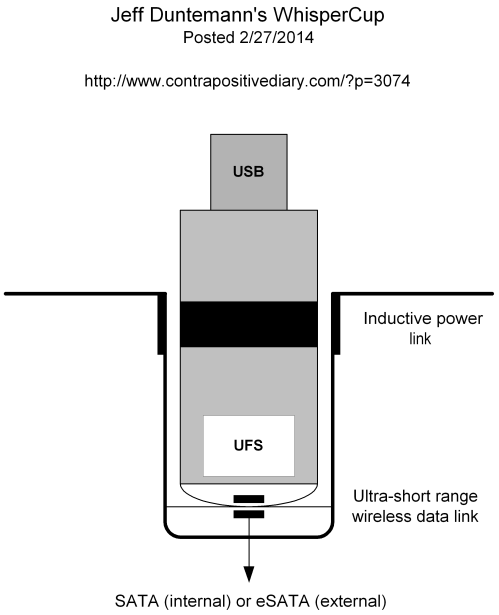
Now, a clever hardware hacker could build the female end of the cable into some sort of base that sits beside the tower and plugs into the back. I could see that. Can see that. Will see that.

When I do, you’ll see it here.

Odd Lots

The Original Hard Disk

I know I have an original Bernoulli Box 10 MB cartridge somewhere. I saved one because I was sure that nobody would believe me when I waved this huge slab of plastic at them and said, “This holds 10 MB.” I think I was right. I won’t know until I find it. So I looked…

…and I found something else instead. See the photo above. Anybody recognize it? It’s part of one of the earliest hard drives in computer history. It’s such an old hard drive that it wasn’t even a hard drive. No. It was main memory.

I honestly don’t remember who manufactured it, though Sperry-Univac sounds familiar. (I threw out the case when we left Rochester in 1985.) I bought it at a hamfest for a couple of bucks just for curiosity’s sake; the old guy I bought it from said it was a hard disk, and I was skeptical. He was right, and it was probably fifteen years until Google allowed me to look for an explanation. I took the case apart and found a motor, a fairly heavy aluminum disk coated on one face with red iron oxide, and the assembly above, which has 160 magnetic heads in eight spiral groups. Roughly half the heads look like gray ferrite, and the other half like white ceramic. I’m guessing that the gray heads are write heads, and the white heads are read heads. (It could be the other way around.) The whole assembly is 9″ in diameter; the magnetic disk is 8″ with the outer 2 1/4″ coated with oxide.

So what we have here is a device that imposes 80 tracks on 2 1/4″ of oxide. The number of bits on each track remains a mystery. 1000? 2000? Somewhere in there, which suggests a total of 100,000 or perhaps 120,000 bits, which would provide about 16KB. This was RAM, not mass storage. The principle is basically the same as the magnetic drum memory systems that IBM sold with its vacuum tube machines like the 650. There were no moving parts other than the disk itself, and you can spin a disk faster than you can spin a drum. I’m guessing that the magnetic disk units like mine filled the (narrow) gap between magnetic drums and core memory. I’ve seen writeups indicating that magnetic disk storage was used for swap storage as late as the PDP 11/45 in 1972. The unit I have seemed a lot older than that.

One of the problems in researching a unit like this is that “hard disk” and “magnetic disk” have other, more modern meanings. So what needles may be are lost in the titanic haypile of newer technologies. If any of you know anything more about the technology send me a quick description or links, and I’ll post them in a future entry.

I had 8″ floppies in my first CP/M machine, and 5″ floppies in all my PCs until the 90s. I used SyQuest cartridge hard drives for years after my 1986-1992 romance with Bernoulli Box drives, which drove me nuts with their constant indexing of heads across the medium. (Tick…tick…tick…) The SyQuest cartridges spun fast and died young. There followed three generations of Zip drives, culminating in the monumentally awful Jaz. It was only in 2004 that I set aside moving parts in my removable storage, and began using thumb drives. I’ve had an SSD on my main system for eighteen months, and will be putting them in most of my lab machines as well, spurred by the need to get XP out of daily use here.

It’s sobering to remember: We’ve been spinning magnetic disks for what may well be sixty years now. We’re still spinning them, and we will be for another ten years or so at least. What other computer technology has been in wide use for that many years? Tape–maybe. That’s the end of my list.

Damn. That’s a lot of angular momentum. Will I miss spinning disks when they’re gona entirely?

Hah. Guess.

Odd Lots

  • There’s lots more Neanderthal in us than we previously thought. My knobby Neanderthal head is poking me in my conical ribcage…
  • Google just sold Motorola to Lenovo, but will be keeping the Motorola skunkworks.
  • Saturation radio advertising in the early 70s has left their jingle stuck in the far corners of my head, but I never actually tasted Zapple cinnamon-apple wine. Weird wines fascinate me (I stop well short of baby mice wine, thanks) and that sounds better than some of the gimmick wines I’ve tried in my life.
  • However, I did try Mateus and Lancers back in the day, both of which were handed out to all passengers on those noisy old Fokkers I used to ride between Chicago and Rochester MN when Carol was in grad school. Both still exist. I wonder if I have the will to buy one of each and see if those old golden memories were about the wine or the woman? (Three guesses. None of them count.)
  • So is it “assortive” mating, or “assortative” mating? I see both spellings online, but having internalized “preventive” I’m loath to endorse”assortative.”
  • A heads-up on something I’m investigating when time allows: Running the Atlantis word processor on Windows 7 fails the first time, but launches the Windows 7 Game Explorer module gameux.dll, which for some reason causes rundll32.exe to use about 50% of my CPU cycles thereafter. This problem arises with games, but Atlantis is not a game. The machine does not have a network connection, which seems key. Still poking at it, but if you’ve seen this problem and fixed it, do let me know how. I’m starting to think that there’s a game called “Atlantis” somewhere and that Game Explorer is looking for a network connection to “do something.” If there’s a way to carve Game Explorer out of Win7 without breaking anything else, that would be not only useful, but damned useful.
  • People in Colorado are already skinnier than people in other states. They may be about to become skinnier yet.
  • Another revelation from the Ministry of the Painfully Obvious: Political discussions damage Facebook relationships. Since a huge fraction of Facebook posts seem to be hatehurling anyway, this should surprise no one.
  • Perhaps a new way to look at the dichotomy: Weather is anecdotes. Climate is data.

The March of Computer Time

Last night I turned in my chapter on programming–just think, all of software development summarized in 55 book pages!–and am gathering my thoughts on mass storage for the chapter I’ll begin later today or tomorrow. Again, if you haven’t seen me much lately that’s the reason.

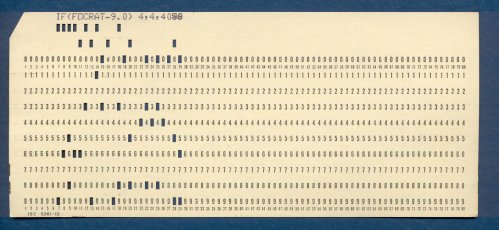
Each of my chapters has begun with a historical perspective on that chapter’s computer technology topic. This has brought lots of things to mind that I haven’t thought about in years, like IBM cards, FORTRAN, punched tape, and Bernoulli Boxes. I still have the card deck from the first program I ever wrote, in the spring of 1970. (See above.) I did some work with paper tape as well in my COSMAC days, but whatever tape I kept has been hiding well. I’d love to get a scan of a length of ASR-33 style punched tape, or a length (8″ or so) of the tape itself to scan here. Doesn’t matter what’s on it as long as it’s not greasy or physically damaged. Contact me if you have some you could spare, or least scan.

Time marches on. I have a 10MB Bernoulli Box cafeteria tray cartridge–probably in a box somewhere with the paper tape–and an original 1983 Microsoft Mouse. Obsolescence doesn’t bother me as long as I can keep functionality. I had to buy a copy of Office 2007 to keep writing commercially, since Word 2000 doesn’t understand .docx files, and Atlantis doesn’t do annotation. Yup, time marches on.

It does. Right now we’re looking down the throat of something a little unprecedented: On April 9, Microsoft turns off security updates for Windows XP.Most of my nontechnical friends seem unaware of this, and my nerd friends have long since moved on to Win7 or 8. I’m in the middle: I’ve been using Win7 on my GX620 for about a year, and have a new Win7 Optiplex 780 on the shelf ready to be populated and configured when time allows. (I’ve done almost nothing but this book for what seems like–hell, has been!–months.) I’m about to take my quadcore in for a new sled-mounted SSD and Windows 7 Pro. The 780 will become Carol’s office machine. I will keep an SX270 XP machine basically forever, because it has pop-in drives for both 3.5″ floppies and Zip cartridges, some of which are piled in odd boxes here for no compelling reason other than they’re paid for. (Yes, most of them have probably gone to bitrot by now.) However, it will no longer be on my network, and will be powered up only as needed.

Here’s an interesting wrinkle that few people seem aware of: Win7 Professional comes with a special-purpose copy of VirtualPC, with a VM containing an instance of XP. (Win7 home does not.) I’m thinking that if I don’t enable the Ethernet connection to the XP VM, it doesn’t matter whether the instance gets security updates or not. I have some stuff here that won’t run on Win8, and possibly not on Win7 either. I can install it on my poor SX270 survivor, of course, but it will be interesting to see what limitations may exist on the XP VM. If something weird turns up in the VM, I can always revert to an archival image.

The real problem with this, of course, is that a lot of nontechnical people are still using ancient machines that won’t run Win7 ever. Only five or six years ago, I still saw Windows 95 on 486 machines owned by older people at my parish. I’ll bet there are plenty of doddering Pentia XP boxes with 512MB of RAM still crunching email and (maybe) Web, along with Office 97. What happens to them? They may well get pwned. On the other hand, I’ve seen several with updates turned off that aren’t pwned. How bad is the problem, really?

I’m sure nobody knows. Sometime this spring we’re going to find out. How many exploits are likely to be left in a 12-year-old codebase? There will be some. Not all exploits are the result of bad coding practices, though I’m sure plenty can be walked back to unbounded string functions in libc, which the C community just can’t seem to give up. XP’s security model is generally lousy, especially for people who don’t understand the implications of what they do, double-especially with Internet-facing apps. That being the case, how far does Microsoft’s responsibility extend? As big as they are, can’t they keep a few security fanatics on staff to fix the exploits that do appear?

I’m thinking that questions like this may soon be asked in the courts of law. We’ll see.

Anyway. I can fix things here, and in extended family. I do worry about nontechnical retirees at our church and elsewhere. When you’re 80, a 12-year-old OS may not seem like any kind of problem, and those on fixed incomes may not feel like $500 for a new box is worthwhile to solve a problem that remains hypothetical. (Hell, my 4Runner is older than XP.) Those of us who remember Y2K hysteria can be forgiven for a strong dose of skepticism. I expect pwnage. There’s pwnage today. The only question is how bad it gets, and how much bad PR it will earn Microsoft. My prediction: If it gets bad enough, and the lawsuits get thick enough, the updates will return.

Pass the popcorn and dig your 3-D glasses out of the drawer. This is gonna be good.

Odd Lots

Odd Lots

Odd Lots

Odd Lots

  • Suddenly the Sun woke up, perhaps afraid that it would get typecast for weak peaks. A sunspot number of 282 is only a little low for a sunspot maximum, and higher than I’ve seen since 2004 or so.
  • The Atlantic takes on the interesting phenomenon of false memories, which I did back in 2009 in a series that started here and continued here, here, and here. As I write my memoirs, I’m checking anything I can against my sister’s memories, as well as any old papers or photos I have lying around in boxes. It’s amazing how much I remembered wrong, and I wonder how much may be wrong that I have no hope of every verifying.
  • Did your favorite classic car ever appear in a movie or on TV? Well dayum, there’s a Web site for that. (Thanks to Ernie Marek for the link. And yes, there are loads and loads of 1968 Chevelles.)
  • Reader DennisK pointed me to LXLE, a lightweight Ubuntu-based Linux distro designed specifically to look and work like Windows XP. I have lots of SX270s here destined to become bookends (and several that already have) so there’s no shortage of test platforms. I’ll let you know what I think after I try it.
  • The Intel Galileo board will be shipping by the end of November, for $70. It supposedly competes with the Rapsberry Pi, but to me it looks like half the computer for twice the price. The Beagle boards have more promise. Anybody using one?
  • Here’s a quick history of optical disks.
  • What do you feed that pharaoh you just mummified? Mummified beef ribs.
  • These peculiar ads (one depicting a brand of salami as a dirigible) don’t include Flying Bomb batteries (battery as bomb; what could possible go wrong?) or another brand of battery I saw in the 1960s that shows an Asian couple riding a battery like a horse. Or could it have been needles and thread? Oh, and meet Seaman Strangelove. There are many more Depression-era product posters (salami was popular) with similar metaphors on the walls of hipster restaurants everywhere.

Daywander

Buck Walking.jpg

This has been a busy two weeks, hence my silence. Carol had her foot surgery on Halloween, and she still can’t walk unassisted. She’s resting with her leg up on cushions, generously draped with bichons, catching up on her reading. Her mood is good. The leg is improving every day, though she still has two weeks to go before the cast comes off and she can put significant weight on both feet.

I’m working on a book project, for large values of “work.” The work isn’t all in the writing. The worst of it lies in the critical difference between a casual understanding of a topic and a detailed understanding. Ever since I got my first Android device and looked into writing apps for it, I’ve been reading up on Android and the ARM processors that lie beneath probably 98% of all Android instances. I picked up the broad strokes quickly: 32-bit single-issue load/store RISC architecture, 8-stage pipeline (for ARM11, at least), dual cache, lotsa registers, several privileged processor modes, SIMD instructions, and good coprocessor support. A little study revealed an instruction set optimized for staying out of system memory and keeping the pipeline full at all times. I had read about but not meditated on a remarkable ARM feature: Virtually all ARM instructions can be conditionally executed based on flags embedded right in the instruction itself. Do a comparison that sets the zero flag, and then any following instructions compiled/assembled to execute when Z=0 will percolate smoothly through the instruction pipeline but not do anything. In essence, instructions whose condition bits aren’t satisfied become NOPs. It’s like branching past a block of code without actually branching and thus messing up the pipeline. Pure brilliance.

You don’t really grasp how much of a topic you don’t understand until you need to explain it in detail. Most hardware guys know how exceptions work, in broad terms. But…does the CPU disable interrupts automatically upon entering an interrupt handler? Or does the handler have to do it explicitly? Things like that require drinking from the doc firehose in a way I haven’t had to for some time.

The book hasn’t been announced yet, but I think I can reveal that it’s mostly about hardware, and that I’m not the sole author. More later, but (I think) sooner rather than later.

I do that all day. In the evenings Carol and I cuddle on the couch and watch TV. TV is a little outside of type for me, granted. (Cuddling with Carol is a lot of what I live for.) But I was poleaxed at how good the comedy writing is on the nerd series The Big Bang Theory. I hadn’t seen more than a few isolated minutes on TVs at doctors’ waiting rooms, and once for maybe half an episode at my sister’s house. TBS has been running several rerun episodes back-to-back on most nights, and we’ve watched what’s been on for a week or so. That nowhere near exhausts the canon, which is now seven seasons and 145 episodes long. Sure, it’s over the top. But it’s a lot less over the top if you’re a guy like me than some jock who went into insurance sales. I’ve met a fair number of Leonard Hofstadters, and at least one remarkably close instantiation of Amy Farrah Fowler. Even if you don’t like TV much, give it a shot.

I’ve had to wonder if all the equations on the whiteboards are real and not gobbledegook meant to fool the rubes who are not into string theory. Maybe a physicist reader will clue us in.

More animal stories: We’ve had an 11-point buck wandering around the neighborhood recently, close enough to the house that I could stand about twenty feet from him and count his points. (He has a small extra one on his left side.) The deer have been thronging our property because the little stream in the gully has been running continuously now for probably six weeks. Ordinarily it runs for eight or ten hours after a bad rain and then goes dry again. Running for several relatively dry weeks suggests that a new spring has opened up on the mountainside above us. It’s not a lot of water, perhaps half a gallon per second. But it just keeps coming and coming, and I’ve begun to see mosquitoes on my office window, staring longongly at my exposed forearms through the glass. The low spot just before the Villegreen cul-de-sac is now a swamp. The deer love it. We see them in groups of eight or nine standing around the flowing water, drinking. Mr. Big Buck sits or lies there, his grey muzzle confident, daring me to disrupt the party by running out there and yelling dumb things like “Roogie! Roogie! Whoosh!” Probably not.

We’ve noticed something else: For the last six weeks or so, we’ve neither seen a fox, nor smelled a skunk. Ordinarily it’s one or the other down there in our gully. Now, nothing. Dare we hope that it’s because the 24″ corrugated iron pipe under Stanwell is half-full of water all the time? We’ve seen both species coming and going at the pipe entrance when it’s dry, though not at the same time. (They’re ecosystem competitors, and they fight. We had a dead skunk in the gully once for several months. Don’t mess with fox.) Nobody likes to sleep in a pipe that’s got eight or ten inches of water in it. We’re good with that.

If you’ve never seen the film Pirate Radio, rent or stream it. Carol got it for a dollar at the local Blockbuster while they were blowing out their inventory. Rehabbed fishing boats really did park off the coast of England once, broadcasting rock’n’roll and manic DJ chatter while deliberately tweaking the BBC bluenoses who eventually shut them down. A little raunchy but goodhearted, and the 1966 period look was uncanny. (I was 13 in 1966 and remember the era well, largely because I didn’t have a girlfriend to distract me.)

One of the other dollar DVDs she bought astonished me with its awfulness. Yes, I loathed Cowboys and Aliens. Sue me; it sucked bigtime. Every bad Western cliche that’s ever seen print or film was there in seething, wriggling, vomiting color–except when the film retreated into faux moody darkness so deep you had no idea what the hell was going on. The aliens looked and moved like gorillas in alien suits. The HQ spaceship was stolen–most appropriately–from Alien. The formidable Daniel Craig was utterly wasted. The aliens were so stupid they set down a wrist-mounted raygun right next to Craig so he could put it on and start blasting them. The plot made very little sense except when it was utterly predictable. I’m glad we got it for a dollar–which was probably five dollars more than what it was worth.

Dash threw up on our bed late this afternoon. We got it all before it soaked through to the mattress, but we have to wash and dry several more rounds of sheets and blankets before we sleep tonight. We have a perfectly good bedroom downstairs–but Carol only has one good leg for the time being, and there are a lot of stairs. Talk atcha later. I have to go upstairs and throw another round in the dryer.