You’ve heard me say this before, and I suspect you’ll hear it again and again: Creating ebook files is much harder than it needs to be, and creating ebooks in the EPub format is particularly–and inexplicably–hard. In my June 9, 2010 entry, I spoke about the EPub format itself, and how it’s not a great deal different from a word processor file format. In fact, Eric Bowersox pointed out that OpenOffice’s ODF files are also based on XML and organized in a similar way.
Bogglingly, most people appear to be hand-coding EPub XML. In recent days I’ve been looking for better ways to create EPub ebooks. Many places online cite Sigil as the only WYSIWYG EPub editor in existence right now, and I grabbed it immediately. It’s a very nice item, but appears to be an undergraduate’s Google Code project, and I certainly hope he will hand it off to others if he ever gets tired of hammering on it. Version 0.2.1 has just been released, and it fixes a number of bugs that I stumbled over in the last couple of weeks that I’ve been using it.
Then, yesterday, without any need for ancient maps or Edgar Cayce, I found Atlantis.
The Atlantis word processor is a $35 shareware item created by a very small company in France. It’s portable software, meaning it can live on a thumb drive and does not have to be installed in the usual fashion. It’s tiny; nay, microscopic (the executable is 1.1 MB!!) and lightning fast. It doesn’t have all the fancy eye candy of modern software, but it’s amazingly capable, and highly focused on the core mission of getting documents down and formatted. It has a spellchecker and other interesting features like an “over-used words” detector. It reads and writes .doc, .docx, and .odt (ODF) files, and here’s the wild part: It exports to EPub.
Furthermore, it does a mighty good job of it. I loaded a .doc of my story “Whale Meat” into Atlantis and then exported it to EPub. The generated EPub file passed the very fussy EPubCheck validator immediately with flying colors. Now, this was pure text, without any images or embedded fonts or other fanciness, but that’s ok. You have to start somewhere, and I would prefer to start with a genuine word processor.
I then loaded the EPub file that Atlantis had generated into Sigil, which I used to divide the story into chapters and add a cover image. Sigil isn’t really a word processor in the same sense that Atlantis or Word are, but it allows split-screen editing of WYSIWYG text on one side and XML/XHTML code on the other. Sigil 0.2.0 had a bug that generated an incomplete and thus illegal IMG tag (XHTML requires the ALT attribute) but I see that the new 0.2.1 release fixes that. Adding the ALT attribute manually in Sigil 0.2.0 allowed the EPub file to pass EPubcheck without further errors.
I have not yet generated a TOC in Sigil, nor have I attempted to create an EPub of any significant size. (“Whale Meat” is only 8,700 words long.) When I’m through playing around, I’m going to load the entire .doc image of Cold Hands and Other Stories into Atlantis, export it to EPub, semanticize it in Sigil, and see what I have. At some point along the way I may be forced to hand-code (or at least hand-correct) the XML or XHTML, and you’ll hear me bellyache about it when I do. But I will admit that I’m pleased with what I have so far. Yes, Atlantis and Sigil ought to be one product, or at least two closely-knit utilities in the same product family. Still, given the primitive state of the EPub reader business (I have yet to find a Windows or Linux-based EPub reader that I’m willing to use) I’m satisfied with the way that Atlantis and Sigil cooperate. Now that Apple has anointed the EPub format for iBooks, I’m guessing that EPub-related improvements will be arriving thick and fast in coming months.
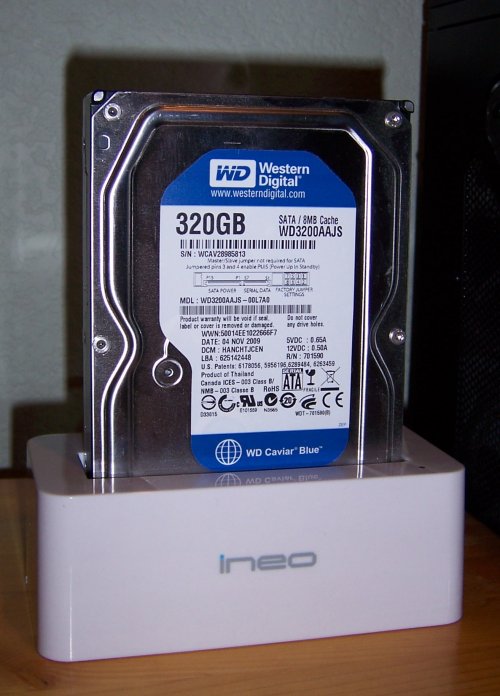
 One solution is shown above and (top view) at left: The Ineo I-NA317U+ “toaster” dock. It’s a USB 3.0 device (which works at reduced speed at a USB 2.0 port) with a spring-loaded hatch on the top. You drop a SATA hard drive into the hatch and shove it down until the drive data and power connectors mate with those in the dock. That’s it. The drive then appears as a USB storage device to Windows and Linux without any additional fuss or installing of drivers. The hatch has a notch in the connector corner sized to fit a 2.5″ laptop SATA drive. When you drop in a 2.5″ drive, the hatch doesn’t push down and away, but acts as a positioning guide. The SATA connectors are physically identical irrespective of the size of the drive, and located on the drive end plates so that the dimensions from the corner of the drives are the same on both 3.5″ and 2.5″ drives.

 Oh me, oh my, oh me, oh my…I’m just such a bad boy. Last year, I