Jeff Duntemann's Contrapositive Diary Rotating Header Image

Daybook

Descriptions of what I did recently; what most people think of when they imagine a “diary entry.”

Where’s the rest of SQLite?

Wait. Oh. That’s all there is.

Really.

I had this problem once before, with the Atlantis word processor. It’s 5MB installed. 5. The first time I installed it I suspected I had downloaded a corrupt file, but no: However they did it, the wizards over at Atlantis implemented a damned fine Word 2000 clone in 5MB. It doesn’t have the collaboration features, but for solo work it’s a very big win, and exports extremely clean epubs as a side benefit.

For a fair number of years now, my non-Delphi database work has all been in MySQL. (With Delphi I use a VCL product called DBISAM, which is linked into the compiled .exe and doesn’t have to be installed separately.) Because SQLite is available for the Raspbian OS and MySQL isn’t (as best I know; Percona runs on Arch Linux) I’m going to be using SQLite as a database teaching tool. So when I installed it the other day, I stared at the 600K .dll and wondered, Is that all there is?

Yes, that’s all there is, my friend–so let’s keep dancing. Let’s break out the tools and have a ball. ‘Cause that’s all there is!

Wow. I verified it by searching for the sqlite3.dll file on my system. The Calibre ebook manager uses an older version (as do a few other things) and the file was not only that same unbelievable size, but smaller. Can you implement a relational database engine in only 372K? I guess you can.

One reason SQLite’s .dll is so small is that it contains no UI at all. There’s a bare-bones command-line management utility available as a separate download. As some of you may know (or suspect) I dislike command lines intensely. So it wasn’t long before I had two free GUI management apps for SQLite databases. One was recommended by Chris Newman’s book on SQLite, SQLite Database Browser, and the other is SQLiteMan. Both are free and installed without drama. So far I prefer SQLiteMan, but it’s really too early to tell. SQLiteMan is supposedly compilable on the RPi. I intend to try that. I’ll let you know how it goes.

One other reason may be that SQLite is “typeless,” which means that the engine does not do type-checking on reads and writes. You can put anything you want in any field (apart from key fields, which are treated specially) and if it makes no sense, it’s your screwup on your conscience. I’m a strongly typed guy and this would rankle, if it didn’t allow a database engine to come in at half a megabyte.

There are wrappers for most common languages, including Lua and Lazarus/FreePascal, both of which I have here and have been fooling with in recent months. I’ve been very spoiled by DBISAM, and I’m interested to see how well SQLite works in non-server applications. More as it happens.

Goof-Proof Meets Green Giant

Goof-Proof Flying-350 Wide.jpg

Well, the punk felt lucky today, so after Carol and I got back from some shopping midafternoon, we threw Dash and QBit in the back of the 4Runner and went down the hill to the park to fly a couple of kites.

But not just any kites. In the past few months I managed to score a Hi-Flier Goof-Proof Kite and a classic RB Toys Green Giant kite. Both are collectible, but like I said, it was a beautiful day and I was feeling lucky. I was lucky, actually, since I got both of them back to the house without damage or drama.

The Goof-Proof Kite is rare but not legendary, and most people have never even heard of it. It’s listed in the 1977 Hi-Flier trade catalog but not in the 1987 catalog. It’s a 36″ plastic bow kite with a twist: There’s no bow. The cross stick is in two pieces, and the pieces attach to the vertical stick with an injection-molded plastic connector that provides about 15% dihedral and a single mount point for the string. The dihedral makes a bow unnecessary, and the single mount point makes a bridle unnecessary. You tie your string to the plastic loop at the center of the connector (which pokes through the plastic sail at the kite’s center of balance) and that’s it. Done. Goof-Proof.

Goof Proof Connector 500Wide.jpg

I don’t have a lot of experience with single-point kites, and what I’ve had has been marginal. The problem is that the bridle and the bow are the only real adjustments you have on a two-stick kite. You’re at the mercy of the wind and the kite’s designers. In this case, the kite did fairly well in the very light and intermittent wind we had in our late afternoon. It was unstable without a tail, but 4′ of tail did the trick and didn’t weigh it down very much. (Kite tails are about wind resistance, not weight.)

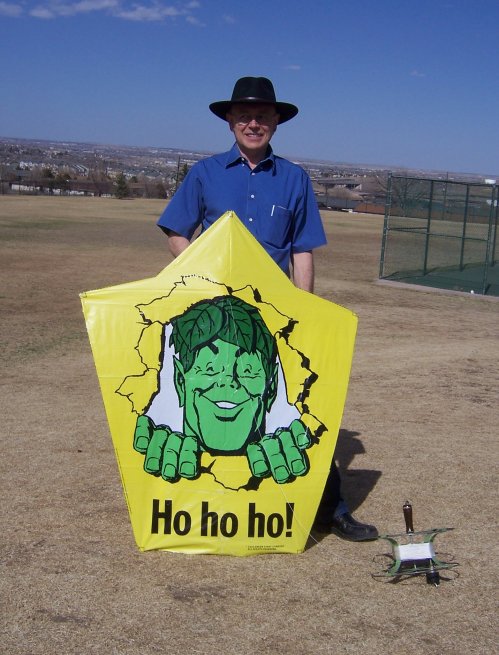
I paid $25 for it, and I’ve told people for years not to fly classic kites. But having done that, I went back to the car and did something even nuttier: I flew an original 1972 RB Toys Green Giant promo kite. I don’t have to describe the kite in detail. If you want to know more, read the larger article on them, linked above. It was the first time I’d flown a kite like that since 1987. I hadn’t imagined it: They fly better than almost anything else I’ve ever had. But having paid $50 for it (and considered it a steal at that price) actually tossing it into the air was crazy. 41 years is a long time, and I don’t know how well the plastic center connector keeps on a decadal scale. (RB Toys didn’t expect they’d be flying forty years after manufacture!)

1972 Kite With Jeff-500 Wide.jpg

I had another insight while the Green Giant was in the air: That little camera we found in the bushes a few months back might be just the thing for kite aerial photography. I’d have to make a mount for it, and I would need a bigger and ruggeder kite than I have right now. But remote control really isn’t necessary if all you want to do is take video. Start the camera, launch the kite, and let it run as long as the kite’s in the air. I’ll read up on it, and when time allows I think I’ll try it.

When time allows. Aye, there’s the rub.

Open-Source Database App Builders

Some folks I know are asking me something I can’t answer: What are people using these days to build small-scale client-server GUI front ends? They have an app created with FileMaker Pro years back that they want to re-create. The catch is this: They want it to be built with something cheap (ideally open-source) and widely used, so that one person isn’t stuck supporting it forever.

The number of records in typical use is not high; from what I can tell, fewer than three hundred in the largest table. There are eight or ten tables, depending on how you slice up the database. There is a need for a certain amount of scripting in addition to table indexes and relationships. The app doesn’t have to scale. Again, 300-500 records is probably as many as the main table will ever need to hold. The database itself must reside on a server, accessible over the Internet from the front end, which will be on laptops and/or desktops.

I used to do things like that in Delphi, and have done simple apps for local tables in MS Access. Access is not cheap, nor is Delphi, and few people are learning Delphi anymore. Lazarus could work, but again, the real question is what’s out there that a lot of people use so that expertise is easy to find.

I wasn’t even aware that FileMaker was still being sold. I haven’t seen it since I had a review copy at VDM circa 2000. Did anyone ever create an open-source equivalent? A quick look around failed to spot one. Any insights?

The Lost Hobby of Microscopy

Carol found some very small insects crawling around on Dash’s neck yesterday while she was brushing him. She dropped several of them into a pill bottle followed by some alcohol. These were tiny bugs; I’m guessing the biggest one wasn’t quite two millimeters long, and most were at best a millimeter. We squinted and used the magnifying glass that I keep in my desk drawer, and the best we could say is, Yeah, that’s a bug.

I knew what I had to do next, and it took me way back. For Christmas when I was eight (the end of 1960), my father bought me a microscope. It was small and lacked a fine focus knob, but it had an iron frame and decent optics. For the next two years until I discovered electronics, looking at very small things was one of my main hobbies.

My father helped me get the hang of it. He had had a simple microscope himself in the early 1930s, and I still have it somewhere: A black crinkle-finish tube about five inches high, with an eyepiece at the top, a slot for inserting slides, and a tilting mirror in a large milled cutout toward the bottom. He bought me a book called Hunting with the Microscope, by Gaylord Johnson and Maurice Bleifield (1956) and I spent a couple of years hunting for all the microscopic things the authors had painstakingly drawn on its pages.

Many of the drawn microorganisms were said to be found in rivers and ponds, and my friends and I haunted the banks of the Chicago and Des Plaines rivers in the summer with mayonnaise jars in hand, scooping up slimy water and the even slimier mud on the riverbottom beneath it. Holding up the jars against bright light showed them to be absolutely crawling with minuscule thingies in constant motion. I had a well slide and managed to corral some of the little monsters in it, but they didn’t slow down long enough for me to identify them. None followed the corkscrew path that paramecia were said to exhibit. We saw no volvoxes nor stentors, cool as that would have been. Water bears too were AWOL. Most heartbreakingly, we never cornered an amoeba, which we longed to see eat something by engulfing it, which would be akin to watching The Blob in miniature–always a draw for ten-year-olds.

No, most of the critters that moved slowly enough to identify were microscopic worms. When my mother heard us talking about worms from the corner of the family room when my friends and I were gazing into my microscope, she made us dump the mayonnaise jars into the toilet and wash our hands. My mother was an RN, and although we didn’t learn it first-hand until we were 13 (another story entirely, though a good one) both rivers were flood relief for Chicago’s and suburban sewers. After even a modest rain, runoff would cascade from overflowing sewer mains right into the rivers, carrying raw sewage with it. So these weren’t exactly earthworms we were watching.

I’m honestly not sure what became of my little microscope. The good news is that Carol received a much better one she when was fourteen (a Tasco 951 with a fine focus knob) and earlier today, I pulled her microscope down off the high shelf and set it up on the kitchen island where the light was good. I looked at a few of the pickled-in-alcohol bugs, but they had been picked off Dash with a tweezers and were not in good shape. We cornered Dash and hunted until we spotted a live one. I carefully snipped the little tuft of hair to which the bug was clinging, and with some prodding managed to tack the bug to the sticky strip on a white Post-It. (Gaylord Johnson would have been proud.) Under the microscope, it was unmistakable: Linognathus setosus, the dog louse. The tacky Post-It strip kept it from walking around, and we were able to see how it clung to a strand of dog hair with its hooked legs.

Dash got a prompt treatment with the usual doggie bug meds, and in a day or two whatever lice remain will be gone. In the meantime, I have to wonder what happened to the microscopy hobby. Astronomy and electronics are both big business, but beyond some Web sites (like this one) I don’t see much to indicate that anybody is digging through river mud looking for water fleas anymore. The instruments are cheap compared to good test equipment or telescopes. You can get used stereo microscopes on eBay for $250 or less, and used student microscopes like Carol’s for under $50. Rivers are a whole lot cleaner than they were fifty years ago, and I’m thinking that if I sampled the Chicago River today I might score a stentor or two, and maybe even an amoeba. Granting that Google is a much better way to identify the stuff you’re looking at, I might order a copy of Hunting with the Microscope, just for fun. No, I don’t really need another hobby, but I want to be ready the next time something really small comes calling, and I need to know what it is.

My Security System

BewareBichons500Wide.jpg

Multiply your terror by four. Then divide by the square root of pi. Or something. (Sign available at Scandical.com.)

The Five Minute Electrostatic Charge Detector

ChargeDetector500Wide.jpg

I’ve been building electronic gadgets for almost fifty years, and I don’t think I’ve ever managed a working five-minute project before. If the photo above shows a slightly random assembly style (I’m typically more artful, whether or not the circuit requires it) that’s because I wanted to complete it in five minutes.

I did. And it works. When I snapped the picture, I was holding my hand about six inches from the gate lead of the MPF102. When I pulled my hand back about a foot or so, the LED went out. If I scuff around my static generator of an office, it “sees” me even two or three feet away. The sensing “antenna” is nothing more than the gate lead of the FET, left loose in mid-air. A short scrap of wire three or four inches long would have increased the range greatly.

The circuit came to me from Bill Beaty, who posted a comment with the link to my February 18, 2013 Odd Lots entry. It consists of an MPF102 JFET, a generic red LED, and a 9V battery plus its associated connector. I lashed it up on a scrap of perfboard with a total of three solder joints. Bill found me because of this post, to an old Popular Electronics electroscope project using a 6J7 tube instead of an FET. (They didn’t have MPF102s in 1961.)

Sure, it’s a stunt, but I was in a stunt mood. Remember, if you try this and it takes a little more than five minutes, that I’m good at this stuff, and had gathered all the parts to my workbench before starting the clock. And clock it I did: the stopwatch said 4:39 when I snapped in the battery, leaned toward the gate lead, and saw the light come on.

I’m still considering a tube-based device using some sort of neon light more exotic than an NE-2. I’m considering an NE-34, and would have had one by now if they didn’t cost so much. Or an Aerolux bulb, if I’m feeling Art Nouveau-ish. Those cost even more.

I can feel my resistance crumbling. Remember: It’s futile.

The Surplus Survivors

I’m trying to clean up the shop a little and free up space, and one of the places I need space the most is in my file cabinet. I’ve been accumulating catalogs for electronic parts and equipment for years untold, and each gets a folder in the top drawer, so that invoices and catalogs can live together. (I want to know what I ordered from who, when. The system works well.)

So I asked myself a week or two ago, How many of these firms are still in business? I began looking them up on the Web. An amazing number are still out there and still selling parts and odd junk like they were back in the 90s. Here is a list of the survivors so far:

There were, of course, some casualties:

  • Brigar Electronics, Binghampton NY.
  • Burghardt Amateur Center. Still there, but now a repair shop only.
  • Classic Radio, Houston.
  • DC Electronics, Scottsdale. Sold to Philmore.
  • Edlie’s Electronics, Levittown.
  • Fertik’s Electronics, Philly. Leon was a character. Appreciation here.
  • Ocean State Electronics, RI. Flood apparently did them in.
  • Two Fox Electrix, Tivoli, NY

I didn’t list firms that vanished prior to 1990. I used to order lots of stuff from Poly Paks in the 70s, but they’ve been gone a long time. Ditto Tri-Tek, with their embarrassing mascot Amp’l Annie. Nor am I counting the manufacturers’ distributors like Mouser, Digi-Key, and so on. The file drawer has folders for tool vendors, wood products dealers, and non-electronics firms of many sorts, which also had winners and losers that I won’t tally here. (Many of you may know that Small Parts, Inc. has been bought and converted to Amazon Supply.) A number of used book dealers I bought from regularly in the early 1990s are, not surprisingly, gone. One survivor in that category is Bequaert Old Books, which I knew as Rainy Day Books in the early 90s and heartily endorse, especially for old ham books and “boys'” electronics and science books. Frank survived by moving his sales fulfillment to AbeBooks, as the others did not.

The upshot is that the file drawer isn’t a great deal emptier than it was yesterday. I’m good with that, since some of these firms (like Playthings of the Past) are very nearly the sole source for certain items. What I marvel at is how long some of these companies have been around, and how well they’ve weathered our near-constant recession since 2008. The Web helps. Print catalogs and postage are expensive. The good news is that there seems to be enough people like me to float a quirky industry that looks like everybody’s picture of a hoarder’s basement. As grim as these times may be, there’s always something worth celebrating!

Pirates vs. Ebooks: A Webinar

Very quick note here: I will be giving a webinar today on ebook piracy and DRM at noon Mountain Time (11:00 Pacific Time, 1 PM Central Time) to a site called Book Street Cafe, based in Phoenix but not geographically limited except by time zones. It was founded by some of my friends from the now-folded Arizona Book Publishing Association, which I belonged to all the time I lived in Scottsdale and acted as president for two years. The webinar is scheduled for 45 minutes, with another 15 minutes for questions and discussion.

Book Street Cafe is a paid membership organization, but they’ve given me a one-time link for my webinar that I can post. If you want to participate, click here.

You’ll have to either have Java running or download the Citrix app that underlies the GoToMeeting technology. You’ll be able to do the download when you click to the site. I know that Java is in a bad odor right now, but the Citrix app is relatively small and only takes a few seconds to download and install.

The presentation is oriented toward print book publishers who are nervous about ebook piracy and are considering DRM. It is not a techie show. It draws on research and positions I’ve presented on Contra for several years.

We’d love to have you. Try to log in a little early so that you make sure you’re properly connected.

The Raspberry Pi Keyboard Stutter Problem

When I first cabled up and ran my Raspberry Pi board, it worked like a charm, first time. I was powering it with the Motorola Droid X2 charger that I had stolen from the kitchen desk upstairs. To keep peace in the valley, I went out and bought a cheap Micro-USB phone charger at Best Buy. It booted normally, but then, when I tried to log in, the keyboard began repeating characters. I’d type in “pi” and see a parade of extraneous i’s march in stately fashion across the display:

piiiiiiiiiiiiiiiiiiiiiiiiiiiiiiiiiiiiiiiiiiiiiiiiiiiiiiiiiiiiiiiiiiiiiiiiiiiiiiiiiiiiiiiiiiiiiiiiiiiiiiii

Needless to say, I couldn’t log in. Now, this didn’t happen every time, but probably half of all logins I attempted failed, with the same keyboard jitter. I tried two other USB keyboards I had on the shelf plus the known-good one attached to my GX620 USFF, and saw exactly the same behavior. It clearly wasn’t the keyboard itself. I’m using a Dell SK-8135 keyboard, which has a 2-port USB hub to which a Dell USB optical mouse is connected. This leaves one USB port on the RPi free, with any luck to use for thumb drive add-in storage. More on that once I figure it out.

Anyway. Some googling suggested a power supply shortfall. I got out my DVM and put the probes on test points 1 and 2. These are minuscule “doughnut” pads on the RPi circuit board. One is labeled TP1, the other TP2. Hunt around on the board for them; it’s not like there are a lot of square inches to search. TP1 is located next to the 220 uF filter cap at the Micro USB jack. TP2 is right next to the yellow RCA jack.

The RPi is designed to work at 5V. Anything much below that and things may start getting flaky. My reading across the test points was 4.72V. Aha! We now have a new phone charger for the kitchen desk–a cool one with a retractable cord–and I decided to dedicate the old one to the RPi. With the original Motorola Droid X2 charger in the wall, I measured 5.03V across the test points. Shazam! No more keyboard stutter.

I’m not sure it’s a question of the RPi drawing more current than the charger can provide. The Droid X2 charger that works is rated 850 ma. The no-name charger that provided only 4.72 volts is rated 2.1 A. Current sourcing ability is important, especially since different USB keyboards and mice draw different amounts of power–but accurate voltage is just as important. I’m guessing it’s sloppy voltage regulation in the cheap charger. If you’re getting keyboard weirdness, put your DVM on the test points and see what your charger is feeding the RPi.

What? You don’t have a DVM? No Pi for you!

The RPi Enthroned

I wonder how many Raspberry Pi boards will spend their entire working lives sitting cockeyed on a desk somewhere, at the center of a tangle of cables. That’s how mine was until a couple of days ago, when despite my cough I allowed myself a few minutes of quality screwdriver time to pull a proper RPi system together.workstation-500wide.jpg

It didn’t take much. Mostly what it took was a 2004-era Dell SX270 all-in-one system minus the SX270, which I now use as a bookend. The key component is a heavy stainless steel base with a VESA monitor mount and a bracket to hold the SX270 behind the monitor. The monitor itself is an unexceptional Dell 1704fp, with a native resolution of 1280 X 1024. (Those now sell for ~$50 on eBay.) That’s more than enough pixels for an RPi, although I tested it on one of my 21″ 1600 X 1200 behemoths and the little gadget did quite well overall.

BackView-500wide.jpg

I had already mounted the board on an aluminum plate, and all I had to do this time was drill two holes and bolt the plate to the SX270 mounting bracket. I may dress the wires a little to keep them from placing any torque on the connectors, but it works well as-is.

I was surprised to find out that the MagPi magazine is actually laid out on an RPi, using the open-source Scribus layout program. I installed Scribus via apt-get and poured some text into a layout. (I’ve been playing with Scribus for years.) Brisk! I guess we need to stop boggling at the capabilities of tiny little computers with all of two ICs on the mobo.

It certainly does a good job with FreePascal and Lazarus, which is why I went to all this trouble. They’ve now sold half a million of these things. At least a few of those people ought to be willing to buy a Lazarus tutorial for it. We’ll see.