Jeff Duntemann's Contrapositive Diary Rotating Header Image

Reviews

Evaluations of products and services

Review: Despicable Me

gru.jpgOne reason I let my subscription to National Catholic Reporter lapse in 2001 was that they reviewed Shrek. C’mon: Space I would prefer to see covering Catholic issues like Papal authority and women’s ordination was spent reviewing cartoon movies of no religious significance. Worse yet, the reviewer just didn’t get it. He was furious that Shrek was obviously skewering Disney-style storytelling and assumed that it was indicative of laziness. Dude, that was the idea.
I thought of that review last night when we left the theater after seeing Despicable Me. Shrek changed cartoon movies forever by its wholesale embrace of sly cultural references that shoot right past the kids but make the adults chuckle. A bush that looks like Shirley Bassey? How many eight-year-olds have ever even heard of Shirley Bassey? I was half an hour into Despicable Me when I realized what was wrong: No cultural references. An entire genre of humor was simply missing from the film. (Ok, two turned up later on, but given their rarity I won’t spoil either here.)

After recalibrating myself away from the Shrek humor setting, I managed to enjoy the film a great deal more. What we have here is still a sort of sendup, but a much subtler one: of the whole idea of comic-book supervillains. Somewhere looking suspiciously like San Francisco, in an oversized Gothic bungalow, lives Gru the supervillain. He steals things, and competes for supervillain cool points with other supervillains who also steal things. The stakes have been ratcheting up lately, and a younger supervillain across town manages to steal the Great Pyramid of Giza and hide it in his backyard by painting it blue with little white clouds. The glove has been thrown, and vaguely middle-aged Gru knows he is being shown up by an upstart punk in a warm-up suit. Hence his audacious plot to re-seize the high (low?) ground: Steal the Moon! What could be bigger than that?

Everything else builds upon this remarkably silly premise, and the kids all around us in the theater laughed almost continuously. Gru himself is beautifully done, if a little derivative at times. To me he suggested Gomez Adams, especially given the décor of his house, which is replete with iron maidens, cannons, and Viking flails. (Others have pointed out a certain resemblance to the food critic in Ratatouille.) His nerdy younger rival supervillain, Vector, is a lot more high-tech and was clearly intended to channel Bill Gates. Gru has a backstory: He craves his indifferent mother’s approval, and has always wanted to go to the Moon. How could he not be a little bit nuts?

Deep under his suburban backyard, Gru has a supervillain hideout and research facility where hundreds of little yellow guys do his heavy lifting and (once the bank won’t offer any additional R&D loans) fund his supervillainy. He calls them Minions, and they have both of the essential characteristics of minor cartoon movie characters: They are very cute, and eminently injection-moldable. (They reminded me of squeaky dog toys. But when you have four dogs, a lot of things remind you of squeaky dog toys.)

The real story begins when Gru adopts three orphan girls as part of a plot to steal a reducer-ray from Vector. Although he finds the idea of small children barely tolerable, little girls are like puppies: Once you have them for awhile, it’s very hard to give them up. The girls work their magic on Gru and against his will slowly redeem him from supervillainy.

The rest of the action is silly sight gags, Minion antics, and humor targeted squarely at eight-year-olds. The voices (primarily Steve Carell, Jason Segal, and Julie Andrews) were skillfully deployed. I felt that the script could have done a lot more with the rich visual vocabulary offered by the animation, but I’m a writer and I’m hard on movie scripts, especially when I get the sense that the scriptwriters assumed that superb animation would carry the story.

Still, the kids loved it, and that’s who it was for. Cynics looking for snarky humor will cringe at the sweetness displayed toward the end, and the (mostly extinct) cynical side of me wondered if the sweetness was tacked on simply for commercial reasons. Doesn’t matter; it’s not a major classic and shouldn’t be compared to things like The Incredibles or Shrek. My inner eight-year-old loved it. (And as soon as I can find one, Dash will be chewing on a squeaky Minion.)

Recommended.

Review: The Calibre Ebook Management System

I tried Calibre when it first came out a little over two years ago (v0.4.83) and was reasonably impressed. It did everything it said it did, reliably and without much fuss. Alas, I didn’t test most of its features back then, especially its file conversion modules. I’ve done a lot more in the past week, and overall I’m pleased.

The current version is 0.7.6, and author Kovid Goyal posts updated releases frequently, as often every couple of weeks. That’s amazing for a GPLed app, but Calibre itself is amazing in its way. If you install no other ebook reader or manager, get Calibre. It’s a Python app, and can be downloaded for Windows, Linux, or Mac.

There are three general aspects to Calibre:

  • It’s a sort of jukebox for ebooks: a simple database manager that allows you to browse your ebook collection, search for individual titles, and edit metadata by individual title or in bulk. It can send books to any of a growing list of hardware readers.
  • It’s a collection of import/export modules behind a GUI, allowing you to take an unencumbered ebook in one of a long list of formats, and export it to a different format out of that same long list.
  • It’s an ebook viewer that can render ebooks for reading in most popular formats. When a format isn’t supported, Calibre attempts to launch the associated app to render the book.

All three aspects work well, though I ran into some problems with format conversion. I tested Calibre by importing basically every ebook I have on disk, which at this point isn’t all that many. I still don’t have a portable reader device that I like, and I don’t read a lot on my PC display. So I went and got a bunch of things from Project Gutenberg (including all the pre-1923 Tom Swift Senior books) plus some religion journals and other PD oddments from Google Books, and ended up with about 150 titles.

Calibre copies imported ebooks from their original locations to a separate directory, and it operates only on those copies, leaving the originals alone. (This means that the space your library takes on disk will basically double, though I doubt that this is an issue in an era of 2 TB hard drives.) It controls the filename of each file, and imposes a filename by running a regular expression against the title and author name in its database. Change a book’s title in the database, and the filename changes in sync. Delete a book, and only the imported copy in the Calibre directory goes away. Your originals are not touched.

Once you import the ebooks you own, plan on spending some time editing the metadata. Calibre uses a regular expression to extract an author and title string from each file, and although you can change the regular expression if you want, there’s no broadly accepted standard for ebook filenames, and you’ll find that many of your books have the author name in the title field or vise versa irrespective of the expression Calibre uses. You can specify a series name and number for books in series; e.g., Tom Swift, Sr., Volume 12. There are additional fields for publisher, ISBN, pub date, and comments, and if a cover image is present in a book, a thumbnail will be displayed. There is a tagging system with a tag manager.

Sorting out the metadata was a fair bit of manual labor, even for only 150 books. You can do updates on several books at once; for example, I highlighted all the Tom Swift books and set the Author field to Victor Appleton in one operation. If you have many hundreds or perhaps thousands of ebooks (and I know people who do) good luck; you’ll need it. There is autocomplete on fields and that helps, but there’s an irreduceable amount of keystroking that has to happen to get the most from the database browser.

The ebook viewer is as good as I’ve tested so far. It renders almost every ebook format I’ve ever heard of, including the comic book formats and PDF. (You can configure it to launch an external app to handle a specific format if you choose; for example, I open CBZ and CBR files with Comical.) For EPub and MOBI files, at least, the reader automatically maintains a bookmark to the last opened location in the book, and when you reopen a book, the cursor goes right to that bookmark. (This is not true for LIT, PDB, , and LRF books.)

About the conversion modules I have mixed feelings, and the problems are probably not all with Calibre. I converted my EPub version of the Beyschlag Old Catholic history to LRF, MOBI, and PDB. Results were so-so. One problem with the LRF export was that the font size was inconsistent: Parts of the text were rendered in larger type than others, and I can’t tell (yet) if that’s an issue with Calibre’s LRF viewer module or with the conversion process from EPub to LRF. The conversion to PDB stripped out all the formatting, including italics, and that does appear to be a problem with Calibre. MOBI kept the italics but didn’t center the author lines. Calibre seems happiest dealing with EPubs, and conversion from other formats to EPub works better.

Note that Calibre doesn’t deal with DRM-encumbered files at all. That’s fine with me, as I won’t buy DRM, but you need to keep it in mind if you’re looking to read DRMed books on your PC; Calibre is not the item for that.

I also installed Calibre under Linux, and I moved my entire Calibre database over to the Linux machine by simply copying the Calibre books directory to a thumb drive, and then copying the directory from the thumb drive to a folder in my home directory and telling Calibre to use it. As best I could tell, there were no functional or performance differences between the Windows and Linux versions.

There isn’t a lot of downside to Calibre. Opening and rendering an ebook on the internal reader can be slow if it’s one of the more sophisticated formats. (Txt and .rtf files open very quickly.) The viewer doesn’t downsample cover images very well when displayed at less than their native resolution, though that’s a quibble. (Reduce the display size on my Old Catholic history epub and you’ll see what I mean.) Adding bookmarks seems to take more time than it should, especially on longer books. The program crashed once when I had a lot of windows open. (These included Thunderbird 3, which seems to be causing a lot of weirdness recently.)

Calibre doesn’t help you create ebooks; that’s not what it’s for. And some issues with the conversion modules are going to keep me looking for reliable ways to make MOBIs, LRFs, and PDBs out of my EPubs. However, in terms of an ebook manager, it’s just short of stellar. The viewer modules work reasonably well, particularly with files created “natively”–that is, not converted from one format to another.

Basically, the ebook business is still mighty young, and I’m not surprised at how random things still are. Among ebook-related software products, Calibre is the least random of anything I’ve yet tested, and at this crazy stage of the game, that’s high praise.

Highly recommended.

Coding vs. Compiling EPubs

It’s always unsettling to admit that the other side has a point, but it’s good practice and often absolutely necessary. I am the VDM guy, after all, and I’ve never been one for hand-coding what can be generated automatically. As I’ve mentioned here earlier, an awful lot of people take their text and hand-code an EPub framework around it to create an ebook, which I found borderline ridiculous…until this morning. Now I think I know why they do it.

It’s simple: Our EPub compilers have a very long way to go.

The process of creating EPub-formatted ebooks can be done two ways: Write your own XML/XHTML by hand, or let a utility of some sort generate it for you. I’ve done both in recent days, and I was bowled over by the conceptual similarities between that and the gulf between writing a program entirely in assembly and writing it in an HLL like C. I’ve done a fair bit of tracing through assembly code as compiled by GCC, and I’ve been very impressed by the cleanness and comprehensibility of the assembly files it produces. GCC is one helluva compiler, as is the Delphi compiler. (And that’s where my low-level code tracing experience begins and ends, mostly.)

Well, I’ve been spoiled. Compared to GCC (or even Delphi, which is now 15 years old, egad) the EPub format is a babe in diapers: poorly understood, still growing furiously, and, as often as not, smelly as hell. All of that will pass. (I remember my nephew Brian in his diapered era; he is now 27 and an investment banker.) But in the meantime, well, the immaturity of the EPub technology must be dealt with.

I did another, larger test case EPub yesterday. I took a 15,000-word article from an old theology journal, extracted the text via ABBYY PDF Transformer, cleaned up the text (which was in fact pretty damned clean to begin with; ABBYY does a superb job here) and loaded the text into the Atlantis word processor. Without a great deal of additional editing, I exported it to an EPub file. That file may be downloaded here. (40K EPub.) There are no images, and all the text exists in a single XHTML section. It’s about as simple structurally as an EPub can get, and what you see is just as it came out of Atlantis. I did not tweak it at all post-Atlantis, neither manually nor in Sigil. (Note well that Atlantis can export EPub, but it cannot import EPub files, nor display/edit EPub XML/XHTML.) I then took that file and loaded it into Sigil, added a cover image, and split the text into two sections. You can find that file here. (1 MB EPub.) Both of these files pass EPubCheck without errors.

The Atlantis EPub renders (reasonably) well in all the local readers I have here, as well as the online Ibis Reader. It’s small (only 40K) and if you can do without a cover it’s a perfectly reasonable ebook. The Sigil copy does not do nearly as well. The online Ibis Reader refuses to render any of the images at all, including the cover image, the copyright glyph, and the generated images of the two grapevine glyphs that I inserted into the title page as decorations just to see what would happen. The copyright glyph issue is disturbing for legal reasons, but worse, it’s a standard character with a standard HTML encoding, and should be renderable irrespective of font. Ditto Azardi, which renders the Atlantis EPub well but not the Sigil copy. Over and above Azardi’s leaving out all the images (including the copyright glyph) the Sigil copy of the EPub loses what little formatting it had in the Atlantis EPub. None of the centered text remains centered, for example.

There are some additional weirdnesses in the readers themselves: FBReader renders both files well, but (weirdly) the Go Forward button moves the reading window toward the beginning of the file, and the Go Back button moves the window toward the end of the file, perfectly bass-ackwards. Ibis displays the title three times, which is overkill. FBReader handles the images just fine, but renders the copyright notice for both versions in Greek letters, sheesh.

These rendering issues are probably reader failures, since the files themselves are EPub-compliant. However, the autogenerated XML/XHTML code is often obscure, and in one case, at least, dead wrong: The title tag includes only the first line of the title. I understand that the title text is split into two lines, but I was never asked to define the text within the title tag and can only assume that Atlantis picked the first Heading 1 style it found and plugged its text into title. (The metadata for the title was stored correctly, and all readers displayed the full title text. I don’t think that the title tag is used by the readers. An empty title tag is perfectly acceptable to EPubCheck.) The gnarliest part of the compiled EPub (in both versions) is the CSS. Atlantis took the page format settings and translated them into generically named CSS classes, which are accurate representations of the word processor settings, but not easily identifiable and in no wise good quality CSS.

This isn’t insurmountable, and most of the problems I’ve had so far can be blamed on incomplete and buggy reader apps, but it shows how young a business this is. The hand coders still have the edge, and I’d be better off on the readability side creating the ebook text in a WYSIWYG HTML editor like Kompozer or Dreamweaver and hand-coding the CSS myself. That is, however, precisely what I’m trying to avoid. Sooner or later, Atlantis or something like it will offer pre-written CSS style sheets designed specifically for text intended for EPub export. That will help a great deal. In the meantime, some manual futzing is unavoidable, and my opinion of Sigil has been greatly tarnished. I may have to try something else on the EPub editor side; suggestions always welcome.

And the readers, yeech. Don’t get me started. I may have to buy an iPad just to see what my own damned books look like!

Atlantis and the EPub Toolchain

You’ve heard me say this before, and I suspect you’ll hear it again and again: Creating ebook files is much harder than it needs to be, and creating ebooks in the EPub format is particularly–and inexplicably–hard. In my June 9, 2010 entry, I spoke about the EPub format itself, and how it’s not a great deal different from a word processor file format. In fact, Eric Bowersox pointed out that OpenOffice’s ODF files are also based on XML and organized in a similar way.

Bogglingly, most people appear to be hand-coding EPub XML. In recent days I’ve been looking for better ways to create EPub ebooks. Many places online cite Sigil as the only WYSIWYG EPub editor in existence right now, and I grabbed it immediately. It’s a very nice item, but appears to be an undergraduate’s Google Code project, and I certainly hope he will hand it off to others if he ever gets tired of hammering on it. Version 0.2.1 has just been released, and it fixes a number of bugs that I stumbled over in the last couple of weeks that I’ve been using it.

Then, yesterday, without any need for ancient maps or Edgar Cayce, I found Atlantis.

The Atlantis word processor is a $35 shareware item created by a very small company in France. It’s portable software, meaning it can live on a thumb drive and does not have to be installed in the usual fashion. It’s tiny; nay, microscopic (the executable is 1.1 MB!!) and lightning fast. It doesn’t have all the fancy eye candy of modern software, but it’s amazingly capable, and highly focused on the core mission of getting documents down and formatted. It has a spellchecker and other interesting features like an “over-used words” detector. It reads and writes .doc, .docx, and .odt (ODF) files, and here’s the wild part: It exports to EPub.

Furthermore, it does a mighty good job of it. I loaded a .doc of my story “Whale Meat” into Atlantis and then exported it to EPub. The generated EPub file passed the very fussy EPubCheck validator immediately with flying colors. Now, this was pure text, without any images or embedded fonts or other fanciness, but that’s ok. You have to start somewhere, and I would prefer to start with a genuine word processor.

I then loaded the EPub file that Atlantis had generated into Sigil, which I used to divide the story into chapters and add a cover image. Sigil isn’t really a word processor in the same sense that Atlantis or Word are, but it allows split-screen editing of WYSIWYG text on one side and XML/XHTML code on the other. Sigil 0.2.0 had a bug that generated an incomplete and thus illegal IMG tag (XHTML requires the ALT attribute) but I see that the new 0.2.1 release fixes that. Adding the ALT attribute manually in Sigil 0.2.0 allowed the EPub file to pass EPubcheck without further errors.

I have not yet generated a TOC in Sigil, nor have I attempted to create an EPub of any significant size. (“Whale Meat” is only 8,700 words long.) When I’m through playing around, I’m going to load the entire .doc image of Cold Hands and Other Stories into Atlantis, export it to EPub, semanticize it in Sigil, and see what I have. At some point along the way I may be forced to hand-code (or at least hand-correct) the XML or XHTML, and you’ll hear me bellyache about it when I do. But I will admit that I’m pleased with what I have so far. Yes, Atlantis and Sigil ought to be one product, or at least two closely-knit utilities in the same product family. Still, given the primitive state of the EPub reader business (I have yet to find a Windows or Linux-based EPub reader that I’m willing to use) I’m satisfied with the way that Atlantis and Sigil cooperate. Now that Apple has anointed the EPub format for iBooks, I’m guessing that EPub-related improvements will be arriving thick and fast in coming months.

Review: The Ineo Toaster Dock

IneoDock500Wide.jpg

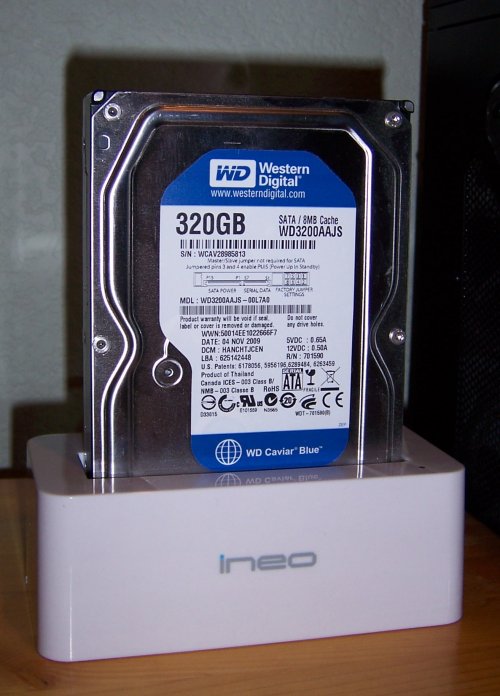
I have a 320 GB SATA drive that got corrupted when power dropped during a thunderstorm. I lost nothing in terms of data (I do backups well here) but now I have this naked drive in the drawer. I want to go through it and make sure there’s nothing worth taking from it that wasn’t in my backups, and then low-level reformat it and see if it could again be of use.

This is something that most of us do from time to time. I have a small pile of hard drives downstairs on my shelves, pulled from defunct machines before they went to the recycler. A couple of the older ones (1.6 GB anyone?) I treated with one-clunk degunking (in which that single clunk is applied out on one of the flatter boulders behind the house, with a five-pound sledge) but there are some that are still large enough to be useful.

Ordinarily I stick them inside a system to examine and reformat them, but most of the systems in the house are now USFF Dells, and don’t have an “inside” as we define insides. My current Antec desktop tower, as nice as it is in some ways, is miserable to open up. I used to use my old Antec and just left the covers off, but then the mobo died, making it junk. It would be damned fine to have an easy way to connect the occasional drive to a system to work with it, without having to fuss with Metric screws and cables and covers.

IneoDockTopView.jpgOne solution is shown above and (top view) at left: The Ineo I-NA317U+ “toaster” dock. It’s a USB 3.0 device (which works at reduced speed at a USB 2.0 port) with a spring-loaded hatch on the top. You drop a SATA hard drive into the hatch and shove it down until the drive data and power connectors mate with those in the dock. That’s it. The drive then appears as a USB storage device to Windows and Linux without any additional fuss or installing of drivers. The hatch has a notch in the connector corner sized to fit a 2.5″ laptop SATA drive. When you drop in a 2.5″ drive, the hatch doesn’t push down and away, but acts as a positioning guide. The SATA connectors are physically identical irrespective of the size of the drive, and located on the drive end plates so that the dimensions from the corner of the drives are the same on both 3.5″ and 2.5″ drives.
The dock requires a separate wall-wart power supply; there’s not enough power available from a typical USB connector to run both the drive and the dock. (USB 3.0 is more power hungry than 2.0, evidently.) The cable is also different from the conventional USB 2.0 model, and relatively short, at 3′. SATA drives are hot-swappable, and you don’t have to power-down the dock or the system to change drives in the dock. Just do the usual USB unmount, and you can then pull the drive up and out of the dock without damage.

The Ineo device worked flawlessly the first time. It’s SATA only, and I have begun looking for something similar for ordinary parallel ATA drives. I know that ATA drives aren’t hot swappable, so I may be forced to use an ordinary external USB enclosure and just not screw the top back on, but I can live with that. SATA is the future, and as I migrate away from ATA-equipped SX270 USFF machines to SATA-equipped SX280s the Ineo dock will become more and more generally useful.

About $50. (Mine came from Amazon.) Highly recommended.

Scheherazade Live

Carol and I cruised out to Manitou Springs last night to pick up our friends David Beers and Terry Blair, and we all went downtown to the Pikes Peak Center to take in the Colorado Springs Philharmonic‘s last concert of the season. On the program were Wagner’s Prelude from Die Meistersinger, Mozart’s Symphony #40, and Rimsky Korsakov’s Scheherazade. It had been way too long since we’d heard live music of any kind, and it was about damned time.

I was familiar with all three pieces, though I doubt I’ve listened to any least scrap of Die Meistersinger since Dr. Raymond Wilding-White‘s courses in college. Opera isn’t a big thing with me, and Wagner never takes ten minutes when fifty will do. Mozart? What can I say? Reliable and familiar, and great stuff when you want a graceful background for good conversation. But Scheherazade, wow. Conductor Lawrence Leighton Smith gave it all he got, and it was one of the most amazing classical performances I’d ever experienced.

It’s a stunning piece to begin with, an interweaving of a dozen or so Russian-ish themes with enormous energy and a loose program following the old tale of the 1001 Arabian Nights. Smith and the orchestra put their backs into it, and I found myself sitting on the edge of my seat in concentration. It was one of the few live performances I can recall which was better than the recordings in my own collection. I know the piece very well, and I found myself waiting anxiously to see how well they would do a particular passage. In every single case, it was well indeed–and by the end of the concert (it was the final item) I was exhausted. The temptation to treat music as background for other activities is strong, but when you’re paying thirty bucks for the seat, you pay attention. That may be the biggest single upside to live music heard in concert: It’s you and the music, nose to nose. We forget that at our peril.

Scheherazade and I have an interesting history. When I was 7 we got a very early stereo record player, and not long after that, my mother started bringing home a classical LP every month from the local A&P food store in Edison Park. (The remarkably durable independent Happy Foods is in the building now, and has been since the 70s.) I don’t precisely recall the deal, but I think they were a dollar if you bought ten dollars’ worth of food. My mother played the records a lot, hoping to instill a love of classical music in Gretchen and myself. It worked, at least until the first sparks of the British Invasion (not the Beatles–Chad & Jeremy) drew me to pop music in 1963. However, by that time I had heard six or eight well-known classical pieces dozens of times, including Scheherazade. I assumed at first that Rimsky & Korsakov were a duet of some kind, but hell, I was 8. (I’m not sure I even knew that there were detailed jacket notes inside the cardboard sleeves until I was well into my teens.)

The Colorado Springs Philharmonic concerts begin with an optional half-hour lecture given by the conductor, asssisted by the concertmaster and sometimes other members of the orchestra. Smith is a good presenter, and explained how the Great Russians took simple Russian folk music and made it into orchestral battleships like Scheherezade. He spoke of The Five, and reminded me of something that I’ve never entirely understood: Why don’t we ever heard the music of Cesar Cui and Mily Balakirev? I went through the classical side of my CD case and didn’t find a single piece by either composer, peppered as it is by Borodin, Mussorgsky, Rimsky-Korsakov, and several other famous Russians. Their contribution may have been organizational (Balakirev did a lot to point them in the right direction and keep them all focused) but I’ll have to go looking for some of their work.

Hearing Scheherazade, Night on Bald Mountain, the William Tell Overture, and the several other pieces in the grocery store music collection made the back of my 8-year-old head just go wild with images and crazy ideas. It may not be far from the truth that classical music pushed me over the edge into writing fiction. Even today, when I need to crack a plot problem, I stick an upbeat classical CD into the player and crank it up loud. Eight times out of ten, the plot problem is toast, and the story continues. Music is good that way. I need to do more of it.

Criggo

ashwednesday.jpg

Back in 1986, the Baltimore free paper ran an ad from a local seafood eatery, advertising a lobster dinner special. In three of the ad’s four corners was a clipart lobster. In the fourth corner was a clipart scorpion. That ad was taped to my office door until I left the company, and I wish I’d kept it. (Especially once I moved to Arizona and learned first-hand the difference between lobsters and scorpions.) Here and there over the years I’ve seen howlers in local newspapers and thought there ought to be a Web site for them.

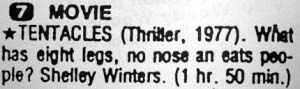
tentacles.jpgThere is. Criggo is a little like ILoveBacon, save that it specializes in newspaper and magazine bloopers and other print-media found weirdness. Some are the unintended consequences of enforced brevity (see above right) while others are clearly the result of being a little too free and a little too clueless with the spell checker. (See below left.) Space prohibits more than a taco.jpgcouple of examples here; see the site itself for ads offering Jack Russell Terrorist puppies, or a Palm Iranian dog, as well as an ad for I Can Believe It’s Not Butter.
Rated mostly G, or PG for occasional mild crude humor. Funny as hell. Highly recommended.

Kodak’s V530: The $40 Pocket Battleship

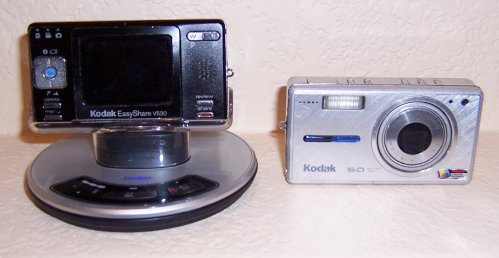
V530Cameras.jpg

The camera gremlins have been active here this year: Both of mine were stolen at a dog show in February, and Carol misplaced hers last week. Fortunately, I bought a used Kodak V530 on eBay to replace my 5-year-old and now defunct V530, so we were able to take pictures at Aero’s pivotal dog show this past weekend. And of course, with the dog show past, Carol’s camera turned up again this morning. (I think it’s taking lessons from Aunt Kathleen’s Lucky Dollar.)

The “new” V530 is black, which wouldn’t have been my first choice. Anodized aluminum shows nicks and scrapes much better than plain aluminum. My poor busted V530 rode around in my pockets with my car keys on plenty of back-country hikes, to the point where much of the printing on the body is worn away past legibility. Still, it looks amazingly good, and if it still worked I’d still be using it.

The V530 has a feature important to me: A dock charger. The charger wall wart plugs into this little flying-saucer thingie with a plastic insert unique to the V530 body (other inserts are available for other cameras) and when I come back from a hike, I just drop the camera into the dock and it’s charged again within the hour. I know, people who take more than forty or fifty shots in a session will need to carry a spare charged battery, but I’m just not that avid. I have (or will soon have again) a much more capable camera for deliberate photography. Pocket cameras have a different mission in my universe: The V530 rides with me in case I need to take a photo–say, if I spot a bear rifling a trash can or a flock of wild turkeys up on the mountain slopes. Rather than pack a full camera bag when I’m not sure I will encounter anything remarkable, I just toss the V530 in my pocket with my keys so it’ll be there if I need it.

The used V530 cost me forty bucks plus shipping. Not too damned bad for a fully-functional camera in better shape than the one I’d been using. It was dusty (especially the dock) and a little greasy where fingers had been gripping it, but a few alcohol wipes took care of that. I’m seriously considering buying a “shelf spare” if another comes up on eBay, just in case the gremlins descend again in the future. It’s easily the best digital I’ve ever had, and for “opportunistic photography” I’m quite sure it’s as good as you’ll find.

CBZ Files as Image Archives

Last fall, I gathered a stack of Alma-Tadema‘s paintings from my pre-1923 images folder, wrapped them up into a ZIP file, and sent them to a friend who was looking for a copyright-free color cover for a novel. Some weeks ago, I learned that the CBZ (Comic Book Zip) file format is nothing more than a ZIP file with a different extension. I downloaded and installed a free CBZ reader called Comical. After changing the extension on the Alma-Tadema archive to .cbz, I double-clicked on it, and boom! There it was, beautifully presented and trivially easy to click through. And if you change the extension back to .zip, you can de-archive the images in the usual fashion using any ZIP-capable archiver. It’s all in the extension; no changes to the binary archive need to be made.

Not being a comics guy, I’d never heard of the CBZ format, though it’s been around since 2004. It’s basically an ebook reader protocol (since it is, after all, simply an ordinary ZIP archive) that opens a .zip file and displays the files in alpha order by filename. If the files are displayable as images, the reader displays them. If the files are not displayable as images, a well-behaved reader will ignore them. (Comical, one of the simplest free readers, sometimes crashes when it encounters a non-image binary.) If you need an indicia page, some readers will display text if it’s in an .nfo file. The .nfo will appear in a separate text window on opening the file, rather than in the page display area.

I’ve tested four free CBZ readers: ComicRack and Comical under Windows, and QComicBook and Comix under Linux. All but ComicRack are open-source. ComicRack is overkill in a lot of ways, though it works very well. (It requires the .NET framework, if that’s significant to you.) Comical is much simpler, and my only gripes are that it doesn’t display .nfo files, and it crashes when it finds certain kinds of non-displayable files in a .cbz archive. QComicBook is a Qt4/KDE app, and the one I find myself using under Linux. Comix (a Python app) works well but is not as capable as QComicBook. (Feature-wise, it’s on a par with Comical.) Others exist. Okular will open CBZ files without complaint, but it simply scrolls vertically through the images without attempting to show one per click.

Most of the comic book readers also read CBR and CBT files, which are RAR and TAR archives, respectively, and work almost exactly the same way. (I haven’t tested those formats.)

The CBZ system works best when all the images in the archive are the same dimensions and aspect ratios. I’m putting together some photo albums for showing the folks back home that are collections of digital photographs in one (big) .cbz file. The bigness is mostly unavoidable, since JPG files don’t compress very well. Still, it makes file management simpler

Here are some sample CBZ archives that I put together for testing: Alma-Tadema (14 MB). Hi-Flier Kite Catalog 1977 (6 MB). The “Elf” Space-Charge Receiver (1.7 MB).

Film’s Last (Hawaii) Hurrah

SugarCaneTrainJeff03-2010.jpg

The camera gremlins were hard at work prior to our recent Hawaii vacation. Both of my working digital cameras were stolen at the Denver dog show in February. I do intend to get another Canon mid-size eventually, probably the G11, but in shopping for new pocket units I found that Best Buy had no Kodaks, and (worse) every damned pocket camera they sold requires that the battery be removed for recharging. The chap there had no idea why this was so, and I still don’t have a good explanation. But that’s idiotic, especially if (as I suspect) it was done to save a quarter’s worth of interior parts in a $500 camera.

My 2005-vintage Kodak V530 pocket camera had both a charger dock and a wall-wart, and the battery never needs to emerge from the camera until you carry it out in its coffin. Alas, the whole camera got carried out in its coffin last fall. My solution was to find a used or (hopefully) NOS Kodak V530 on eBay, and while I looked, I didn’t nail one until just last night, and that didn’t help us with Hawaii. Carol has a Kodak digital camera, but we’ve lost the portable charger, and the only way to recharge it is using her printer dock, which isn’t designed for lugging around.

So about all we could do was dig Carol’s 2001-era Kodak Advantix film camera out of the junk cabinet to see if it still lived. And mirabile dictu! The little CR2 3V battery wasn’t even dead, after not having been used for at least six years.

Wow.

We put a new battery in it anyway, and it handled the bulk of the photography on our Hawaii adventure. (We bought an underwater film camera for our very corkybobby snorkel trip.) Walgreens no longer has Kodak machines, but Target does, and we got the pictures back a few days ago.

It was interesting to compare digital photos from our 2004 Hawaii trip and our 2005 Bermuda trip to the Advantix film photos. It’s obvious why film is barely twitching: The colors were brighter on the digital shots, and the resolution noticeably better. The photo above is typical; in bright light, Advantix does pretty well. (That’s me in the open car of the Sugar Cane Train, waiting to pull out of Lahaina.) In low light, Advantix got very grainy, and the colors lost most of their subtlety.

Carol paid for digital images on CD, which saved me having to scan prints into our photo archives, and that was quite welcome. One annoyance: The digital images were numbered 1-25, but in reverse order. In other words, photo 25 was the first photo taken on the roll, photo 24 the second taken, and so on. I don’t know if a tech at Target messed this up, or if it was an engineering brainfart associated with the machines.

No matter. My NOS Kodak V530 is on its way, and I’ll be getting a G11 one of these days. But Hawaii reminded us that film is mostly dead for a reason: Color, resolution, convenience, immediacy, and probably a few more. There are probably circumstances where film can still shine, but tourist photography is not one of them.

Boy. Keith and I talked about starting a magazine called Digital Camera Techniques in 1996. We didn’t. Talk about opportunities missed.