Jeff Duntemann's Contrapositive Diary Rotating Header Image

Reviews

Evaluations of products and services

Mikogo Over Skype

Yesterday I discovered Mikogo, a Net meeting/remote desktop technology that would be a lot like VNC and the others I’ve played with, except that it can be configured to piggyback on Skype. There is a Mikogo Skype “extra” (what Skype calls its plug-ins) and I will be using it to give a remote lecture on Carl & Jerry to the Southwest Ohio Digital and Technical Symposium on January 10, with the help of Jay Slough K4ZLE.

Jay and I gave it a spin yesterday to make sure we could connect during the Symposium in January, and in addition to working well, Mikogo was mighty cool. You install the extra from the Skype Extras menu, and it comes down the same way that other Skype extras do. Once installed, you can create a 1-to-1 or 1-to-many connection with anybody else who has the Mikogo Skype extra running. Skype handles the audio, and where the connection is between two machines, the “presenter” (the machine that provides a screen echo to the other) can be switched back and forth at any time. Mikogo has a simple whiteboard feature that allows the presenter to draw lines in various thicknesses, colors, and shapes on the screen. It also has the option of remote control, so that the non-presenter can use the mouse and keyboard on the presenter’s machine. Pete Albrecht and I plan to try using Mikogo over Skype to allow me to control Pete’s big Meade telescope from here in Colorado, at least when it stops raining in Orange County.

I don’t have a great deal of experience with the Mikogo system yet, but after an hour or so of solid connections with Jay and with Pete, I can say that it’s well worth trying if you have any use for that sort of thing.

Review: Hellboy II

Not much would make me want to be 12 again. Halloween 1964 was great good fun (and on a Saturday!) but soon afterward, life started to get mighty weird. Ordinary girls who lived in ordinary houses and had ordinary names (like Terry, Laura, and Kathy—not a Samantha in the bunch!) became mysterious, mythic creatures who in defiance of my own will drew my fascination away from the trappings of a comfortable grade-school life, like flying kites, raiding the neighbors’ garbage on Wednesdays for broken radios and TVs, and…monster movies.

Monster movies were a big part of late grade-school culture in 1964. Cheesewad classics like The Crawling Eye and Curse of the Demon had scared the crap out of me when I was in third grade, but by the time I was 12 the experience was drifting in a new direction. The monsters were becoming less scary than ridiculous. And…we laughed. I think that boys discover bravery by laughing at the things that used to frighten them. (Some of us laughed at girls; most of us eventually called a truce and married them.)

Being home alone for the nonce (and it’s getting to be a lot of nonce, sigh) I rented a monster movie a few nights back and sat down to find the 12-year-old in myself, if there’s any of him left. The movie is Hellboy II: The Golden Army, and boy, if all monster movies were like that, I might be willing to go through puberty again. (Wait. No, strike that. Forget it. Never. Sheesh.)

I tepidly enjoyed my first viewing of the original 2004 Hellboy, and my admiration has grown after seeing it a few more times. In 2004 I didn’t recognize it for what it was: A ’60s monster movie with much better monsters—plus a monster we could identify with. Sympathetic monsters as a concept are not new. King Kong vs. Godzilla (1962) pitted the anthropoid against the sauropod, and expected us to root for our nearer cousin. (This did not stop some of us from identifying with Godzilla.) Hellboy II, however, perfects this approach by completely understanding its audience and giving them absolutely everything they could want.

Hellboy‘s high concept is that of a toddler demon accidentally dragged into our dimension by a group of occultist Nazis in 1944. Hellboy, known to his buds as “Red,” is a poster child for the nurture side of the nature/nurture debate. Although nominally a son of Satan, he is raised with high standards in a secret military base by kindly Professor Bruttenholm (John Hurt) and keeps his horns ground down to stubs so they don’t skewer anybody accidentally. Sixty years later, Hellboy has a job for a paranormal Men-In-Black-ish agency, hunting evil occult-ish thingies with a revolver as big around as my thigh. As the 2008 film opens, Hellboy has an annoying new boss—a pompous German ghost who lives in a deep-sea diving suit—and the same hot girlfriend, the incendiary Liz (Selma Blair) who becomes a Johnny Storm-ish human torch whenever she gets annoyed. Hellboy annoys her at times, but he’s a hell boy, after all, and fire does nothing to him. The intellectual and C3PO-ish gill-man Abe Sapiens returns, carrying around Ghostbusters-ish paranormal thingie detectors and sounding befuddled.

The plot is conventional action-film fare: An evil albino kung-fu-ish elf named Prince Nuada wants all three parts of an ancient gold crown that would give him control over an army of 4,900 Tik-Tok-ish clockwork warriors, and mayhem ensues. I think most of us are a little tired of deranged albinos, I’m guessing real albinos most of all. It was purely gratuitous albinism, after all; Nuada could have been purple for all the difference it would have made. We 12-year-olds don’t care what color the monsters are. We just want to see their asses kicked, and imagine ourselves doing the kicking.

And that’s where Hellboy II excels: It knows what 12-year-old boys want, and ladles it on with a trowel. Guillermo Del Toro created the single most marvelous collection of monsters in film history, and has them all wandering around in the hollow portions of the Brooklyn Bridge. The Troll Market is nothing but monsters, and our good-guy freakos Hellboy and Abe don’t get a second look there, as they search for Nuada, belch, have repartee, get in fights, and generally wreck things. The humor is gross but nonsexual, the violence comic book-ish and not especially bloody, and through it all is an un-subtle invitation to 12-year-old boys to take it all in and…laugh.

The real secret is that Hellboy himself is a boy—just like us. He wants attention (he gets in trouble by posing for photos and signing autographs) and resents the constant implication that he’s freaky and unattractive. His life is a sort of prepubescent nirvana: He’s snotty and rude but heroic, as boys always like to imagine themselves. He’s got the biggest damned handgun I’ve ever seen. And he gets paid to make a mess.

The film has some weak spots where it goes too far toward the comic: Hellboy and Abe drink too much beer at one point and start singing “I Can’t Smile Without You” with Barry Manilow on the CD player. That aside, it’s a wonderfully effective montage of chases and fight scenes, with a weird Celtic steampunk-ish setting for the climactic battle against the Golden Army. It’s certainly derivative; in fact, it borrows from everything in sight, and may in fact be the most ish-ish film I’ve ever seen. But that didn’t keep it from being a great deal of fun. After it was done, I could only think: Well, I’ve taken care of the monsters. Now I just have to figure out girls.

Wait! Mission accomplished. The nice part about being 12 is that you’re not 13 yet. And the really great part about being 56 is that you’ve already been 13.

Highly recommended.

St. Peters, and a Miracle Voice Teacher

It’s been a low-energy and off-my-peak couple of days here for reasons I won’t bore you (or gross you out) with. Had to take a run up to Denver, but mostly I’ve been sitting quietly and reading. I finished a book that I don’t really recommend unless you’re chained to the potty and need to kill time: Basilica by R. A. Scotti is a popular history of the construction of the second St. Peter’s Basilica in Rome, the one that we all know and love, which supports the largest church dome in the world. The book is competently written, but it’s a little thin on details of the construction itself. Ms. Scotti is much more interested in politics and personalities, and in truth I did learn a lot about Bramante, Michaelangelo, Raphael, and Bernini (and more than a few popes) that I didn’t know before. But she has no good head for architecture, and does not define any terms. I kept flipping into a wonderful DK book called The Visual Dictionary of Buildings to clarify certain elements of church architecture. Now that book I recommend, especially if you’re a writer trying to set a scene in a complicated building and aren’t entirely sure what an oculus is. (Or—quick, now!—define a “spandrel”.) There are some factual errors in Basilica, one of the worst of which suggests that poured concrete was used in some places in St. Peter’s. Not so—poured concrete was an ancient technology that was lost after Imperial Rome came apart and was not recovered until the 19th Century, or pretty close to it. St. Peter’s was built almost entirely of mortared masonry and sculpted stone.
If you’re interested in the peculiarities of St. Peter’s Basilica, a better book is The Bones of St. Peter by John Evangelist Walsh, which speaks of the excavations under the main altar just before WWII. The Basilica was built over a Roman graveyard, and there was a lot of fascinating stuff under the floors. More about the Shroud of Turin than about the Basilica is Holy Faces, Secret Places by Ian Wilson, of which I reread a considerable chunk. However, Wilson speaks of the countless weird little crannies in the Vatican complex, in which a lot of interesting things, and not only relics, may be hiding. Secrets are not good in religion for many reasons, but mostly because secrets are a power thing, and power corrupts spiritual organizations mortally. (See Encountering Mary by Sandra Zimdars-Swartz for a good discussion of this problem.) Wilson is a marvelously engaging writer, and potty reading doesn’t get a whole lot better.

I also reread several sections in Peter Ochiogrosso’s fascinating 1987 book Once a Catholic, in which a number of famous Catholics and (mostly) former Catholics explain what sorts of marks their Catholic upbringing left on them. The book is not explicitly about the gulf between Tridentine (i.e., Latin) Catholicism and Vatican II Catholicism, but the demographics of the people the author chose to interview almost guarantees it. Like them, I grew up Tridentine, and like them, I know what we lost, and why. (Not all that was lost was good; in fact, a good deal of what we lost was desperately in need of losing.) The book is secular in approach and intent, and does not preach, in either direction. It’s a character study, of real characters. (One of them is George Carlin.) Highly recommended, and I think I’ve spoken of it here before.

All these books but Basilica are currently out of print, but cheap on the used market. Reading them was research for a current project of mine—Old Catholics. (Nothing makes you a better writer than simply reading, and reading a lot.)

Finally, I’ll throw out an idea I had yesterday, for an invention I wish someone would get to work on. I want something I might charactize as a Miracle Voice Teacher. I want a program that will put a musical score on the PC screen and listen to me try to sing it. The program should average the frequencies that come in from the mic and put a line above or below a note in the score, telling me whether I’m high or low. It should have a metronome, and the ability to play the score as MIDI. It should be able to record what I sing and play it back for me, showing me on the screen where I botched the melody.

And if that’s possible, then the program should be able to teach me how to harmonize, by isolating one of the melodic lines and allowing me to sing it, and then gradually adding in the other lines in the headphones while I try to stick with my own line and not get confused. Scarily, such a thing would allow me to sing four part harmony…with myself. The world may not be quite ready for that, but at this juncture I think I am. I went looking for the product and didn’t find it, but if you know of something along those lines, I’d like to hear about it.

Review: Irreconcilable Differences

One reason I like Jim Strickland's fiction is that I like the way he thinks. He and I look at the future and draw a lot of the same conclusions. I understand his logic, and that helps me appreciate the stories he tells, even if I myself would not tell them in anything like the same way. Being able to toss ideas around with him in person helps a lot; we workshop together, and I've learned quite a bit watching him hone his style.

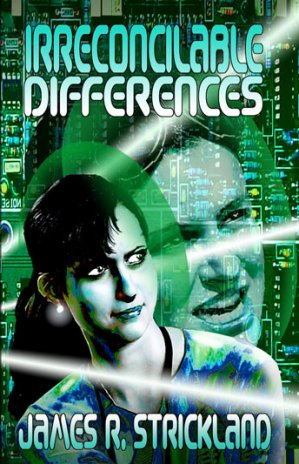
So we come to Irreconcilable Differences, which was released at the publisher's frontlist party at Denvention a few weeks ago. As with his first novel, Looking Glass, we have a police mission in a now+20 near future in which the world has boiled over but not burned. The US has split into several pieces along tribal lines, and various interests are trying to bring the world into a new equilibrium. Chief of these is Interpol Covert Services, which is paying particular attention to activities on the Internet. As a means of cracking a particularly difficult case, Interpol has gone deep bleeding edge and uploaded the mind and memories of one of their toughest agents into a 16-year-old hacker girl who got caught, and agreed to the mission as part of a plea bargain. The agent is Rachel Santana, who's lived a little too much; the girl is Micki Blake, who has barely lived at all. The two coexist in a single body, Micki in her own brain, Rae in a block of high-performance synthetic nerve tissue inserted surgically. They communicate internally through a sort of VR boundary zone called the gestalt, which is more than conversation but not quite telepathy. With Rae on board directing the show, Micki returns to her small-town hacker group, a little bleary but suspecting that she's not in Kansas anymore.

Except that she is. Micki is a Kansas farm girl (from a farm that harvests the wind as much as meat and grain) and the action is out on (and under) the Kansas plains. Micki/Rae ride with the rest of their gang along dirt roads in a ramshackle Winnebago RV full of state-of-the-art networking gear stuffed in a closet, ducking in and out of the Net as needs require. The rest of the story is nonstop action taking place at several levels, with some diabolical twists and turns that I'll leave for you to discover.

Where we may also not quite be anymore is cyberpunk, even though that's how Jim characterizes the novel. There's lots of exhaustively researched cyber here, but very little punk. The American culture of the plains has mutated in some ways, but it's not the oh-so-precious Gibsonian San Francisco noir that always makes me giggle a little when I read it. Kids still ride on school buses and go to dances—and now help one another keep the family wind-turbines turning. The rural character of the future is an intuition I had 20 years ago: Once the Net genuinely fuzzes out the idea of physical location, the real action will be where the food and the energy come from. Cities produce nothing but proximity—and once proximity ceases to be a core value, life on Earth will change radically, especially if even minor cold wars heat up a little. Maybe a better word would be “cyberbilly.” I think of it that way; the heartland has more head than the headland will ever have the heart to admit.

One of the few downsides to the novel is that it's too short to give us as much flavor for this future world as I'd prefer. Jim has rightfully emphasized the questions of what it's really like to be a copy of a human being—something most cyberpunkers and transhumanists take for granted and never think too deeply about. Rae's struggles with this issue of self are mirrored in Micki's struggles to appreciate the self that she has, and the two are inadvertent agents in one another's healing processes. The story is a personal one, intense and immediate. Another 50,000 words would have fleshed it out, but also slowed it down. It's a conundrum that every good writer has to confront eventually. I think Jim made the right choice here. He will have future novels in which to develop the world as a whole, and I'm patient enough to wait for them.

Jim gets extra points for appending a glossary to the end of the novel, summarizing the technological and cultural ideas he's presented through the story, along with quick brushups on networking terms. You may need it; this is one of the most unabashedly technical novels I've seen in a long time, and for a hard SF guy like me, well, that's simply delicious.

In short, highly recommended.

The Conundrum of AVG LinkScanner

Just before we left Colorado, and after several weeks of furious nagging by the software, I upgraded version 7.5 of AVG Free Anti-Virus for the new V8. I did it on Carol's machine only, as the upgrade required some damned thing or another that was missing on Win2K SP4, and I didn't have time to research it. (Carol uses XP.) With version 8 came something I had not heard about and did not expect: AVG LinkScanner.

It's an interesting idea, and at first glance sounds like something truly useful: LinkScanner works with Google and Yahoo to prescan search results for evidence of malware injection. At a rate of 2-20 results per second, LinkScanner visits each displayed search result link, looks at what's on the other side, and displays one of three icons to the right of the search link: Good, questionable, or bad. I didn't even know the feature was present until later that day, when Carol was doing some Google work and asked me what the icons were. All were a reassuring green, but when I Googled on “warez” almost all of the search results came back with icons of alarming red.

This seemed reasonable to me, and I was too frantic getting ready for our trip to think too deeply on it. But a few days later, I started to run across Web articles howling about an avalanche of Web hits spawned by LinkScanner. The Register provides one of the saner descriptions of the issue. Traffic on some smaller Web sites has spiked by 80%, and Slashdot says that as much as 6% of its massive clickthrough comes from LinkScanner's user agents.

LinkScanner, it seems, tries its best to look like an ordinary user. Well, duhh: If LinkScanner's probe announced its presence, malware artists would serve up an innocuous version of their sites, keeping the malware for ordinary Web surfers who could be discerned as such. I can understand the logic, but given that AVG has as many as seventy million users worldwide (few of whom have yet upgraded) widespread adoption of the technology could make ordinary Web traffic analysis meaningless. Traffic on duntemann.com started rising about April 1, but I couldn't quite figure what was going on. May was a record month for me, even though my traffic has been fairly steady since I launched my LiveJournal mirror of Contra in early 2006. Things leveled out in June, but given the proportion of my traffic that now reads Contra on LiveJournal, I would expect aggregate traffic on duntemann.com to be falling slowly.

Having had a little time to think about this, I can raise a couple of points:

  • AVG has not made it entirely clear what its probe looks for when it prefetches search results. A site tagged as “safe” might not actually be safe—especially once the bad guys reverse-engineer the probe and figure out how to dodge it. People might trust the utility a little too much, and assume that there is no possible downside to visiting a green-tagged site.
  • Obviously, AVG actually visits all sites in a search results list, even those most users would shun as obviously dicey. If the bad guys discover an exploit in AVG's probe, AVG could unwittingly become the world's largest malware installer.
  • The probe does not mask or alter the user IP in any way. As far as remote site logs are concerned, the local user clicks on every link in a search results list. Meditate on that for a moment, and then read this article from Slashdot. If you're not at least a little freaked out yet, read it again.

I'm going to uninstall the feature on Carol's machine when we get home, and may try one of the alternative lightweight AV products like Avast, especially since AVG Free V8.0 barfed on my main Win2K machine.

I've begun to see indications that AVG is patching V8.0 so that LinkScanner is not enabled by default, but haven't gotten anything crisp enough to link to. Supposedly, the patched version becomes available today. We'll see. In the meantime, spidering sites with some sort of malware-detection probe may not be as good an idea as it seems on the surface. Better, perhaps to completely sandbox or virtualize the browser, which would be better protection at a bandwidth cost of…zero.

Review: Easy Duplicate Finder

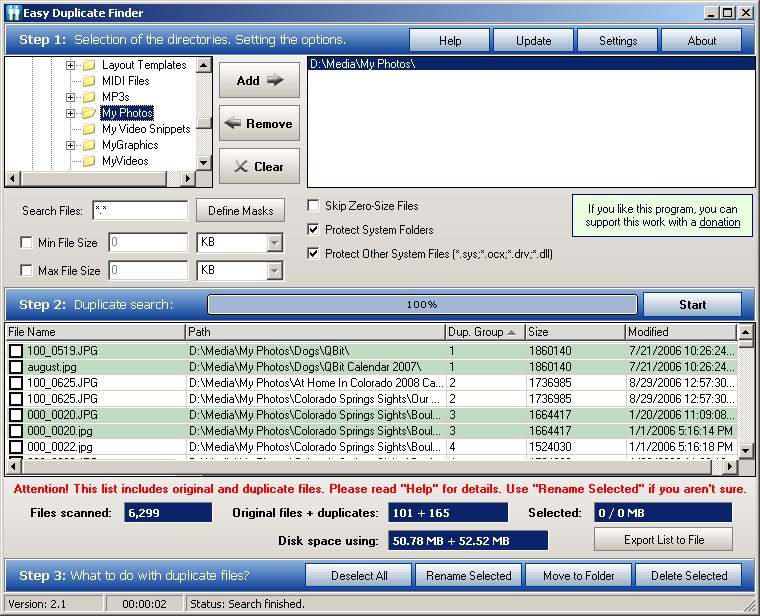
I've used a number of utilities to search for duplicate files under Windows in the past few years, but in doing research for Degunking Essentials I've run across the king of the category: Easy Duplicate Finder. I like it for these reasons:

  • It's a “portable” or “no-install” app, meaning a single .exe file that can run from anywhere. It does not shotgun itself into fifteen different places on your hard drive, including the Windows Registry. You “uninstall” it by…deleting the file. Damn, what a brilliant notion! Why haven't more programmers thought of that?
  • In a sense, the UI contains its own documentation. You proceed through the single screen from top to bottom, filling things out in an order that makes sense. It actually says “Step 1:”, “Step 2:”, and “Step 3:”
  • It is astonishingly fast, at least in the mode that checks for duplicates using file size and a CRC32 checksum. When I captured the screenshot above (full size image here) it had just scanned 6,300 files in…seven seconds. (I suspect that the alternate algorithm, which performs a byte-by-byte test, would take a little longer.)
  • It's free. Really and truly free, without ads or spyware or any other gotchas of any species.

In the two hours of testing I put it through, I managed to find two old copies of my mailbase that I had forgotten I had, plus almost two hundred duplicate digital photos. I realized that I had an extra copy of the Hardy Heron .iso (700+ MB right there) a dozen or so duplicate MP3s, plus a substantial number of other things scattered allthehell over the place, which taken together lightened my hard drive by a little over two GB.

It reminded me of a lesson I learned a couple years ago, too: Empty your digital camera when you move pictures over to your PC. Most of the duplicate photos happened this way: I moved photos from the camera to my folder hierarchy without deleting them from the camera, then gave the numeric filenames more descriptive replacements. Alas, the next time I synced the camera, the same files came over again in their original numeric filenames, leaving me with identical file pairs with names like 100_0519.JPG and QbitChewsTennisBall1.jpg.

After the utility locates the dupes, you can select specific files for deletion, renaming, or moving to a catchall folder. You can limit the search to particular file types and file sizes, and define masks for ambiguous filespecs, like QBit*.jpg. Overall, a spectacularly useful utility that has no defects that I can see.

Highly recommended.

Review: Mi Paste

I've been busy for the past few days, and not at my best. I had a “crown lengthening” two weeks ago, which basically means lengthening the amount of tooth above the gum line by cutting away gum tissue and (in my case, at least) shaving away some bone. The surgical site was protected for two weeks by dental packing material (a goopy plastic that hardens into a sort of armor around the affected gum tissue) and the packing material was removed on Monday. What I soon found is that without the packing in place, the exposed sides of the tooth were extremely sensitive to temperatures even a few degrees from 98.6. One slug of Diet Mountain Dew for lunch on Monday and I damned near went through the roof.

Hot coffee twinged me a little bit as well, though the temperature delta was nowhere near as great. But this put me in a bad mood, and I returned the next day to pick up a tube of something called Mi Paste. I freely confess I don't understand the biology here, but after applying it to the exposed tooth for two days, I can now slug ice-cold sodas and barely feel it at all.

The product was created to counteract the sort of mild tooth sensitivity that often appears after teeth are whitened. I didn't think it would have much effect on a case as severe as mine, but shazam! It worked. The stuff isn't cheap ($18 for a smallish tube) but it didn't take a lot to do the job, and it's available without prescription online. It's based on casein, so if you have milk allergies it may be problematic. Otherwise, damn. Like magic. Highly recommended.

Ubuntu and the 20/80 Application Rule

As time has allowed, I've been downstairs getting a sense for the new Ubuntu 8.04 release (Hardy Heron) in both its Ubuntu and Kubuntu (KDE 4 UI) distributions. My experience with Kubuntu was cut short when the new and rather bleeding-edge KDE 4 system malfunctioned in a weird way just a few days after I installed it. I will reinstall it when they get a bug-fix release of KDE 4 out there; in the meantime, it's been worthwhile playing with Gnome-based Ubuntu.

As I said in my May 28 entry, desktop Linux has arrived. People still quibble about whether or not Grandma can install Linux, but think for a second: Does Grandma have to install Windows? Hardly. If we can persuade hardware vendors to offer Linux preinstalls, Grandma will have no more trouble with Linux than she would with Windows, especially if this is Grandma's first PC and she isn't constrained by old Windows habits.

I've been testing four free software packages in some depth: Abiword, OpenOffice, Gnumeric, and Kompozer. I tested Abiword and OpenOffice some years back and again last year when I installed Ubuntu Gutsy Gibbon. Both worked fine. OpenOffice seemed slow to me last year, but then it was running on a 2002-era 1.7 GHz machine, not the loaded P4 3.2 GHz box I'm using downstairs these days. OpenOffice now seems more than responsive enough. Abiword, by contrast, has always seemed pretty brisk, and it has evolved to the point where it can do just about anything I need a word processor to do. It loads and saves Word 2000 files—with a couple of minor gotchas—and had no trouble with the documents I edited. The Gnumeric spreadsheet works extremely well for me and handled every Excel 2000 spreadsheet I threw it at, keeping in mind that I'm not much of a spreadsheet guy and none of my spreadsheets ever gave Excel stretchmarks to begin with.

Kompozer was a bit of a surprise: It's a fork of Linspire's now-abandoned NVu WYSIWYG Web editor, and as close to Dreamweaver 3 as anything I've tried. It's available for Windows, and if it doesn't fail me in any significant way, I'm moving all my HTML development over to it, because it outputs cleaner HTML than the 1999-era Dreamweaver 3.

I've done less testing of OpenOffice, but will continue testing and report more here. If I have to move to a non-Microsoft office suite in the future, this will probably be it, and what testing I've done so far tells me that file compatibility is probably the only serious problem I'll have.

What my recent testing of Ubuntu and these several apps suggests to me is that only a lack of big box store preinstalls keeps desktop Ubuntu from becoming a very big hit—and the biggest challenge to Microsoft since OS X. What has always been true but rarely mentioned in the computer press is that 20% of app features satisfy the needs of 80% of app users. That 20/80 rule goes further: Email, Web, word processing, and spreadsheets together represent probably 80% or more of what home users do with computers. (I suspect that the rest is a combination of media players, IM, photo managers, and games.) And within those apps, 20% of the features do 80%—or more—of the work. I know a lot of people who still use Office 97 every day, and have no intention of upgrading. It works like lightning on modern PCs—and it's paid for, heh. It's harder for me to tell with Gnumeric, but I'm quite sure at this point that Abiword is on par with Word 97 and very close to par with Word 2000, certainly close enough to satisfy the 80% rule.

The recent (and completely unexpected) explosion of interest in cheap “netbook” subnotebook PCs comes into play here. The Atom-based netbooks I've researched will not run Vista and probably never will. Caught again with its pants around its ankles, MS is trying to popularize a streamlined version of XP for netbooks, but Linux was there first and seems to be making headway. A netbook does not have to be a completely general-purpose PC. If it can execute that 20% of app features supporting 80% of user work, it will sell—especially at the $500 price point. A distro that preinstalls Firefox, Thunderbird/Lightning, Abiword, and Gnumeric would be one hell of a road warrior machine, especially if the hardware has a fast SSD and comes in under two pounds. Canonical is working on what sure looks like such a distro, its recently announced Ubuntu Netbook Remix. Ars has a nice preview. No crisp word yet on what apps it preinstalls, but we'll find out before OEMs begin preinstalling Ubuntu Remix on their hardware later this year. In the meantime, I'm very encouraged on all fronts. Finally, there is a non-Microsoft, command-line free path to 80% of what PCs do. As far as I'm concerned, that's plenty.

Kubuntu on Painkillers

A quick update on my mouth rehab, though it borders on TMI: About two weeks ago I had 30 new crowns installed, after fussing with a mouthful of temps for most of a month, one of which had a bad habit of coming loose while I was doing something innocuous, like chewing a chicken leg. That operation was not bad, though my gums got a little beat up from the sterilizing agent and dental pick work to remove excess adhesive. So now I have 30 brilliant white porcelain crowns, and if all you look at are my teeth, well, I look like a TV anchorman.

But that leaves two to go. One of them was so badly damaged by six years under my previous horseshoe of connected crowns that it had to come out. The other is a healthy tooth but needed crown lengthening and a post in the middle of it, because it had gotten whittled down so far in 2001. Alas, a post requires a root canal, because the post has to go somewhere. Yesterday I went back and had the lower molar pulled, and crown lengthening (warning: NSFS) done on its opposing number in my upper jaw. That involved some bone scraping, which was one of the ugliest sounds I've ever heard, given that I could feel it in my…bones.

Everything becomes quiet for about six months now. My empty socket has to heal and fill in with bone, after which the surgeon will install an implant post to hold a porcelain molar. At about the same time, I'll have a root canal done on the upper and a post installed in the middle of that tooth to hold the opposing porcelain molar. And then—egad, I hope!—the whole thing will be finished.

On the other hand, I thought I was finished in 2001. Silly boy.

So I'm back on painkillers, though I don't need as many this time as when I had my gums reworked along the entire perimeter of my lower jaw back in January. And last night I did an interesting experiment: I installed Hardy Heron not once but twice, all while in a codeine fog.

Results: It went flawlessly. Linux has clearly arrived. A week or so back I downloaded and burned the ISOs for both Ubuntu and Kubuntu 8.04, the Kubuntu distro with KDE 4. I like KDE more than Gnome, because it reminds me more of Windows, and I've been looking forward to seeing V4 for several months. Both Ubuntu and Kubuntu installed without incident, each in its own 30 GB partition on my lab SX270 3.2 GHz box. I did not have the display glitches I had back in October, (even though the hardware has not changed at all) and both distros saw my network immediately.

I installed a bunch of things with the Adept installer, including some games, Boa Constructor (a vaguely Delphi-ish RAD environment for Python) and some office apps. No problems there, and Boa Constructor is worth a little experimenting and some description as time allows. My only complaint so far is a minor one: GRUB is ugly, and needlessly so. Suse and Fedora (I think) already have a graphical GRUB OS selection screen. Given the importance Ubuntu places on nontechnical users, I think it would be worthwhile to budget a little work for creating one and including it in the default distros.

The reasons are not entirely esthetic. Nontechnical people almost never see text screens anymore (except for a vanishingly quick appearance while BIOS POST does its thing) and when they do, it almost always means that something is wrong. Leaving a general good impression of desktop Linux is vital right now, as from what I can see, the OS itself is ready.

A quick skim of the Ubuntu forums online indicates that it's possible to install a graphical GRUB display in Ubuntu, and I'm going to give it a shot today or tomorrow, when the codeine is no longer necessary and I can run my brain on all cylinders. In the meantime, if any of you have any experiences (good or bad) with graphical GRUB displays, I'd appreciate hearing them.

The Canon G9 Camera

Our neighbors Lena Olson and David Kuchinski came by for dinner last night, and Lena brought her Canon G9 digital camera. I've been looking for the successor to my well-used Kodak V530, and the G9 is an extremely impressive item. I was thinking that to get all of what I wanted, I would have to stay small and also go big, all the way up to a Digital Rebel SLR or something like it. The G9 falls somewher in the middle, and is about the same size and heft as the compact 35mm film cameras that Carol and used in the 80s and 90s.

I have some complaints about the V530, but it slips easily into my pocket and is all-metal on the outside, which is good if it's sharing the pocket with my keys and my usual quarter-pound of loose change. The V30 is great if you're going walking and want to catch the elusive Colorado wild turkeys that I seem to see only when I don't have a camera in my pocket. (Local bears are not as shy.) However, I do need something with more control over exposure, a somewhat better flash, more battery life, and (especially) better macro capability.

One of the things I want to do is take better pictures of smallish, small, and very small objects. Not microscopic objects—just things down, perhaps, to the size of a quarter. The V530 can focus on things that small, but its depth of field isn't good, its auto focus feature sometimes focuses on the wrong part of the artifact, and exposure control is poor for anything at macro range.

Lena is an award-winning sculptor, and artistic in ways I can never hope to be. I trust her judgment about artist tools generally, including cameras. She thinks the G9 is the best camera she's ever tried—and after I explained what I was looking for, she declared it just the thing and left it with me for a couple of days to see for myself. I took a few test shots with it this morning out on the back deck (where the diffused light of a mildly cloudy day was especially good) and am much impressed.

This was taken without knowing anything at all about what can be done with the camera's special options, and at least for Lulu projects, I consider it publication-quality. I want to see about increasing the depth of field while reducing shadows, but what I got was probably good enough.

The photos I show here (both taken this morning) don't really put across how much detail is present in the digital files, which in their native mode are 3000 X 4000 pixels in size. You can zoom in until you fill the screen with an octal tube socket, which (for tube geeks like me, at least) was mighty surreal.

It's not significantly more expensive than the V530 was a couple of years ago (about $400 online) and looks like it will do the job. We'll see.

As an aside, I'm going in tomorrow morning to get a tooth pulled and the socket bone-grafted. The surgeon is also going to trim the gumline around the opposite molar. I'm likely to be under a fog all day tomorrow (and perhaps part of Wednesday) and may not post for a few days. Man, this dental project is getting old.